Create & View Vault Secret
The EmpowerID Chatbot allows you to store and retrieve vault secrets—private, encrypted credentials that only you can access using your master password. These include:
- Password Secrets – Store login credentials with optional login URLs
- Credit Card Secrets – Securely vault credit card details
- Note Secrets – Vault personal or sensitive notes
⚠️ If a master password is lost, any associated secrets cannot be recovered. A new master password can be created, but old secrets will remain inaccessible.
How to Create a Vault Secret
Supported Commands: Try commands like create a vault secret or create a new secret to start the process. See Chatbot Commands for more examples.
- Type help in the Bot to open the menu.
- Click Create Vault Secret.
- Choose the type of secret you want to create.
- Fill out the form fields and click Submit.
- Password Secret
- Note Secret
- Credit Card Secret
Fields
| Field | Description |
|---|---|
| Display Name | Friendly name for your password secret |
| Username | Username for the login |
| Password | Password to store |
| Login URL | (Optional) Application login URL |
| Notes | (Optional) Any extra information |
| Master Password | Your personal EmpowerID master password |
You will receive a success confirmation once submitted.
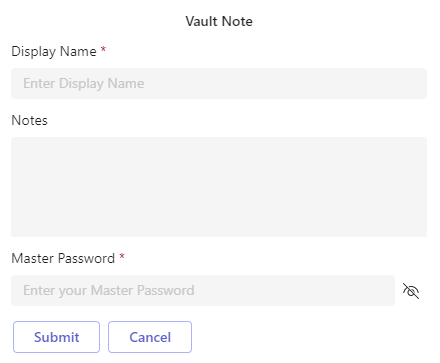
Fields
| Field | Description |
|---|---|
| Display Name | Label for your secret |
| Notes | (Optional) Note contents |
| Master Password | Your master password |
After submitting, you’ll see a success confirmation.

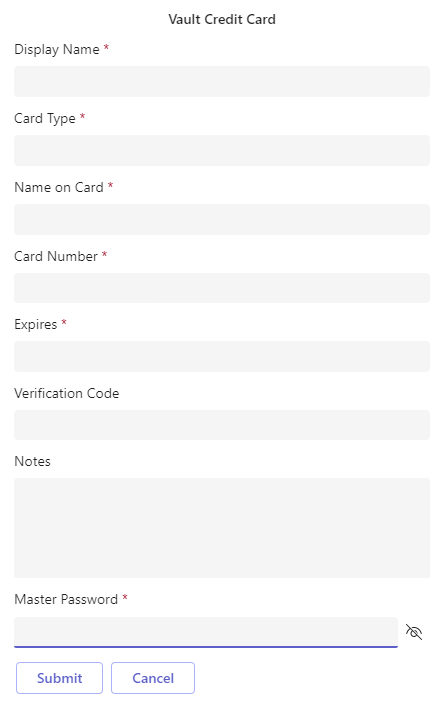
Fields
| Field | Description |
|---|---|
| Display Name | Label for your secret |
| Card Type | e.g., Visa, Mastercard |
| Name on Card | Cardholder’s name |
| Card Number | The full card number |
| Expires | Expiration date |
| Verification Code | CVV or security code |
| Notes | (Optional) Additional notes |
| Master Password | Your master password |
A success message confirms the secret has been stored.
How to View Vault Secrets
Supported Commands: Try retrieve vault secret or show secrets. Full command examples are in the Chatbot Commands documentation.
- Type help in the Bot to open the options menu.
- Click View Vault Secret.
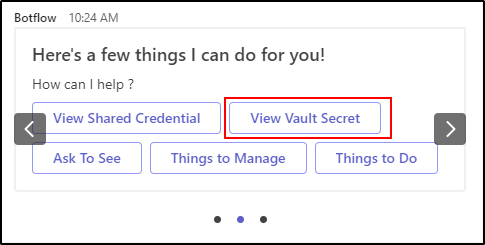
- Select the secret you'd like to view.

- Enter your Master Password to authenticate.

- The Bot will display your secret details.
