Ask to See Commands
The Ask to See Commands feature allows you to request information about your EmpowerID account using predefined commands. For example, you can ask, “Which groups or application roles am I a member of?” to view your current group memberships.
This feature is useful when you want to quickly check your roles, permissions, or pending business requests without needing to log into the portal.
How to Use Ask to See Commands
- Type
helpin the EmpowerID Chatbot to open the menu. - Click the Ask To See button.
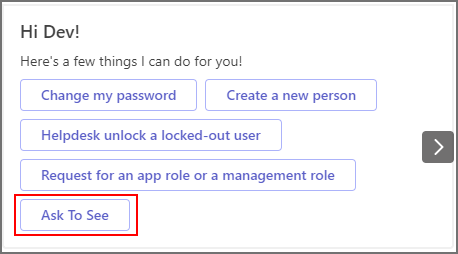
- Select a command from the list and click Submit.
- The bot displays a card with the results of your selected command.
Available Commands
You can choose from several built-in commands:
| Command | Description |
|---|---|
| Which management roles am I a member of? | Lists all management roles assigned to you. |
| Which management roles is Person X a member of? | Lists all management roles for a specified person. You will be prompted to enter their name. |
| Which groups/application roles am I a member of? | Lists all groups where you are a member. |
| Which groups/application roles is Person X a member of? | Lists application roles for another person in EmpowerID. You’ll be prompted to enter their name. |
| Which management roles and groups am I a member of? | Lists both management roles and groups assigned to you. |
| Do I have any new business requests to approve? | Lists all pending requests assigned to you for approval. You can specify how far back to search. |
| Have any of my Business Requests been approved or rejected? | Shows approval/rejection history within a given timeframe. You’ll be prompted to specify the number of days to look back. |