Create Management Role Definitions
Management Role Definitions serve as templates containing operational capabilities and native system rights that provide a baseline of permissions for Management Roles created from them. EmpowerID ships with predefined Management Role Definitions for common scenarios. Create custom definitions when your organizational requirements for role structure and baseline permissions differ significantly from what's provided out-of-box.
Before creating a new definition, review existing Management Role Definitions to see if they meet your needs. The Blank Management Role Definition provides a neutral starting point for roles that don't require predefined capabilities, while specialized definitions offer baseline permissions for specific administrative functions.
Prerequisites
Before creating a Management Role Definition, ensure you have:
- Access to the EmpowerID web application with permissions to create Management Role Definitions
- Clear understanding of the baseline permissions and capabilities the definition should provide
- Identified organizational location where the definition should be created
- Business justification for creating a custom definition rather than using existing ones
Procedure
-
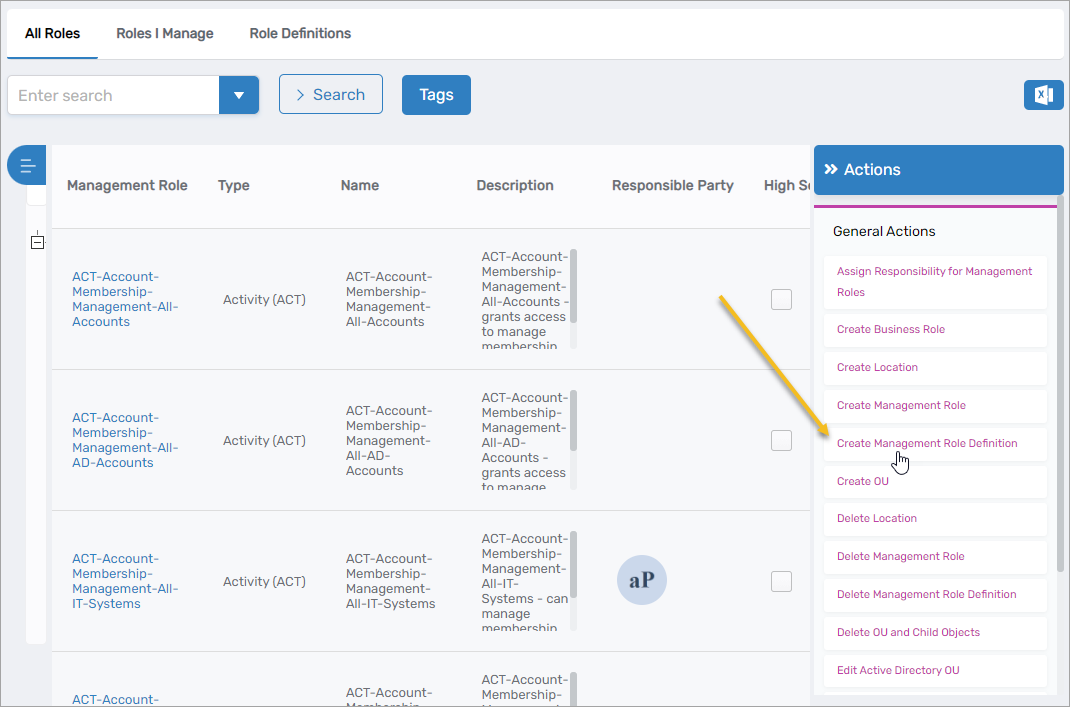
Navigate to Role Management > Management Roles.
-
From the Actions pane, click the Create Management Role Definition action.
-
Complete the Management Role Definition Details form:
- Name - Unique identifier for the Management Role Definition
- Display Name - User-friendly name that appears in interfaces
- High Security - Select this option if the definition grants high-security access requiring additional oversight
- Description - Brief explanation of the definition's purpose and the baseline capabilities it provides
- Instructions - Optional guidance for administrators creating roles from this definition
- Creation Location - Click Select a Location, search for and select the EmpowerID Location where you want to create the definition, then click Save
-
Click Save to create the Management Role Definition.
Verify the Results
After creating the definition:
- Navigate back to Role Management > Management Roles.
- Select the Role Definitions tab.
- Search for the newly created definition by name.
- Click the Display Name link to open the definition's View One page.
- Verify that all details are correct including name, location, and security settings.
Next Steps
After creating the Management Role Definition:
- Assign Access Levels to provide baseline permissions for child roles. See Assign Access Levels to Management Role Definitions for detailed instructions.
- Create Management Roles from the definition using Onboard Management Roles, selecting your custom definition in Step 1.
- Document the definition's purpose to help other administrators understand when to use it versus other definitions.
- Review and refine the baseline Access Levels as you create roles from the definition to ensure they provide appropriate starting permissions.
Related Topics
- Assign Access Levels to Management Role Definitions - Configure baseline permissions for the definition
- Onboard Management Roles - Create role instances from definitions
- Clone Management Role Definitions - Duplicate existing definitions for customization
- About Management Roles - Understand role concepts and structure