Clone Management Roles
Clone Management Roles to create independent copies with all delegations, Access Levels, and configuration settings from the original. Use cloning when you need a role similar to an existing one but with specific customizations.
Prerequisites
Before cloning a Management Role, ensure you have:
- Access to the EmpowerID web application with permissions to create Management Roles
Procedure
- In the EmpowerID web application, navigate to Role Management > Management Roles.
- From the All Roles tab, search for the Management Role you want to clone.
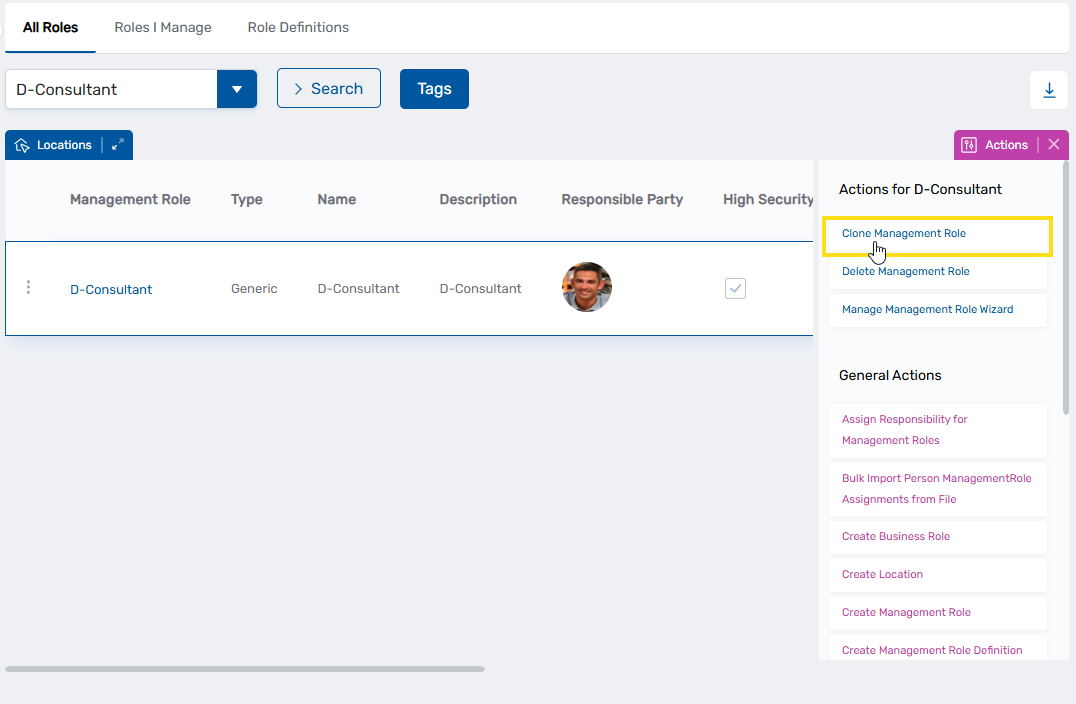
- Click the record for the role to display contextual actions and click Clone Management Role.
- Click Yes in the confirmation dialog to confirm the clone operation.

- Click Submit to close the Operation Execution Summary.
Verify the Results
After cloning:
- Navigate back to Role Management > Management Roles.
- Search for the cloned role (has the same name with "(Copy of)" prefixed) and verify it appears in the list.
Related Topics
- Onboard Management Roles - Create new roles
- Clone Management Role Definitions - Clone role templates rather than role instances
- Manage Resource Access for Management Roles - Modify access assignments for roles
- Add People to Management Roles - Assign members to roles