Configure Server Roles
EmpowerID server roles determine which back‑end Jobs (services) and Web services are enabled on a specific server. Correctly assigning these roles ensures that each server functions as intended—whether for scalability, separation of duties, distributed processing, or cloud connectivity.
This premium rewrite preserves all content exactly as provided and improves structure, readability, and clarity without altering meaning or adding new behaviors.
Server Role Types
EmpowerID supports the following server roles:
All‑in‑One Server
Runs all Web services and all back‑end Jobs.
Best for single‑server or small environments.
Application Server Full
Runs all back‑end Jobs.
Does not run Web services by default.
Application Server Light
Runs a minimal set of Jobs.
Does not run Web services by default.
Good for satellite nodes or distributed load scenarios.
Cloud Gateway
Provides a secure communication channel between on‑prem systems and EmpowerID Cloud.
Runs Web services required for remote agent operations.
Web Front‑End
Runs all Web services.
Does not run back‑end Jobs by default.
Used for UI load balancing and scaling.
Default
Enables no Jobs or Web services.
Assigned during installation to prevent accidental execution.
View Role Details
Expand the sections below to see the complete list of Jobs or Web services associated with each server role.
Application Server Full — Jobs
| Job Name | Description |
|---|---|
| Attribute Flow - Directory Change Processor | Processes attribute changes and updates Person objects. |
| Account Lockout Detection | Detects locked-out user accounts. |
| Account Password Reset Inbox | Performs offline password resets. |
| Windows Service and AppPool Password Sync | Syncs service and IIS AppPool account passwords. |
| Attestation Policy Compiler | Compiles attestation policies. |
| Attestation Processor | Placeholder for attestation customization. |
| Database Archiving Rule Processor | Executes archiving rules. |
| Dynamic Hierarchy Generation | Computes group provisioning for dynamic hierarchies. |
| Dynamic Hierarchy Membership Inbox Processor | Syncs dynamic hierarchy membership. |
| Dynamic Hierarchy Membership Recalculation | Refreshes group memberships. |
| Dynamic Hierarchy Provision Inbox Processor | Processes group provisioning changes. |
| Group Membership Queue Processor | Batch processes membership updates. |
| Group Membership Reconciliation | Compares current vs. expected membership. |
| Inventory Job | Runs inventory for Resource Systems or Account Stores. |
| Office 365 Batch Processor | Executes Exchange Online batch actions. |
| Permanent Workflow Job | Ensures permanent workflows remain active. |
| Person Default Attributes Reinforcement | Applies required attributes. |
| RBAC Maintenance | Recalculates RBAC assignments. |
| RBAC Security Compiler | Builds business role/location trees. Must run on only one server. |
| RBAC Security Person Business Role Compiler | Determines RBAC roles and locations for users. |
| Resource Entitlement Inbox Processor | Executes RET Inbox actions. |
| Resource Entitlement Recalculation | Compares actual vs. expected RET state. |
| Resource Role Reconciliation | Updates Resource Role group memberships. |
| Search Tag Compilation | Generates implicit search tags. |
| Rights Enforcement Job | Applies or removes external permissions. |
| Rights Inventory Job | Inventories external permissions. |
| Risk Factor and Stats Recalculation | Calculates actor risk scores. |
| Role and Location Compiler | Maps roles/locations from external sources. |
| Role and Location Processor | Assigns mapped roles/locations to Person objects. |
| Separation Of Duties Policy Compiler | Identifies SoD violations. |
| Separation Of Duties Violation Processor | Processes SoD tasks and remediations. |
| Set Compiler | Evaluates saved searches (Sets). |
Application Server Light — Jobs
| Job Name | Description |
|---|---|
| Account Password Reset Inbox | Performs offline password resets. |
| Group Membership Reconciliation | Reconciles group membership. |
| Inventory Job | Claims and runs Account Store inventory. |
| Permanent Workflow Job | Maintains permanent workflows. |
| RBAC Maintenance | Recalculates RBAC. |
| RBAC Security Compiler | Builds RBAC business role/location trees. Run only on one server. |
| RBAC Security Person Business Role Compiler | Computes RBAC role and location assignments. |
| Search Tag Compilation | Prepares implicit tags. |
| Rights Inventory Job | Inventories external system permissions. |
| Risk Factor and Stats Recalculation | Computes risk scores. |
| Set Compiler Job | Evaluates saved searches. |
Cloud Gateway — Web Services
| Service Name | Description / Requirements |
|---|---|
| Exchange Management Web Service | WCF service for Exchange cmdlets. Requires Exchange tools. |
| LDAP Management Web Service | WCF service for LDAP directory management. |
| Remote Exchange Management Agent | REST service for remote Exchange actions. |
| Remote LDAP Management Agent | REST service for LDAP directory access. |
| Remote Management Service | Provides remote agent management. |
| PowerShell Web Service | Runs PowerShell cmdlets via workflows. |
| SharePoint Management Web Service | WCF service for SharePoint operations. |
| Remote SharePoint Management Web Service | Cloud agent for SharePoint tasks. |
| Remote SAP Management Agent | Cloud agent for SAP operations. |
Web Front‑End — Web Services
| Service Name | Description / Requirements |
|---|---|
| Exchange Management Web Service | WCF service for Exchange management. |
| LDAP Management Web Service | WCF service for LDAP directories. |
| Lotus Notes Web Service | Provides Lotus Notes integration. |
| Password Manager Web Service | Handles password validation and notifications. |
| Pipeline Service Web Service | Supports system‑wide alerts and BRE. |
| PowerShell Web Service | Runs PowerShell scripts in workflows. |
| Service Bus Management Web Service | Enables WCF‑based external integrations. |
| SharePoint Management Web Service | Executes SharePoint operations. |
| Federation Server Web Service | STS service for federation. |
| Windows Server Management Web Service | Manages OS‑level actions. |
| Workflow Server Web Service | Hosts secure workflow server extensions. |
Configure Server Roles in the UI
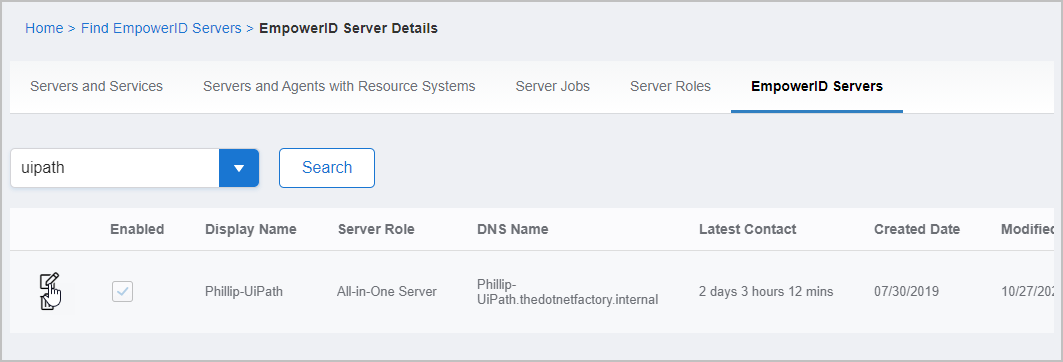
Follow these steps to assign or change the role on an EmpowerID server:
- Navigate to:
Infrastructure Admin > EmpowerID Servers and Settings > EmpowerID Servers - Select the EmpowerID Servers tab.
- Locate the server you want to edit.
- Click Edit.
- In the EmpowerID Server Role drop‑down, choose the correct role.
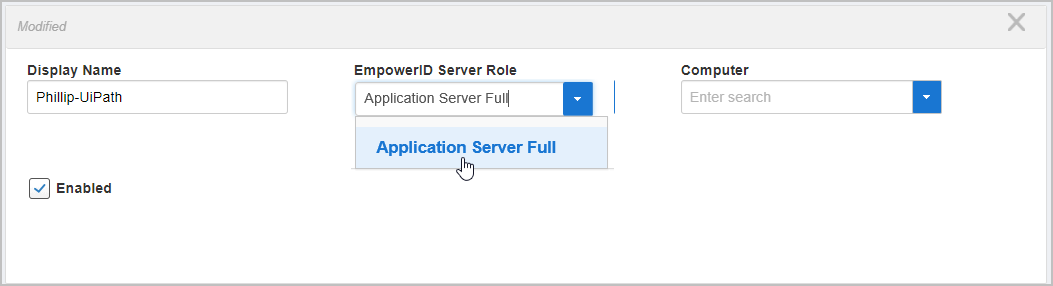
- Click Save.
Best Practices
-
Run the RBAC Security Compiler Job on exactly one server.
Running this job on multiple servers can cause RBAC conflicts. -
Use the Default role for any server that should not run Jobs or Web services.
-
Use Application Server Light for distributed nodes that only require essential Jobs.
-
Use Web Front‑End nodes to handle UI traffic in load‑balanced deployments.