Resource Admin Overview
Resource Admin is EmpowerID's microservice for delegated management of applications, groups, Management Roles, people, mailboxes, and shared folders. It enables organizations to distribute administrative responsibilities to resource owners and designated administrators — without granting them direct access to underlying systems such as Active Directory, Microsoft Entra ID, or other connected account stores.
Access is scoped through Management Roles and visibility policies, so each administrator sees and manages only the resources within their assigned authority. This model lets business stakeholders — department managers, application owners, and delegated IT staff — perform day-to-day resource administration while centralized governance, approval workflows, and audit trails remain intact.
How It Works
Resource Admin provides two ways to perform operations:
- Wizard workflows — launched from the gear icon on a resource record or from the Actions tab in a resource's Details view. These multi-step wizards guide you through complex operations such as onboarding applications, editing IAM Shop settings, or managing credentials.
- Direct actions — performed from within the resource's Details view tabs (such as adding or removing members, scopes, or permissions). These button-driven actions call the API directly and take effect without launching a full workflow.
Some operations — typically assignments that may require approval routing, such as assigning app rights, adding group members, or assigning Custom Security Attributes — are staged in the cart rather than applied immediately. The cart is persistent: items remain across sessions until you submit or delete them, allowing you to accumulate multiple changes before acting. When ready, you open the cart, run Evaluate Request to check for policy conflicts or pre-approval eligibility, then submit. Depending on the approval policies configured for the resource, changes are either fulfilled immediately or routed to approvers.
See The Resource Admin Cart for full details on staging, evaluating, and submitting requests.
Core Functionalities
| Resource Type | What You Can Do |
|---|---|
| Applications | Onboard applications; edit attributes, owners, and IAM Shop settings; manage client secrets and certificates; configure OAuth scopes, API permissions, app rights, claims, and claims mapping policies — without requiring direct access to the Azure portal. |
| Groups | Add and remove members, create groups, modify attributes, and assign roles and permissions across all connected account stores. |
| Management Roles | Manage roles you own, define permissions, and assign role-based access controls. Role delegation is bounded by your own permissions — you can only delegate access you yourself possess. |
| People | Onboard new users, update attributes, and process organizational transfers through guided wizard workflows. |
| Mailboxes | Manage Microsoft 365 and Exchange mailboxes and configure IAM Shop settings for mailbox resources. |
| Shared Folders | Manage access permissions and share or revoke access to specific folders, with changes governed by EmpowerID's approval workflows and audit capabilities. |
Accessing Resource Admin
Users can access Resource Admin through two methods:
- Navigation Bar: Select Resource Admin (Microservice) from the navigation bar.
- Direct URL: Enter the Resource Admin URL provided by your organization. See Set the URL for the Resource Admin Application for configuration details.
User Interface Overview
The Resource Admin interface is organized by resource type and provides access to all management operations through a consistent set of controls:
- Resource type selection — switch between categories (applications, groups, Management Roles, people, mailboxes, shared folders)
- Filtering — narrow resource lists by ownership, location, or other criteria
- Detail views — complete information and direct management actions for individual resources
- Wizard workflows — step-by-step guidance for complex multi-step operations
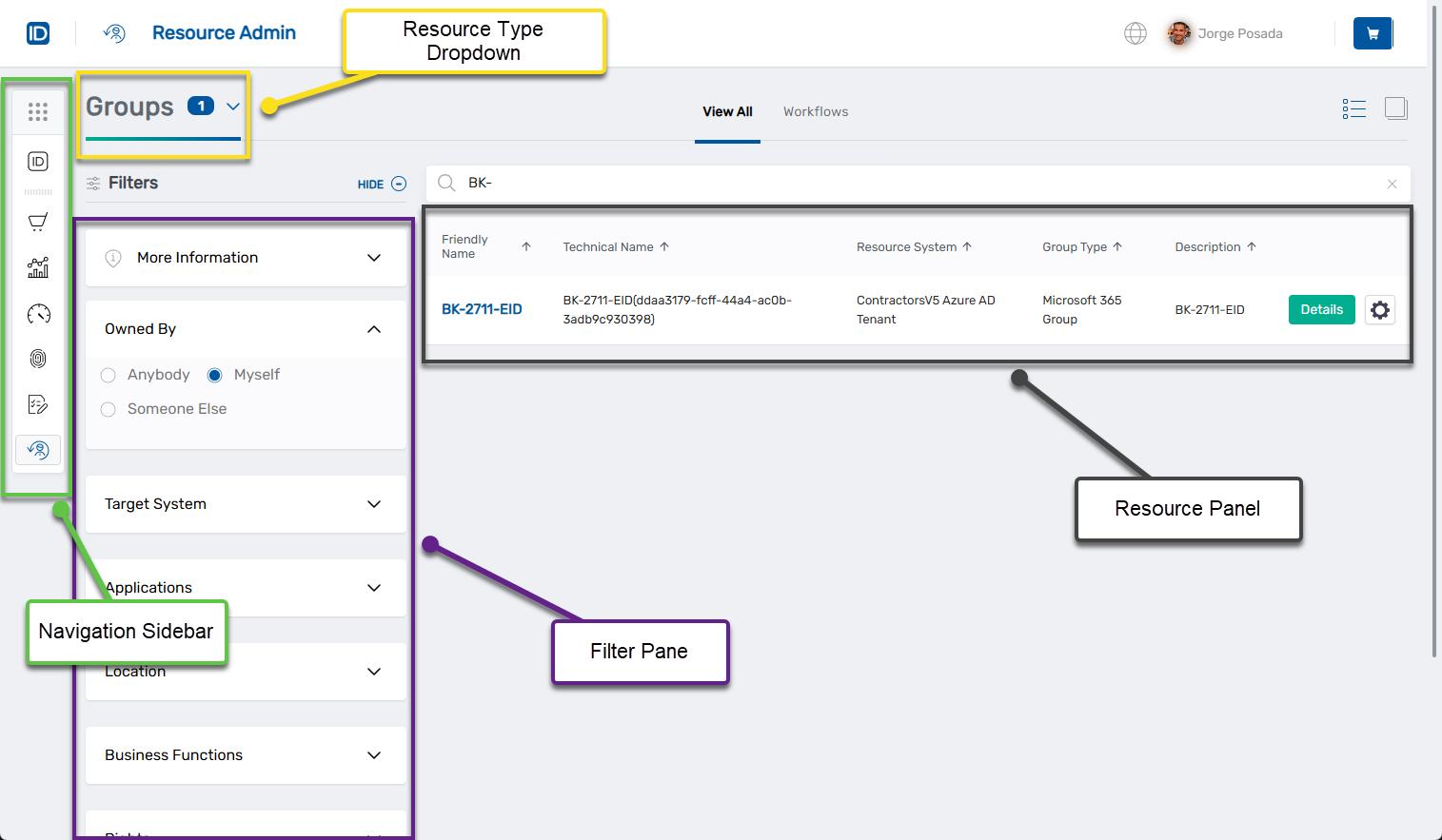
For detailed information about interface components and page-specific features, see Navigating Resource Admin.
Management Roles for Resource Admin Access
Access to Resource Admin is controlled through Management Roles that determine which resource types a user can view and manage. Management Roles enable precise delegation — organizations can grant access to specific resource types without broader administrative privileges. The role structure supports both least-privileged access through Base roles and full feature access through Feature Set roles, allowing permissions to be tailored to job responsibilities.
Role Structure
Common Roles (required by all users):
UI-Res-Admin-MS-Common: Access to shared UI componentsVIS-Res-Admin-MS-API: Access to base web services
Resource-Specific Roles:
Base Roles provide least-privileged access to a specific resource type. Examples: UI-Res-Admin-MS-Applications-Base, UI-Res-Admin-MS-Groups-Base.
Feature Set Roles provide access to all features, workflows, and controls for a resource type. Examples: UI-Res-Admin-MS-Applications, UI-Res-Admin-MS-Groups.
For complete role descriptions and assignment procedures, see Assigning Management Roles Needed to Access Resource Admin.
Next Steps
Configuration and Setup
- Set the URL for the Resource Admin Application: Configure the application URL
- Assigning Management Roles Needed to Access Resource Admin: Grant Resource Admin access to users and administrators
Interface and Navigation
- Navigating Resource Admin: Interface reference with controls, workflows, and page-specific features
Resource Management
- Applications Page: Manage applications
- Groups Page: Manage groups
- Management Roles Page: Manage Management Roles
- People Page: Manage people
- Mailboxes Page: Manage mailboxes
- Shared Folders Page: Manage shared folders
Advanced Configuration
- Use ResAdmin Mode to Restrict the Visibility of Resources: Configure visibility policies for delegated administration