Release Notes - EmpowerID Build 7.209.0.0
EmpowerID Build 7.209.0.0 introduces substantial advancements in identity lifecycle automation and governance capabilities. This release emphasizes workflow orchestration through No Code Flows, enhanced privileged access management, and expanded connector integrations. Key innovations include time-based escalation policies for approvals, comprehensive joiner-mover-leaver automation, and SAP connector modernization with SNC authentication support.
In This Release
- Connectors
- Identity Lifecycle Automation
- Workflow & User Experience
- Privileged Access Management
- Microservices & Integrations
- Role-Based Access Control
- Platform Improvements
- Security Enhancements
- Resolved Issues
Connectors
Azure AD B2C SCIM Connector
The Azure AD B2C SCIM Connector provides standards-based identity management for Azure Active Directory B2C customer identity scenarios. This connector enables automated user provisioning and deprovisioning, eliminating manual processes and reducing operational errors in customer identity lifecycle management.
Real-time synchronization maintains data consistency between EmpowerID and Azure AD B2C, ensuring accurate identity information across both platforms. The connector supports flexible configuration options, enabling administrators to customize integration patterns to align with organizational requirements and customer identity workflows. This integration strengthens security posture while improving customer experience through seamless identity operations.
SAP Connector Enhancements
The SAP connector has been modernized with critical security and performance improvements to support enterprise SAP environments.
SNC Authentication Support
Certificate-based and Kerberos-based authentication are now supported through Secure Network Communications (SNC), providing enhanced security for SAP integrations. Configuration includes:
| Setting | Type | Purpose |
|---|---|---|
Connection_SNC_DisableUsrPwdAuth | Required | Activates SNC-based authentication instead of username/password |
Connection_SNC_QualityOfProtection | Optional | Configures Quality of Service (default: 0, can be overridden) |
Connection_SNC_MyName | Required | Distinguished Name (DN) specified in SAP for the connection user |
Connection_SNC_PartnerName | Required | Distinguished Name (DN) of the SAP system |
Connection_SNC_CryptoLibPath | Required | Physical path to CryptoLib installation |
Incremental Role and Profile Updates
Role and profile manipulation logic has been enhanced to use IDENTITY_MODIFY instead of BAPI_USER_ACTGROUPS_ASSIGN or BAPI_USER_PROFILES_ASSIGN, ensuring incremental operations and reducing unnecessary audit records. The previous behavior can be restored via the disableIdentityManagementBAPI setting if required.
Enhanced RFC_READ_TABLE Performance
The connector now supports RFC_READ_TABLE2, a higher-performance variant of the standard BAPI. Configuration options include:
rfcReadTable2_Enabled– Enables the performant BAPI (default: false)rfcReadTable2_Override– Specifies alternate location if different from default BODS module location (/BODS/RFC_READ_TABLE2)
Microsoft NCo (.NET Connector) Migration
The connector has transitioned to Microsoft's official NCo (.NET Connector) library, replacing the third-party library. This requires connection-account authorization to invoke RFC_METADATA_GET. The previous library can be used by setting nco31_Enabled to false.
Identity Lifecycle Automation
Escalation Policies
Time-based escalation policies provide automated governance for approval workflows, ensuring timely decision-making and reducing bottlenecks in access request processing.
Core Capabilities:
- Policy Definition – Administrators define actions triggered when approval steps exceed specified time thresholds
- Automated Actions – Configurable responses including notifications, approver reassignment, and automatic approval or rejection based on policy criteria
- Sequential Execution – Support for ordered action sequences ensuring systematic handling of overdue requests
- Flexible Application – Policies apply at both specific approval step levels and globally as defaults, ensuring consistent governance
This capability improves operational efficiency and ensures compliance with time-sensitive approval requirements.
No Code Flows
No Code Flows (Business Request Flows) enable administrators to orchestrate sophisticated identity lifecycle processes through configuration rather than code, dramatically reducing implementation time for complex workflows.
Architecture Overview
Flow Definitions
Flow Definitions serve as containers for sequential tasks responding to specific identity events. Each definition specifies the complete workflow to execute when its associated event occurs.
Flow Definitions Library
| Flow Definition | Description |
|---|---|
| Person Leaver | Defines Flow Items executed when a person termination or departure event occurs |
| Person Mover | Defines Flow Items executed when a person transfer or role change event occurs |
| Person Rehire | Defines Flow Items executed when a previously terminated person returns |
Flow Items
Flow Items represent atomic tasks within Flow Definitions, each configured with:
- Item Type Action – The specific task to perform
- Item Scope Type – The execution context
- Item Collection Query – SQL query identifying impacted resources
Flow Items Library
| Flow Item | Description |
|---|---|
| Remove Non-RBAC Assigned group memberships from person | Removes manual group memberships not governed by RBAC |
| Disable Person | Disables the person account |
| Just in Time Person Access Summary Recertification | Initiates immediate access recertification for the person |
| Email a Person | Sends notification to the person |
| Email a Person's Manager | Sends notification to the person's manager |
| Disable Mailbox | Disables the mailbox for the person |
| Disable All Person Accounts | Disables all accounts associated with the person |
| Enable Person | Enables the person account |
| Restore person | Restores a previously disabled or deleted person account |
| EnableOutOfOffice | Activates out-of-office notifications for the person's account |
| Remove Person Group Membership | Removes the person from specified group memberships |
| DisableOutOfOffice | Deactivates out-of-office notifications |
| HideInGAL | Removes mailbox from Global Address List visibility |
| ShowMailboxInGAL | Restores mailbox visibility in Global Address List |
| EnableAllPersonAccounts | Enables all accounts associated with the person |
| EditAccountAttribute | Modifies specified account attributes |
Flow Events
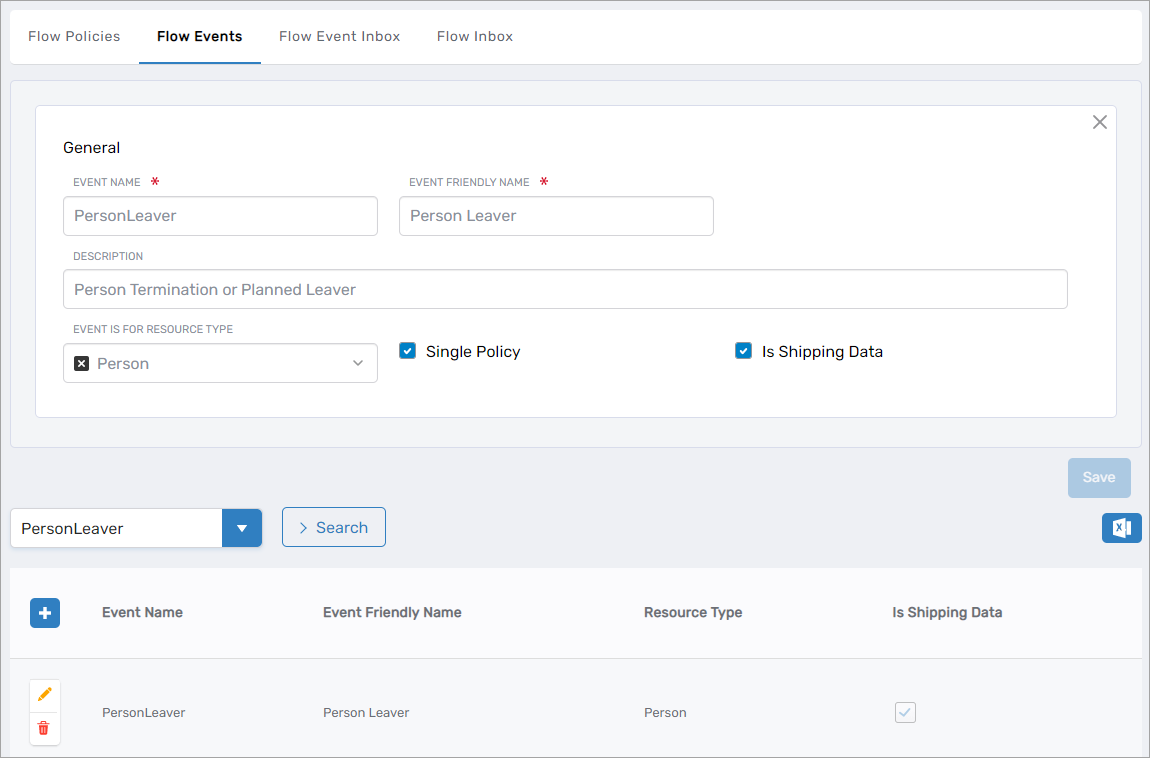
Flow Events serve as triggers initiating Flow Definition execution. When an event occurs, the system executes the associated Flow Items in sequence.
Flow Events Library
| Flow Event | Description |
|---|---|
| Primary Business Role Location Changed Automatically | Role/location modified by RBAC compilation |
| Secondary Business Role Location Added Automatically | Secondary role/location added by RBAC compilation |
| Primary Business Role Location Reverted to Default Automatically | Role/location reset due to missing data or invalid mappings |
| Person Leaver | Person termination or planned departure |
| Person Mover | Person transfer or role change |
| Person Joiner | Person onboarding or initial provisioning |
| Possible Account Takeover | Suspicious activity indicating potential account compromise |
| Mailbox Discovered | New mailbox detected in inventory |
| Account Inbox Person Provision | Person provisioned via account inbox processing |
| Person Inbox Joiner | Person onboarding via person inbox |
| Person Rehire | Previously terminated person returning to organization |
| Person Reactivation | Planned departure cancellation or post-termination reactivation |
| Person Preleaver Notification | Advance notification of upcoming departure |
| Secondary Business Role Location Removed Automatically | Secondary role/location removed by RBAC compilation |
Flow Policies
Flow Policies connect Flow Events to Flow Definitions, determining which workflows execute for specific events. Multiple policies can be configured for the same event, enabling different responses based on context (e.g., internal vs. external employee departures).
Joiner, Mover, Leaver Integration with Flow Engine
Joiner, Mover, and Leaver lifecycle events now integrate with the Flow engine, providing organizations with enhanced flexibility in identity lifecycle management.
Advanced Leaver Flow Configuration
Configuration settings enable organizations to route planned leaver events through the Business Request Flow engine instead of the default termination process:
| Setting | Type | Purpose | Note |
|---|---|---|---|
TerminatePersonTriggerFlowEvent | Resource System Setting | Specifies whether the system bypasses default termination and uses Business Request Flow engine | This global setting overrides the PreTerminatePersonWithFlowEvent, TerminatePersonWithFlowEvent, and ReactivatePersonWithFlowEvent settings |
PreTerminatePersonWithFlowEvent | Resource System Setting | Specifies whether Flow Events handle Preleaver Notifications | If true and TerminatePersonTriggerFlowEvent is false, Account Inbox Settings displays Flow Event Type selection for Preleaver Notifications |
TerminatePersonWithFlowEvent | Resource System Setting | Specifies whether Flow Events handle leaver processing | If true and TerminatePersonTriggerFlowEvent is false, Account Inbox Settings displays Flow Event Type selection for leaver events |
ReactivatePersonWithFlowEvent | Resource System Setting | Specifies whether Flow Events handle reactivation | If true and TerminatePersonTriggerFlowEvent is false, Account Inbox Settings displays Reactivation Event Type selection |
| Preleaver Notification Event Type | Account Inbox Setting | Selects Flow Event Type for Preleaver Notifications | Visible only when PreTerminatePersonWithFlowEvent is true and TerminatePersonTriggerFlowEvent is false |
| Leaver Event Type | Account Inbox Setting | Selects Flow Event Type for leaver events | Visible only when TerminatePersonWithFlowEvent is true and TerminatePersonTriggerFlowEvent is false |
Workflow & User Experience
New Wizard Workflows
This release introduces streamlined wizard workflows simplifying common administrative tasks across multiple resource types.
Credential Management
- Onboard Credential Workflow – Simplifies credential creation with integrated Access Request configuration, eligibility criteria definition, and IAM Shop publication settings
- Manage Credential Workflow – Provides unified interface for credential updates with support for both individual and bulk operations
Management Role Administration
- Onboard Management Role Workflow – Guides role creation with predefined role type selection, hierarchical relationship configuration, and IAM Shop publication options
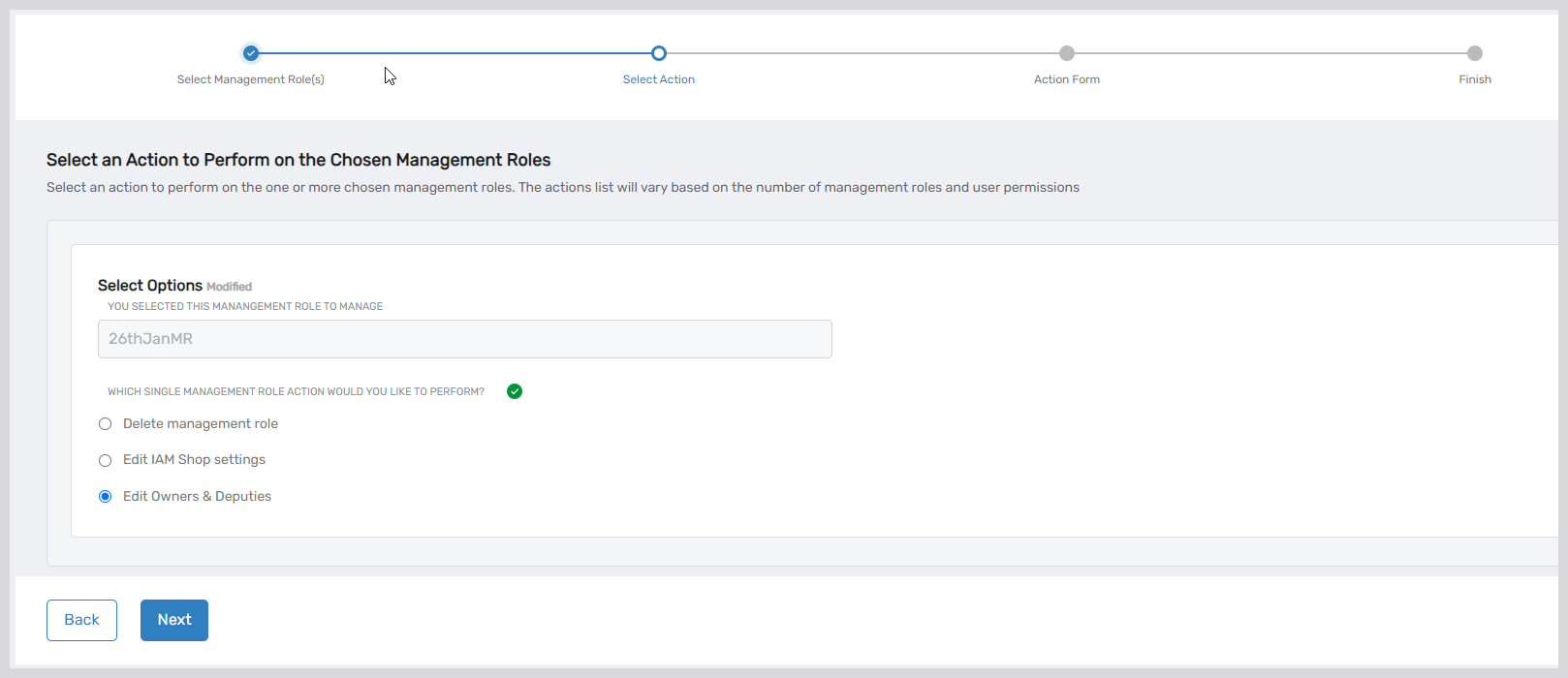
- Manage Management Role Workflow – Streamlines role administration including deletion, IAM Shop settings modification, and responsible party assignment with support for both single and bulk operations
Group Management
- Onboard Group Workflow – Comprehensive wizard for manual group onboarding including responsible party assignment, owner/deputy configuration, IAM Shop settings, and member management—all within a unified interface
- Manage Group Workflow – Centralized group administration for viewing details, editing attributes, deleting groups, assigning responsible persons, and managing membership
Azure Application Workflows
- Create Azure Application – Streamlined application creation with step-by-step guidance. See Create Azure Applications
- Create Azure Application Certificates – Upload and assign self-signed certificates to Azure applications. See Create Client Certificates
- Create Azure Application Client Secret – Generate and upload client secrets for Azure applications. See Create Client Secrets
- Create Azure Application Scopes – Define application scopes for Azure applications. See Add Application Scopes
- Create Azure Application Roles – Configure app roles for Azure applications. See Add App Roles
- Update Azure App API Permissions – Manage API permissions for Azure applications. See Update API Permissions
Person and Account Management
- Onboard Person – Flexible person onboarding with three modes (Simple, Advanced, From Another) enabling tailored workflows based on organizational requirements. See Onboard People
- Manage Account – Guided workflow for account administration including enable/disable operations, deletion, attribute editing, responsible party assignment, and group membership management
Self-Service Capabilities
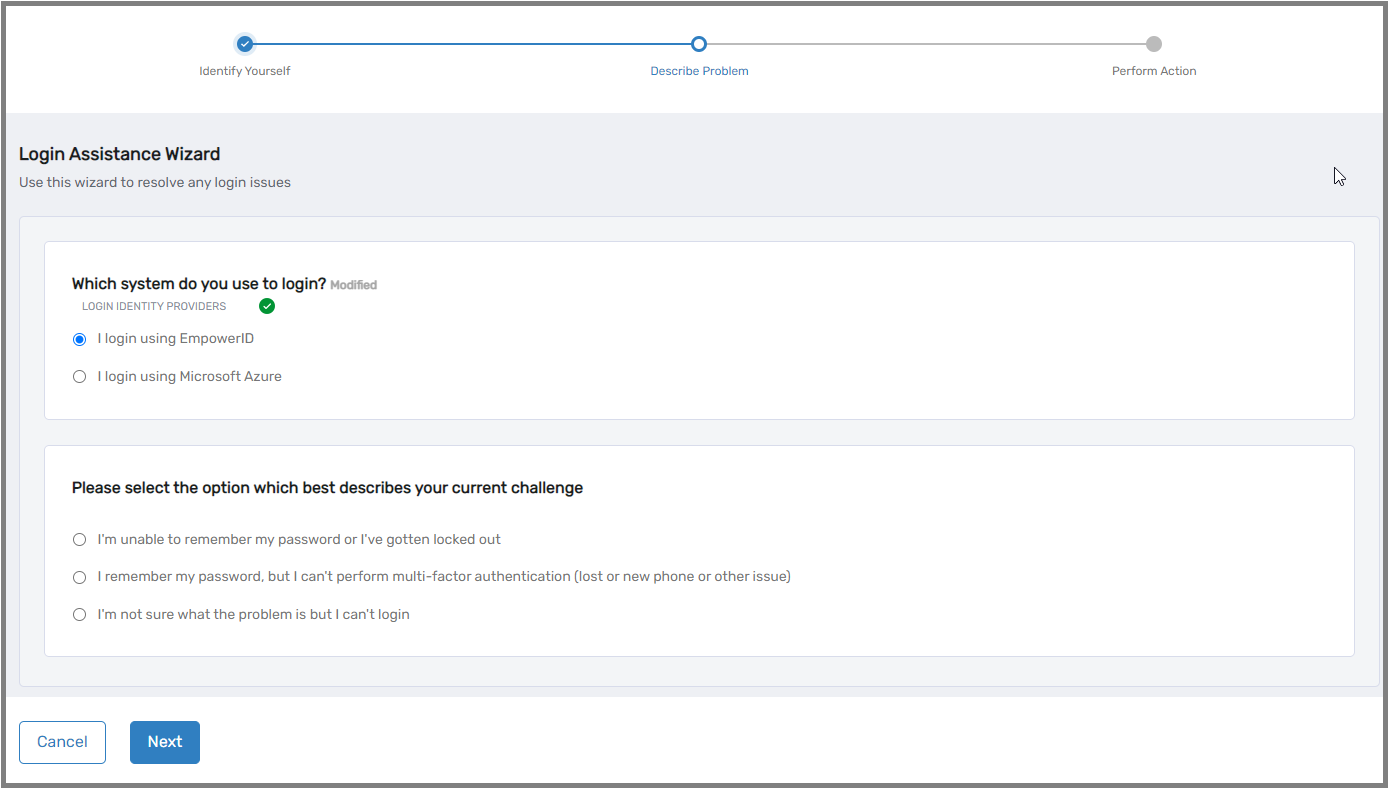
- Login Assistance Wizard – Accessible directly from the login screen, enabling users to independently resolve login issues including password reset/unlock, Azure Temporary Access Pass issuance, and MFA reset/unenrollment/deletion
- Manage Your Identity Wizard Workflow – Unified self-service interface for MFA device management, Q&A password reset enrollment, password changes, profile editing, and MFA authenticator registration. See User Experience - Manage Your Identity
Computer Management
- Onboard Computer Wizard Workflow – Simplifies computer onboarding with IAM Shop integration, eligibility configuration, and flexible Privileged Session Management settings including PSM credential linking. See Onboard Computers
Mailbox Management
- Onboard Mailbox – Streamlines shared, room, and equipment mailbox integration including IAM Shop publication, group membership assignment, eligibility criteria configuration, and approval workflow routing
- Manage Mailbox – Unified mailbox management interface for settings modification, email forwarding configuration, policy management, and quota restriction
More Flexibility for Access Requests
IAM Shop Permission Levels
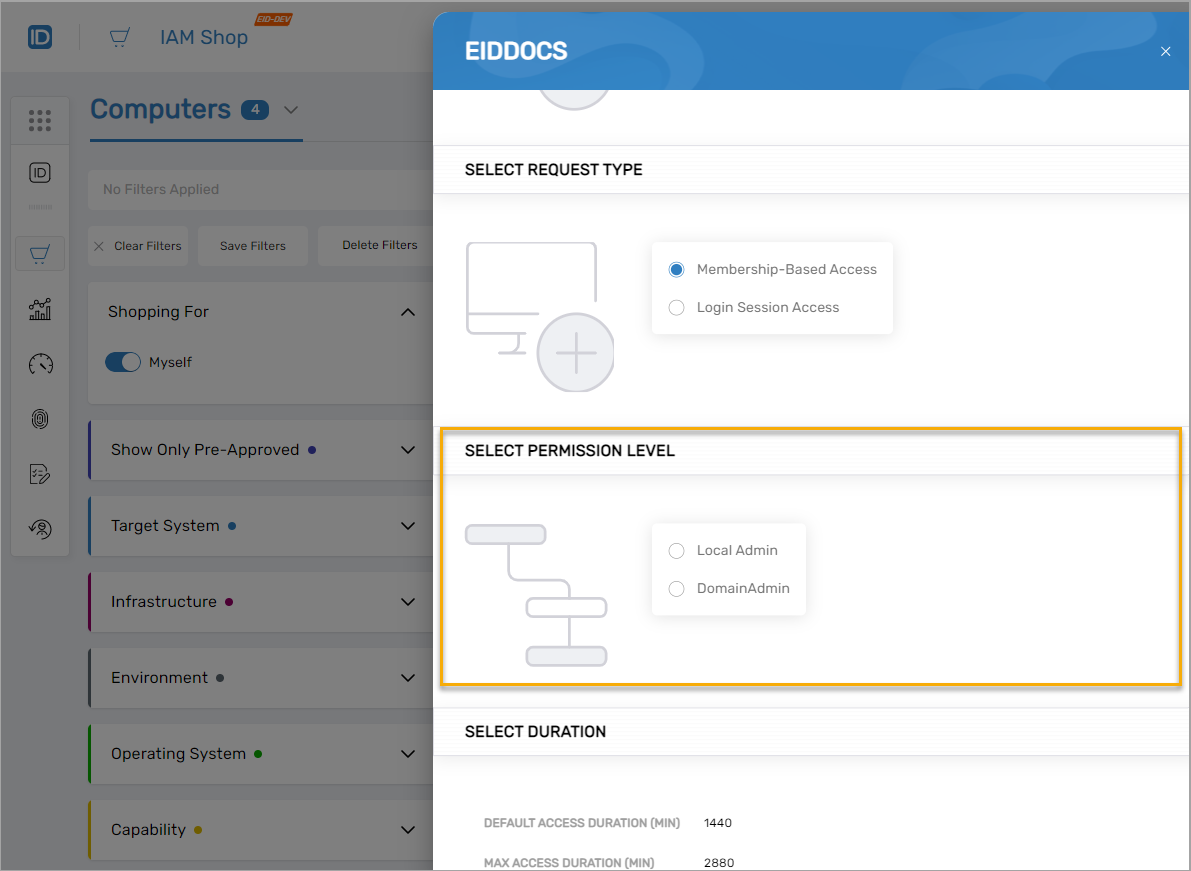
IAM Shop Permission Levels provide granular access control for resources including shared folders, mailboxes, computers, and Privileged Session Manager sessions. Organizations define custom permission levels representing specific access tiers (e.g., "read-only" for shared folders, "local admin" for computers).
When users request resource access through IAM Shop, they select from available permission levels. The system grants access by adding users to native system groups providing the corresponding permissions. For example, selecting "Local Admin" for a computer adds the user to the group with local administrator rights on that system.
This functionality simplifies permission management while providing users with clear, self-service access to required resources. See About IAM Shop Permission Levels.
Workflow Studio Enhancements
Authentication Modernization
Removed dependency on Microsoft Edge for Workflow Studio authentication. The platform now uses modern authentication with front-channel flow, improving accessibility across browsers and environments.
Business Request Template
Introduced fulfillment workflow template for Business Requests, streamlining request management and reducing workflow development complexity.
BotFlow Resource Pinning
Resource pinning capability enables easier interaction within bot flows. Pinning maintains resource accessibility across multiple actions without requiring repeated selection or input. Both temporary and permanent pinning modes are supported.
AI Integration
- New Workflow Activity for ChatGPT integration
- Dedicated Workflow and Bot flow for ChatGPT interaction within EmpowerID and Bot environments
User Interface Modernization
Comprehensive UI updates deliver a modern, contemporary appearance:
- Revamped baseline configuration and integration for AvaloniaUI
- New LowCode/NoCode panel utilizing AvaloniaUI framework for improved functionality and user experience
SAP BAPI Integration
Enhanced SAP integration capabilities:
- New Workflow Activity enabling any BAPI function invocation with result execution
- LowCode UI supporting BAPI structure value configuration at both design time and runtime, enhancing customization and adaptability
Form Control Enhancements
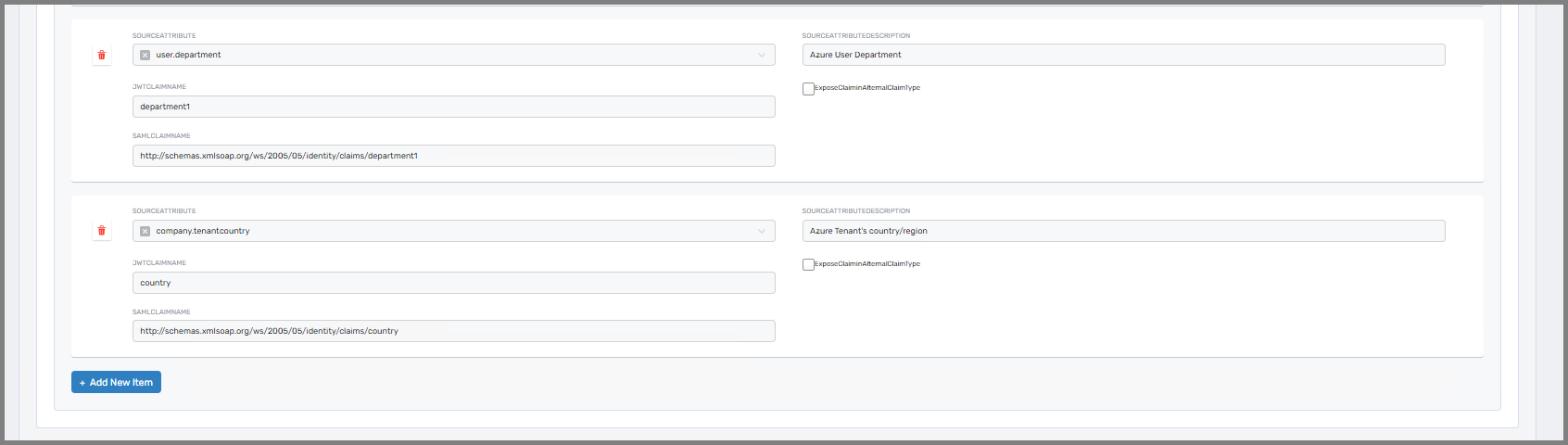
Repeater sections now include Add, Edit, and Delete operations with card UI display, providing developers greater design flexibility and improved end-user experience.
Privileged Access Management
Enhanced Privileged Session Manager
Privileged Session Manager has been significantly enhanced with expanded protocol support, real-time monitoring, and improved workflow reliability.
Telnet Session Support
PSM now accommodates Telnet sessions, expanding compatibility to include Linux, Windows, macOS, and additional operating systems. This enhancement ensures reliable PSM session connectivity across diverse device types and platforms.
Real-Time Session Monitoring
New session monitoring functionality enables real-time tracking of PSM applications, encoders, and uploaders. Users can monitor system health, detect potential issues proactively, and ensure optimal performance throughout privileged sessions.
Enhanced PSM Workflow
The PSM workflow has been optimized for improved efficiency, security, and resilience:
-
Property Verification – System checks
UseExistingAccountIfPresentproperty on the computer, falling back toAccessRequestPolicyif not found -
User Account Discovery – If
UseExistingAccountIfPresentis true, system searches for the person's user account in both local computer account store and Active Directory. When both exist, the account associated withJITLocalAdminGroupIDis selected -
Personal Credential Resolution – System locates personal credentials associated with the selected user account's account store, identified via the
AccountGUIDcolumn in theexternalCredentialtable -
Credential Handling Logic:
- No Personal Credential: Temporary account created in account store associated with
JITLocalAdminGroupID. These accounts are deleted after PSM session ends based onJITDeletePSMAccountsetting - Personal Credential Found:
JITLocalAdminGroupIDgroup added to account in external credential store. Group removed after session ends, but account persists
- No Personal Credential: Temporary account created in account store associated with
-
Explicit Temporary Account Creation – If
UseExistingAccountIfPresentis false, temporary account created in account store associated withJITLocalAdminGroupIDand deleted after session completion
Microservices & Integrations
ServiceNow Integration with EmpowerID Microservices
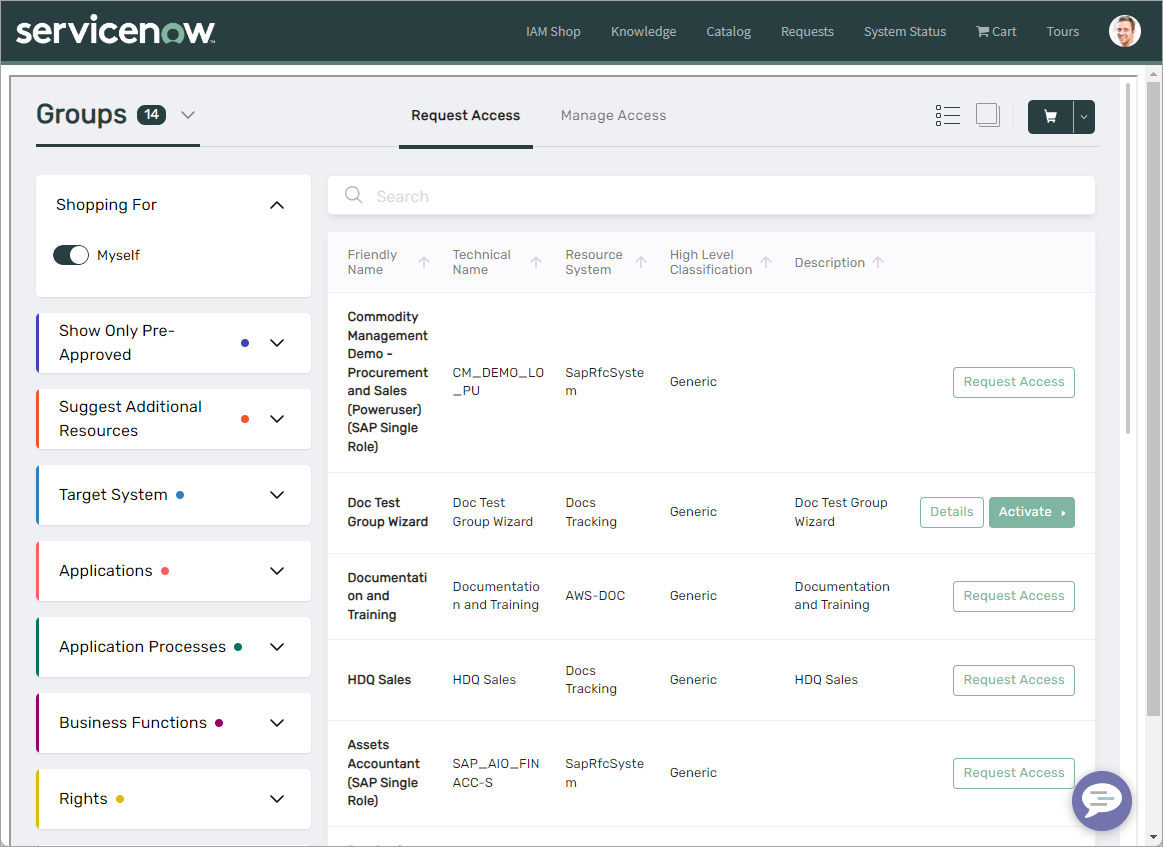
Organizations with ServiceNow integration can now leverage EmpowerID's IAM Shop, Resource Admin, and Identity Manager microservices directly within the ServiceNow user interface. Integration is accomplished by adding widgets to ServiceNow for each microservice, providing seamless access to EmpowerID capabilities within existing ServiceNow workflows.
For implementation details, see Integrate EmpowerID Microservices with ServiceNow.
Updated Microservices
Resource Admin
Resource Admin has been enhanced with expanded resource management capabilities and improved visibility across identity governance operations.
Management Role Administration
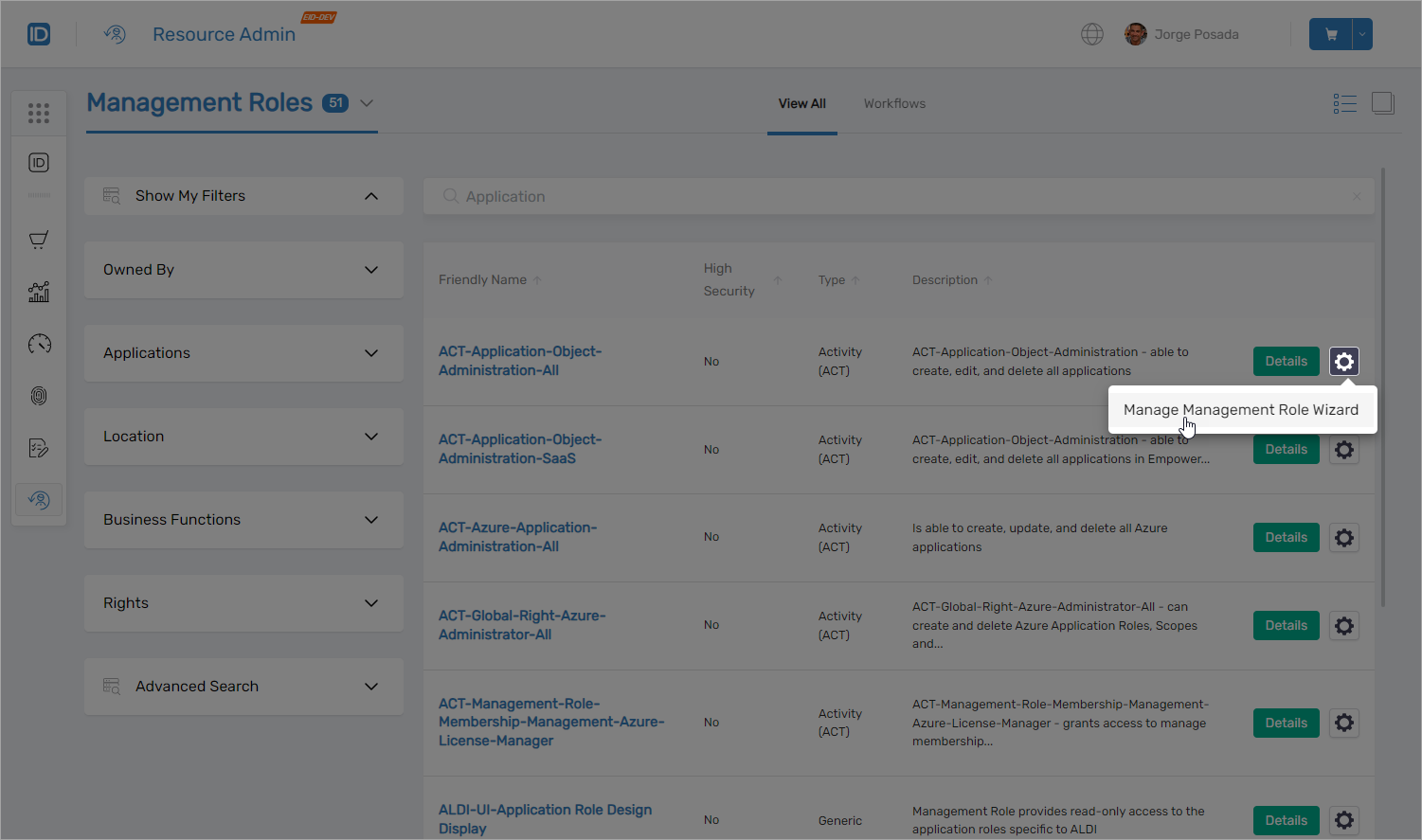
Complete Management Role lifecycle management now available within Resource Admin, enabling administrators to view and manage all role aspects through the microservice interface.
Mailbox Management
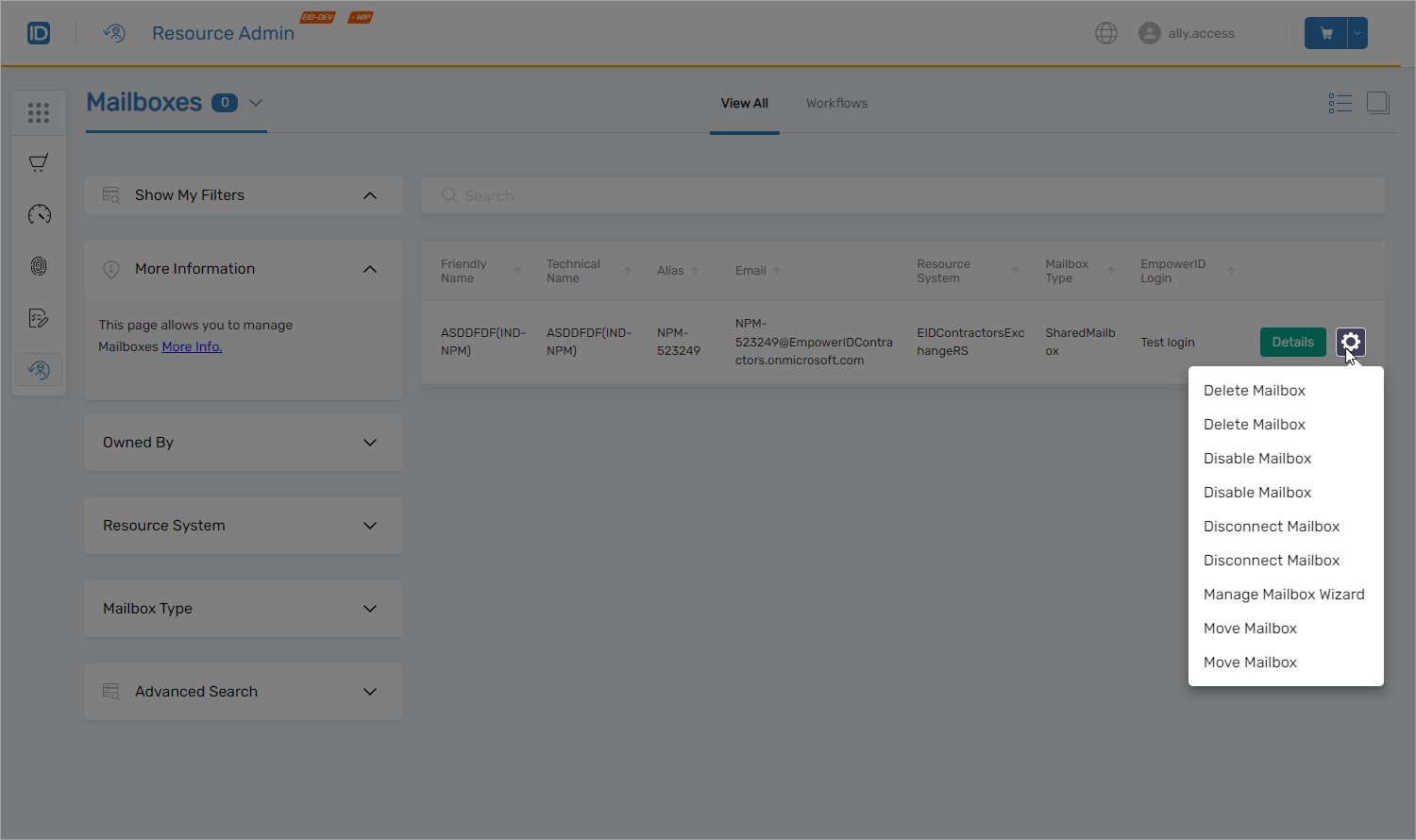
Direct mailbox access and management within Resource Admin simplifies mailbox administration. Resource admins can efficiently assign individuals to mailboxes, modify permissions, and execute mailbox management tasks without switching interfaces.
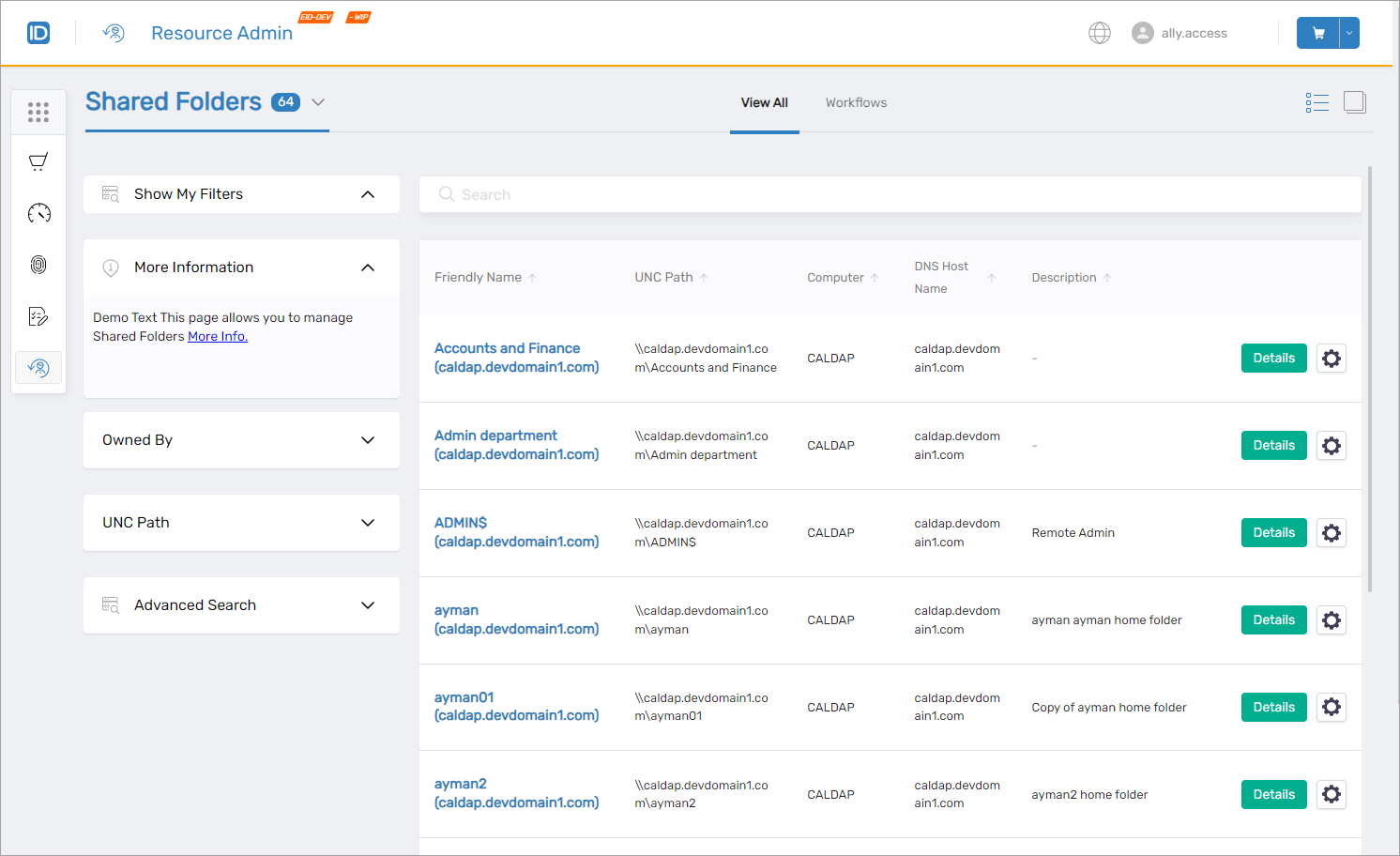
Shared Folder Administration
Comprehensive shared folder management for inventoried Windows servers includes creation, deletion, and modification capabilities directly within Resource Admin.
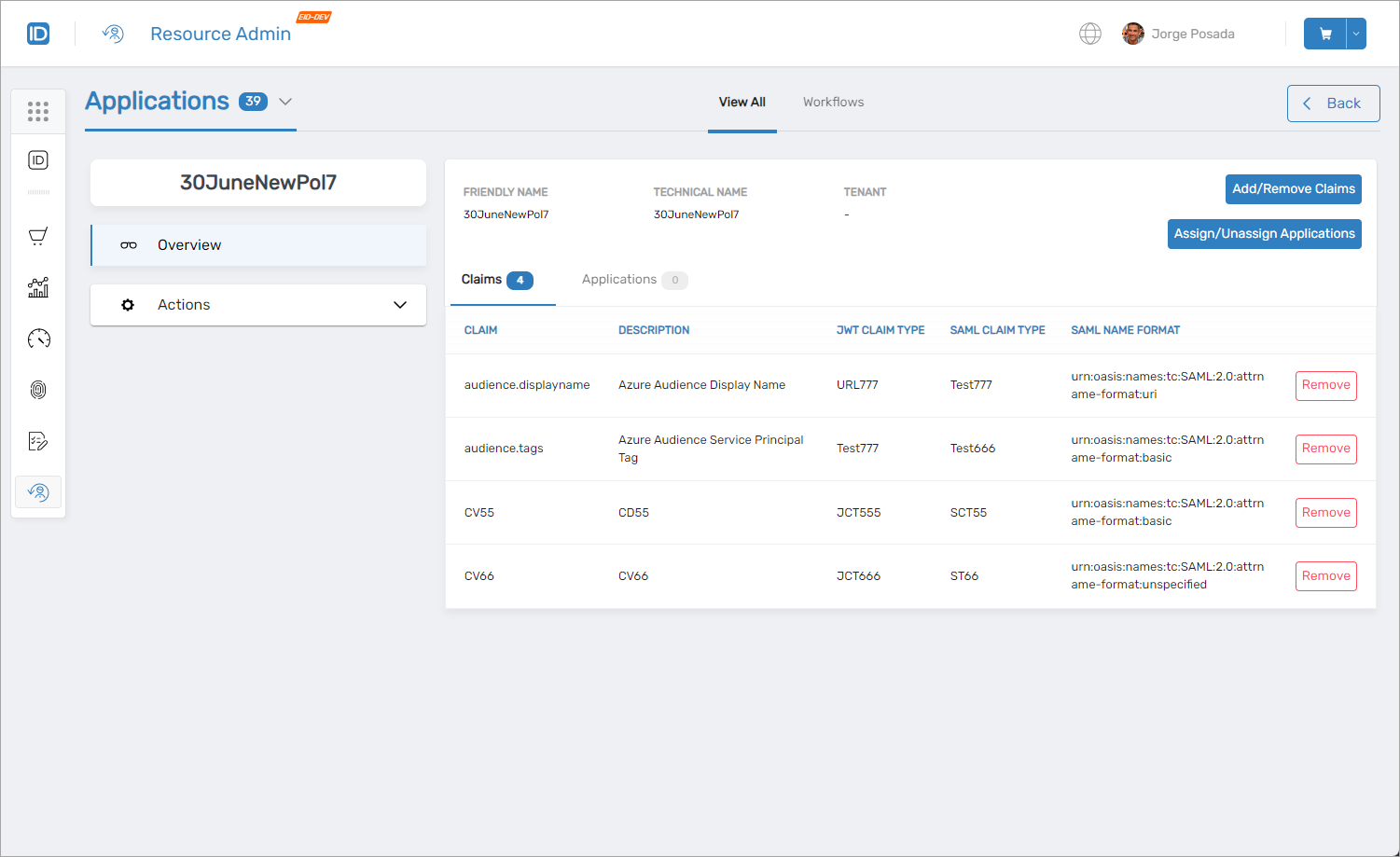
Claims Mapping Policy Management
Access to complete Claims Mapping policy catalog for applications, with capabilities to update policies and manage policy assignments as required.
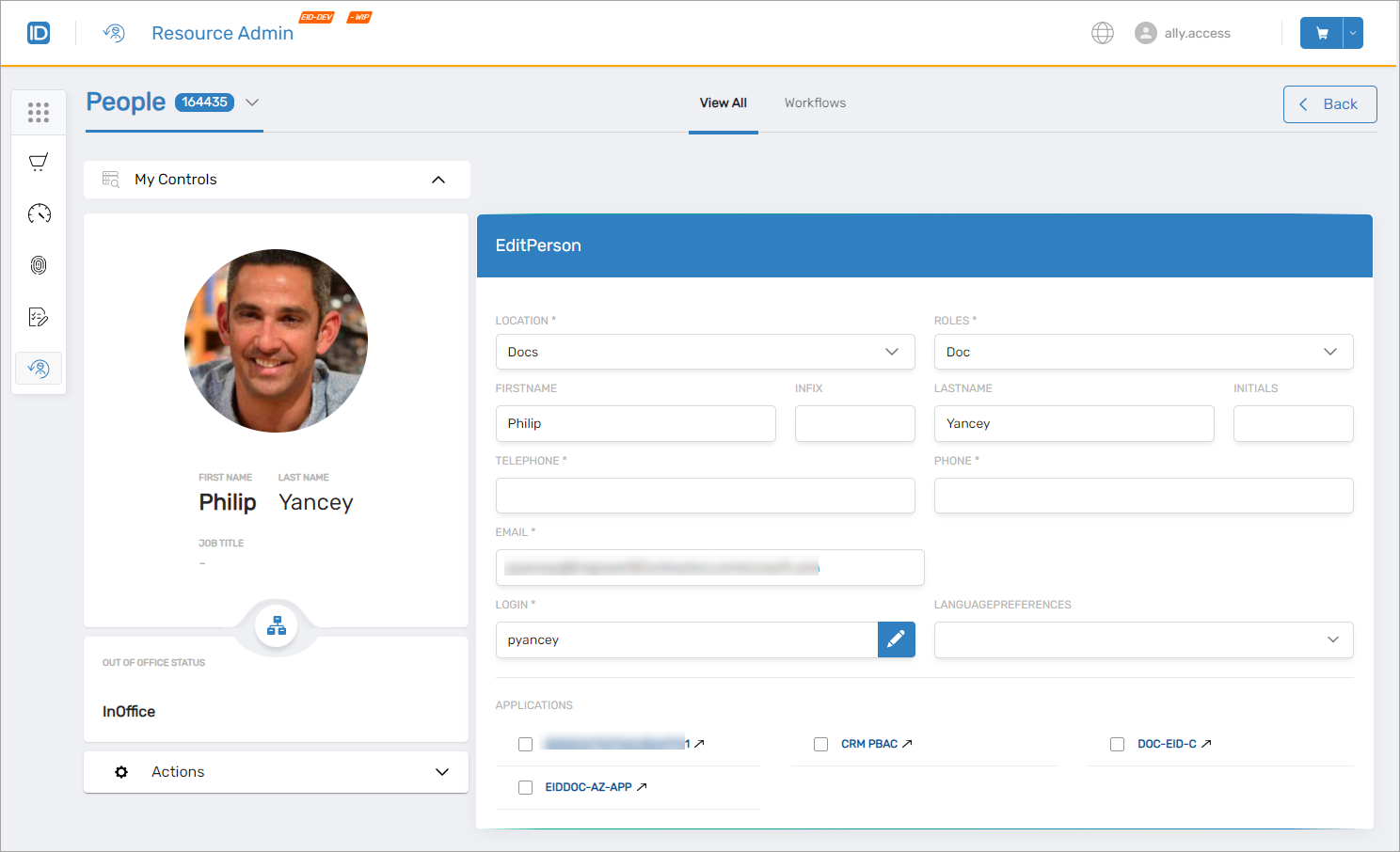
People Management
Enhanced people management capabilities within Resource Admin improve administrative efficiency for user lifecycle operations.
App Rights Visibility
Improved App Rights visibility enables users to view application-specific right details and membership information for authorized personnel, promoting transparency and accountability.
Role Definition Visibility
Enhanced visibility into application role definitions enables users to view definition details and assignments, facilitating improved role-based access control management.
IAM Shop
IAM Shop has been enhanced with capabilities improving user experience and expanding access request functionality.
Application Rights and Role Definitions
End-users can now directly request app rights, role definitions, and app management roles for protected applications through IAM Shop, simplifying permission acquisition and reducing administrative overhead.
Enhanced Access Management
Under 'Manage Access' for applications, end-users view current app rights, app management roles, and role definitions with ability to manage assignments directly, streamlining access control maintenance.
Personalized Resource Visibility
Resources displayed in IAM Shop are now filtered to show only those eligible for each user, reducing interface clutter and improving usability by focusing on relevant resources.
Role-Based Access Control
Projection for AzLocalRights and AzLocalRoles
EmpowerID now provides centralized administration, assignment, and permissions enforcement for Azure app roles across both Azure and external systems, with enhanced auditing and tracking of app role changes.
Enhanced Assignment Capabilities
Azure app role assignment has been expanded beyond Azure users and groups to include:
- Person objects
- Management Roles
- Business Role and Location combinations
Bulk Assignment Support
Administrators can now perform bulk assignments of Azure app roles to multiple users or groups simultaneously, improving operational efficiency for large-scale role deployments.
Fulfillment Groups
Fulfillment groups provide automated permission enforcement in external systems:
- Created automatically by workflows or manually by administrators
- Linked to Azure app roles to enable projection of individuals into corresponding Azure groups
- RBAC engine analyzes assignments and manages fulfillment group membership based on role assignments
- Ensures permission enforcement remains synchronized with role assignments
AssignAZRightScope Workflow
The new AssignAZRightScope workflow provides intuitive interface accessing these enhanced capabilities, simplifying Azure app role assignment and management.
Platform Improvements
Enhanced Tree Loading and Search Functionality
Significant performance improvements have been implemented for tree-based navigation and search across hierarchical structures.
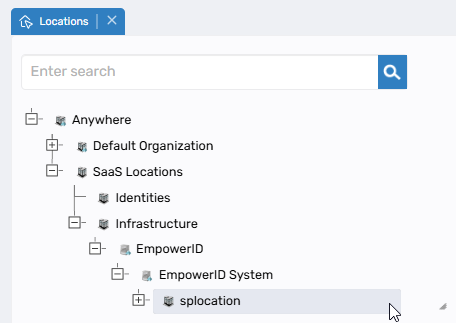
Dynamic On-Demand Loading
- Tree nodes load dynamically as needed rather than loading entire hierarchies upfront
- Only required nodes are loaded, significantly improving performance for large structures
- Node expansion may load one or multiple levels depending on context
- Dramatically reduced initial load times for large organizational hierarchies
Server-Side Full Text Search
- Search operations execute at database level rather than client-side
- More accurate and comprehensive results
- Search retrieval includes all matches with automatic parent node loading
- Search results highlight matching nodes with expanded tree paths displaying complete context
Implementation Scope
Performance improvements implemented for:
- Location trees
- Business role trees
- External location trees
- External business role trees
Trees continuing with previous implementation (appropriate for their size):
- Application trees
- Company trees
- Catalog trees
Mapping Functionality Updates
Important changes to external entity mapping selection behavior:
Selection Behavior:
- System automatically selects all visible children when parent node is checked
- Critical: Only currently loaded/expanded nodes are selected
Required User Actions:
- Expand nodes fully to select all descendants
- Nodes with "+" indicator contain unexpanded children that won't be automatically selected
- Ensure all relevant nodes are expanded before finalizing selections
These enhancements significantly improve performance for organizations with large hierarchical structures. Changes affect Business Role Mapper, External Business Role Mapper, and External Location Mapper.
Additional Improvements
Group Membership Engine
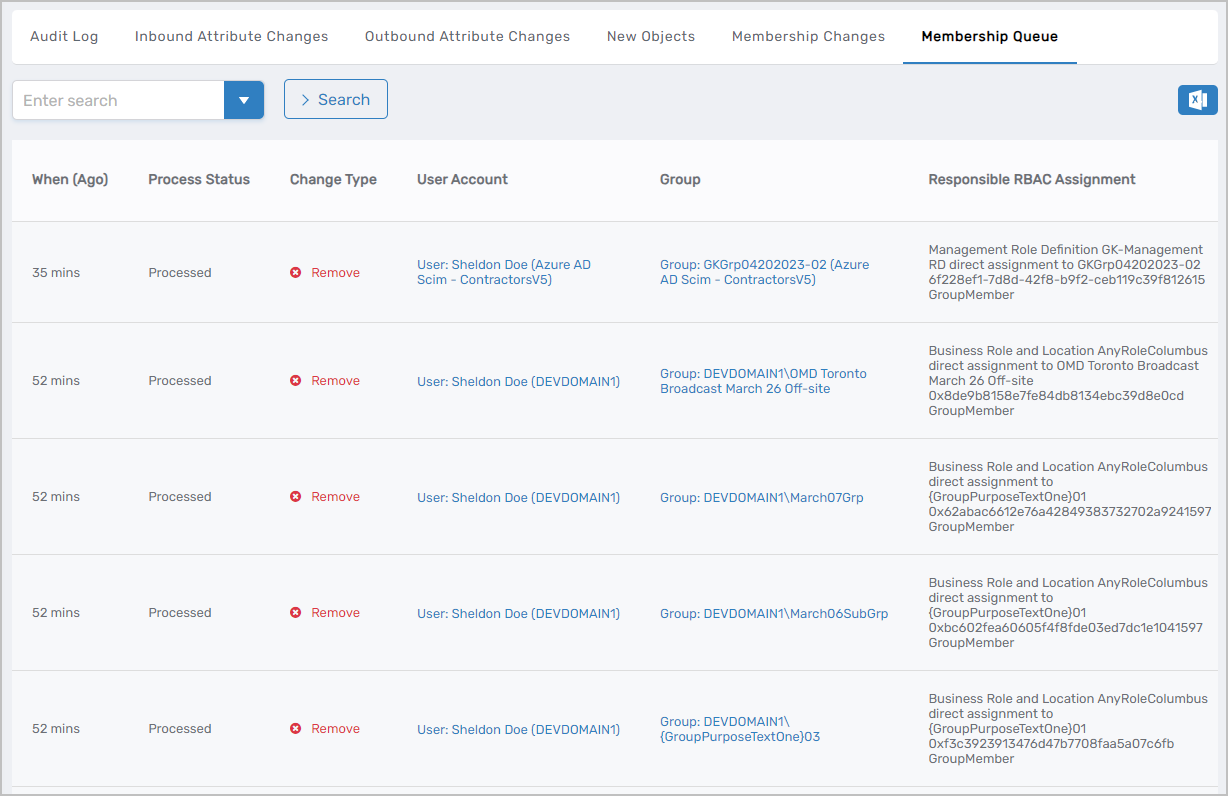
Enhanced group membership processing and auditing across Active Directory, Azure AD, and SAP account stores. The Membership Queue in the Audit log now captures comprehensive information about membership changes including:
- Status tracking for detected membership changes
- Change type identification (addition, deletion, etc.)
- Affected account and group details
- Authorization source (RBAC or local right assignment)
Group Membership Enforcement Paths:
-
RBAC Membership Delegation – Users with RBAC delegation to resource roles are automatically added to corresponding groups
-
Via AzAssigneeLocalRightScope – For Resource System groups mapped to
AzLocalRightinAssignedByGroupID, accounts with Assignee status inAzAssigneeLocalRightScopeare automatically added -
Via AzAssigneeLocalRoleScope – For groups mapped to
AzLocalRoleinAssignedByGroupID:- Accounts with Assignee status in
AzAssigneeLocalRoleScopeare added to the group - Accounts with Assignee status in
AzAssigneeLocalRightScopeforAzLocalRightwith blankAssignedByGroupIDbelonging to theAzLocalRoleare also added
- Accounts with Assignee status in
Rehire Capability
Advanced Leaver feature now supports rehire scenarios for individuals rejoining after previous departure. The rehire process restores previously deleted person objects and associated access provisions when defined criteria are met. Workflows automatically restore the person, reapply attribute flow to accounts, and generate restoration tasks for manual approval.
Time-Based Recertification Escalation
Recertification processes now include time-based escalation, enhancing flexibility and control in Business Role reviews. Automatic escalation requests are sent if reviews remain pending beyond configured thresholds. For example, escalation to Digital Access Governance Manager after one month of inactivity, with automatic business role removal and access deprovisioning after six months of non-response.
Relative Location Delegations
Administrators can now configure relative delegations for Locations within organizations, extending delegation capabilities for visibility and responsibility at the Organization level. This enhancement provides greater flexibility in delegation configuration and management.
Enhanced SetGroup Delegations
SetGroups (Query-Based Collections) delegation capabilities have been significantly enhanced. Previously, only designated "Assignees" received permissions granted to SetGroups. Now, any assignee—whether directly assigned or a member of Management Roles, Business Role Locations, or Groups within a SetGroup—receives delegated permissions. This delegation occurs when the SetGroup has the CanBeAssigneeInRBAC flag set to true.
Business Request Expiration
Enhanced business request management with configurable expiration policies ensuring timely approvals and regulatory compliance. Expired requests are hidden from approvers, improving request management efficiency.
Two expiration strategies are available:
- Fixed 90-Day Policy: Automatically expires incomplete requests after 90 days
- Dynamic Inactivity Expiration: Adapts based on user activity, recalculating expiration dates with each interaction
Expiration Date: Upon creation, requests receive an expiration date (default: 90 days from creation)
Inactivity Expiration Date: Dynamic date accounting for user activity, adding ExpireRequestAfterXDaysOfInactivity from request type to current date. User interactions adjust the date, recalculating based on request type configuration.
For more information, see Business Request Lifecycle Management.
Expiring Access Notifications
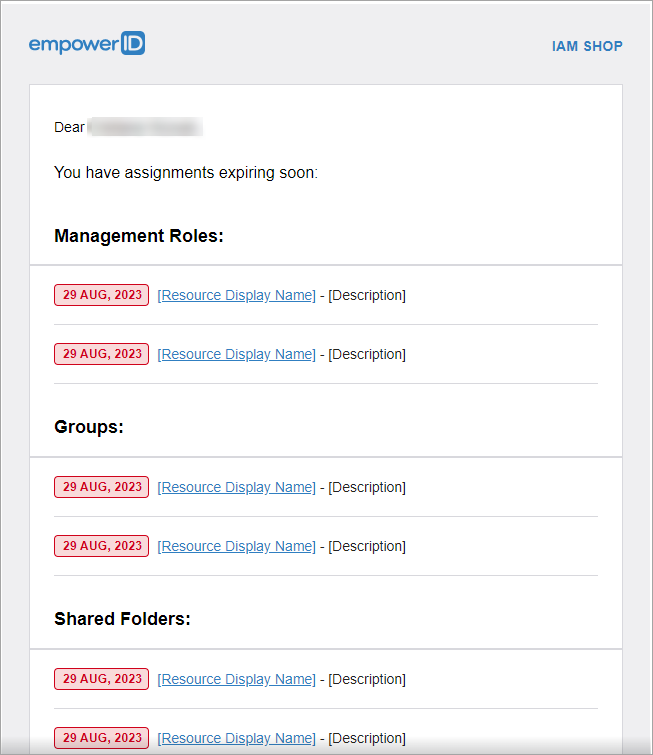
Notifications engine now includes email notifications for impending access assignment expiry, specifying resource details and expiration dates.
Google ReCaptcha V3 Upgrade
Platform upgraded to Google ReCaptcha V3, enhancing security and user experience. Users no longer solve CAPTCHA challenges; the system detects risk based on behavioral analysis.
Azure Group Membership Management Enhancement
Azure AD group account membership management has transitioned to a queue-based model, improving efficiency and reliability. Management Roles, Business Role and Location combinations, and Query-Based Collections can now be seamlessly added to and removed from Azure AD groups.
Exchange Mailbox Audit Settings Sync
EmpowerID now periodically retrieves and synchronizes audit settings from Exchange Mailbox, ensuring consistency between EmpowerID and Microsoft Exchange Online.
Microservices Framework Upgrade
Azure microservices upgraded from .NET 5 to .NET 6, ensuring continued support and security:
- Azure AD SCIM Microservice – Upgraded to .NET 6; .NET 5 version now in maintenance mode
- Exchange Online Web Jobs and Functions – Upgraded from .NET Core 3.1 to .NET 6; previous versions in maintenance mode
- SharePoint Online Web Jobs and Functions – Upgraded to .NET 6; previous versions in maintenance mode
Security Enhancements
MFA OTP Patch
This patch addresses multiple critical vulnerabilities in multi-factor authentication functionality.
Patch Information:
| Field | Value |
|---|---|
| Patch Number | EID Version V7.187.0.28046 |
| Affected Functionality | Multifactor Authentication |
| Affected Version | V7.X.X and below |
| Patch Release Date | 03/31/2023 |
| Severity/Priority | High |
Vulnerabilities Addressed:
-
QR Code Regeneration Prevention – Previously, unauthorized individuals with username/password could bypass MFA by manipulating network trace URLs to regenerate QR codes. The patch prevents QR code regeneration for accounts with registered MFA.
-
Email-Based MFA Protection – Previously, unauthorized individuals could redirect MFA codes to different email addresses by manipulating the MultifactorAuthOption "Post" method. The patch prevents email address modification during MFA verification.
-
Retry Limit Enforcement – System now properly enforces MFA retry limits, preventing unlimited authentication attempts.
Security Enhancements:
- MFA Registration APIs updated to prevent registration manipulation for accounts with existing MFA
- QR code access restricted for accounts with registered MFA, preventing bypass attempts
- Account lockout implemented after exceeding maximum unsuccessful MFA attempts
- MFA retry limit configuration moved from
EidMultifactorRetryLimitto password policy settingOneTimePasswordLockPolicyAttempts, enabling policy-specific limits
Resolved Issues
| Issue | Component | Resolution |
|---|---|---|
| Function Access report search by Function Friendly Name not functional | Reporting | Search by Function Friendly Name now operates correctly |
| Missing filter in My Tasks application's My Requests view | My Tasks | Implemented filter for My/All Requests by Request Status Changed Dates |
| PSM MFA authentication not recognizing SMS | Privileged Session Manager | SMS authentication now correctly recognized |
| Usability issues with "Owned by" filter in IAM Shop group context | IAM Shop | Default value now "Myself" if user lacks filter access, "Anybody" if access granted |
| Date filter validation issue in My Tasks | My Tasks | Validates that start date does not exceed end date |
| PSM video recording timestamp discrepancy | Privileged Session Manager | Timestamps now accurately reflect actual recording length |
| Session management on workflow screen timeout | Privileged Session Manager | Added 'userUnloaded' event handlers supplementing 'userSignedOut' handlers |
| Intermittent CTRL key functionality loss in PSM sessions | Privileged Session Manager | CTRL key functionality now maintains consistency throughout sessions |