Release Notes - EmpowerID Build 7.212.0.0
EmpowerID Build 7.212.0.0 delivers substantial advancements in zero-trust network access integration, application lifecycle management, and platform modernization. This release emphasizes Zscaler connector capabilities, enhanced PBAC field type approvals, and microservices framework upgrades to .NET 8 long-term support. Key innovations include application activity monitoring for stale application detection, encrypted PSM session streaming, and comprehensive Azure credential lifecycle management.
In This Release
- Connectors
- Platform Modernization
- Microservices
- Application Lifecycle Management
- PBAC Enhancements
- Workflow Enhancements
- Security & Performance
- Platform Improvements
- Resolved Issues & UI Fixes
Connectors
GCP Connector
The Google Cloud Platform Connector has been enhanced with comprehensive inventory capabilities for users, groups, and memberships.
User Inventory
Full and delta inventory features have been implemented for GCP users:
- Full inventory for users
- Delta inventory for users
- Delta inventory in the connector
- Full inventory for guest accounts
Group and Membership Inventory
Complete inventory support for GCP groups and group memberships:
- Full inventory endpoints for groups and memberships
- Delta inventory endpoints for groups and members in the microservice
These enhancements ensure comprehensive visibility into GCP identity structures while supporting efficient incremental synchronization for large-scale environments.
Zscaler Connector
The Zscaler Connector delivers comprehensive zero-trust network access integration, enabling centralized management of Zscaler resources through EmpowerID.
SCIM Group Reconciliation
SCIM group reconciliation ensures consistency between Zscaler and Azure AD. The connector:
- Retrieves SCIM groups provisioned in Zscaler
- Matches Zscaler group IDs with Azure system identifiers stored in Azure Blob
- Performs reconciliation to ensure system alignment
This capability streamlines group management and synchronization across both platforms.
Segment Group Inventory
Zscaler Segment Group inventory uses the JSON inbox method for data retrieval and processing. The stored procedure Custom_ZScalerJSONInbox_ProcessResourceSystem handles JSON inbox entries, with processed data stored in EID segment group tables (ZscalerSegmentGroup and ZscalerSegmentGroupAccessPolicy). JSON inbox data persists in ZScalerJSONInbox and zscalerjsondoctype tables, ensuring seamless integration.
Application Segment Inventory
Application Segments from ZScaler are inventoried using the JSON inbox method. The stored procedure Custom_ZScalerJSONInbox_ProcessResourceSystem processes entries, with application segments and associated data stored in relevant EID tables. This provides automated application segment management.
Server Group Inventory
Server Group inventory from ZScaler uses the JSON inbox method, with the stored procedure Custom_ZScalerJSONInbox_ProcessResourceSystem processing entries for each resource system.
Access Policy Management
Zscaler Access Policy management is now available directly from EmpowerID. Users can:
- Create access policies
- Delete access policies
- Update access policies
Self-service wizard workflows simplify policy management, enhancing user experience and reducing administrative overhead.
Platform Modernization
Microservices Framework Upgrade to .NET 8
All microservices have been upgraded from .NET 6.0 to .NET 8.0, ensuring continued platform security and support. This upgrade addresses the impending end-of-support for .NET 6.0 by migrating to the current long-term support (LTS) release. The upgrade:
- Maintains existing functionality and performance
- Ensures continued security updates and support
- Enables future compatibility with .NET ecosystem enhancements
- Positions the platform for long-term maintainability
Service Principal Object ID Visibility
Service Principal Object ID now displays on the overview page of Azure applications in Resource Admin, providing immediate visibility into Azure service principal identifiers for troubleshooting and configuration.
Enhanced Application Rights Assignment
Application rights can now be assigned to individual users and groups, enabling more efficient permissions management. Administrators can streamline permissions across multiple users simultaneously, simplifying user management and improving operational efficiency.
Microservices
IAM Shop
IAM Shop has been enhanced with improved user experience features, performance optimizations, and security improvements for privileged session management.
Multi-Select FieldType Enhancement
A Select All button has been implemented for multi-select FieldType controls (specifically MultiSelectCheckBoxList). This enhancement:
- Enables selection of all FieldType values in a single action
- Reduces manual entry time for access requests
- Enforces selection when
EnforceFieldTypeSelectionandisFieldTypesflags are true
The EnforceFieldTypeSelection flag is available in OnboardAzLocalRight workflow advanced settings.
Search Performance Optimization
Search functionality now enforces a minimum three-character requirement on listing screens, addressing database timeout issues caused by excessive load from shorter queries. This optimization:
- Improves response times
- Reduces likelihood of timeouts
- Ensures database stability during high-volume access request periods
Configurable BusinessRequestName Field
Resource Admin and IAM Shop now include configuration options to make the BusinessRequestName field mandatory or optional, providing flexibility in business request documentation requirements.
Encrypted PSM Session Streaming
Encrypted media streaming infrastructure enhances security and performance for PSM session recordings. The solution:
- Encrypts all recordings by default for data-at-rest protection
- Supports unique encryption keys for specific recordings, restricting access to authorized users
- Employs HTTP Live Streaming (HLS) protocol with AES-128 encryption
- Divides videos into segments with manifest files for adaptive streaming
- Improves start times and enables seamless playback based on connection strength
- Prevents unauthorized playback even if segments are downloaded locally
The VideoJS player decrypts segments on-the-fly, ensuring secure on-demand access without performance impact.
Resource Admin
Resource Admin has been enhanced with improved visibility, streamlined navigation, and expanded PBAC management capabilities.
Pre-Approved Members Visibility
A new Pre-Approved Members grid on the Groups overview provides immediate visibility into members with pre-approved access. This enhancement:
- Improves transparency in group membership management
- Enables quick review of pre-approved memberships
- Streamlines group administration workflows
Enhanced Navigation
Menu links have been added to streamline access to standard functionality across resources including Applications, Groups, Management Roles, and Mailboxes. New menu items provide direct access to:
- Access Managers (RBAC Owners)
- Direct Assigned Locations
- Access Request Policy settings
This simplifies the management experience by reducing navigation complexity.
Shared Folder Permissions Visibility
Inventoried permissions for shared folders are now accessible directly within Resource Admin, enabling users to view and manage shared folder permissions without switching to legacy applications.
Enhanced App Authorization Model Display
The Application Details interface now displays the ProtectedApplicationResourceUsageTypeFriendlyName property under the App Authorization Model, providing clear visibility into application authorization patterns.
Group-Based App Rights Assignment
App rights can now be assigned to groups in Application → App Right Assignments, enabling administrators to efficiently manage permissions across group memberships rather than individual users.
Expanded PBAC Role Definition Assignments
PBAC Role Definition Assignments section now supports assignment to:
- Groups
- Business Roles and Locations
- SetGroups
These capabilities include view, add, and remove operations, enhancing flexibility in role definition management.
Person Assignment for Role Definitions
The "Assign to Person" feature in PBAC Assignments → Role Definition Assignments enables assignment of Role Definitions to eligible individuals. The system:
- Fetches eligible persons
- Retrieves existing roles
- Displays current assignments
This streamlines role management by consolidating person-based assignments.
Management Role Assignment for Role Definitions
"Assign to Management Role" functionality in PBAC Definitions → Details → Assignments enables Role Definition assignment to management roles within applications, with full view, add, and remove capabilities.
Comprehensive PBAC Assignment Options
New assignment functionalities in PBAC Definitions → Details → Assignments enable Role Definition assignment to:
- SetGroups
- Groups
- Business Roles and Locations
These options provide comprehensive flexibility in PBAC definition management with complete view, add, and remove operations.
Global Field Types Management
Global field types can now be managed under Applications, providing:
- View capabilities for global field types
- Create operations for new field types
- Delete operations for existing field types
Global Field Types appear in the left-side menu similar to Claim Mapping policies, improving field type organization and accessibility.
Application Lifecycle Management
Activity-Based Application Monitoring
Application activity monitoring enables detection, reporting, and recertification of inactive Azure applications. The integration:
- Leverages Azure AD Graph API to retrieve application activity data
- Records activity in the
LastActivityDatefield in theProtectedApplicationResourcetable - Automatically flags inactive applications based on last activity date
- Sends flagged applications for recertification
This ensures proactive monitoring of application usage with prompt identification of gaps, maintaining accurate tracking for recertification workflows.
Automated Azure Credential Lifecycle Management
The AzureCredentialExpirationNotification permanent workflow automates detection and management of expired Azure client secrets and certificates. The workflow:
- Checks all registered Azure tenants
- Identifies expired credentials
- Deletes expired secrets or certificates in Azure
- Removes corresponding external credentials in EmpowerID upon successful Azure deletion
- Sends individual notification emails to app owners and credential owners for each expired item
For applications with multiple expired credentials, the workflow ensures each credential owner receives notification, supporting prompt remediation.
Enhanced API Permission Management
API permission management for managed identities and service principals has been expanded from read-only to full CRUD operations. Administrators can now:
- View API permission assignments
- Create new permission assignments
- Update existing permissions
- Delete permission assignments
This enables complete lifecycle management for API permissions on managed identities and service principals.
PBAC Enhancements
Field Type-Based Approval Splitting
Business request approval splitting can now be configured by field type values, expanding approval workflow flexibility. The setting, configured as a pointer column (AzFieldTypeIDToSplitBy) on AzLocalRight, enables:
- Designation of specific FieldTypes for request splitting
- Business request separation per unique field type value
- Automatic copying of other field type values to each split item
This provides granular control over approval routing based on field type values.
Workflow Enhancements
Enhanced OnboardMailbox Workflow
The OnboardMailbox workflow has been improved with:
- Popup grid search for Responsible Party
IsRequiredparameters for Responsible Party, Owner, and Deputy fields- Flexible configuration for desired audiences
GetSearchAdvancedfor Owner selection, improving accuracy
These enhancements improve the mailbox onboarding experience.
Advanced Search Display Fix
The DisableMultiplePeopleWF, EnableMultiplePeopleWF, and ResetPassword workflows now correctly display advanced search options when expanding the search box after selecting No for user selection, ensuring efficient advanced search capabilities.
ManageAzLocalRightWizard Enhancements
The ManageAzLocalRightWizard workflow now supports:
- Setting
SplitBusinessRequestApprovalPerFieldTypeValueandApprovalAzLocalRightIDfor multiple AzLocalRights - Renamed "Edit Settings for Right" to "Edit Local Right Settings"
- Disclaimer for setting overwrites
- Radio buttons for specific checkboxes ensuring intentional changes
- PBAC approval right dropdown with selection-based changes
- Owner and deputy configuration for multiple AzLocalRights selections
- Deprecated Assign Responsible Party action for multi-selection
Role Definition Fulfillment Group Selection
The Role Definition Information form for onboarding local roles includes an optional dropdown for fulfillment group selection, aligning with OnboardAzLocalRight workflow configuration. The "App Right Options" section has been renamed "Advanced Settings" for clarity.
ManageComputerWizard RDP and SSH Configuration
The ManageComputerWizard workflow now supports RDP (Remote Desktop Protocol) and SSH (Secure Shell) configuration for computers. Users can configure:
- RDP access options
- SSH access options
- Hostname
- Telnet access
- VNC access
The workflow is accessible through ITShop → Computers → Workflows → Manage Computer Wizard.
Security and Performance Enhancements
Enhanced MyIdentity Data Privacy
The MyIdentity feature has been enhanced to address data privacy concerns through the SearchToLoad configuration parameter. Key improvements:
- Users cannot view unfiltered identity lists under All Users, Internal Users, and External Users tabs without search queries
- Identity lists display nothing until searches are performed
- Ensures compliance with privacy regulations
- Prevents unauthorized access to potentially exportable user information
Token Refresh Optimization
Token refresh requests are no longer made after session expiration, eliminating unnecessary API calls and improving system efficiency.
Platform Improvements
Enhanced Tree Loading and Search Functionality
Significant performance improvements have been implemented for hierarchical navigation across location and role trees.
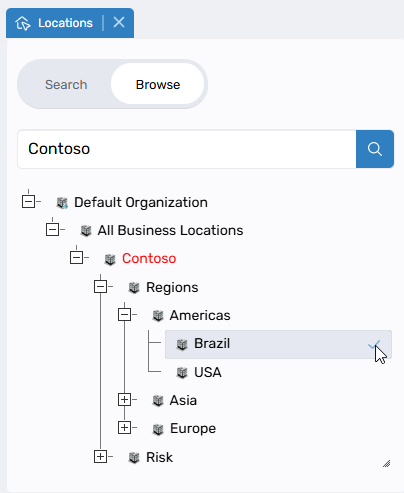
Dynamic On-Demand Loading
- Tree nodes load dynamically as needed rather than loading entire hierarchies
- Only required nodes are loaded, significantly improving performance
- Node expansion loads appropriate levels based on context
- Initial load times dramatically reduced for large organizational hierarchies
Server-Side Full Text Search
Search operations execute at the database level, delivering:
- More accurate and comprehensive results
- Automatic loading of all parent nodes in paths to root
- Highlighted matching nodes
- Expanded tree paths displaying complete context for each match
Implementation Scope
Performance improvements implemented for:
- Location trees
- Business role trees
- External location trees
- External business role trees
Trees continuing with previous implementation (appropriate for their size):
- Application trees
- Company trees
- Catalog trees
Mapping Selection Behavior
Important changes to external entity mapping selection:
Selection Behavior:
- System automatically selects all visible children when parent nodes are checked
- Critical: Only currently loaded/expanded nodes are selected
Required User Actions:
- Expand nodes fully to select all descendants
- Nodes with "+" indicators contain unexpanded children that won't be automatically selected
- Ensure all relevant nodes are expanded before finalizing selections
These enhancements significantly improve performance for organizations with large hierarchical structures. Changes affect Business Role Mapper, External Business Role Mapper, and External Location Mapper.
For more information, see Role and Location Mapper.
Resolved Issues & UI Fixes
PBAC Fulfillment Time Display
Resolved incorrect fulfillment time display on PBAC App Details page under process steps. Previously, fulfillment time incorrectly matched request time; it now displays accurate fulfillment timestamps.
Access Duration Selection
Resolved an issue preventing users from setting duration beyond three days while requesting resources (except Business Roles) in IAM Shop, despite "Restricts Length of Access" being set to No. Users can now select any end date as expected.
Role and Location Mapper Scroll and Sorting
Resolved horizontal scroll UI issue and column sorting functionality in Role and Location Mapper and Role Mapper tabs. The scrollbar no longer displays extra spacing, and column sorting operates correctly.
Business and Location Mapper UI Alignment
Resolved UI overlap issue affecting hide/show button alignment in Business and Location mapper. The issue, particularly noticeable when clicking "Map selected to new" without selection, caused text overlay in the classification section and unclickable buttons near the save button.
Shopping Cart Icon Display
Resolved duplicate shopping cart icon issue in Resource Admin and IAM Shop. The cart drawer now opens correctly with full-width app content utilization, eliminating the appearance of duplicate cart icons.
Azure Role Access Duration Visibility
Resolved missing access duration display for Azure roles in IAM Shop. Time duration now displays correctly in the manage access listing when Azure roles are requested with time constraints.
Application Rights Visibility for Group Members
Resolved an issue where application rights assigned to group members via ResAdmin didn't appear in IT Shop. Application rights assigned through PBAC Assignments → App Right Assignments now display correctly for all group members under Applications → Manage Access.
Field Type Configuration Display
Resolved incorrect configuration behavior in ConfigureApplicationAuthorizationFieldType Workflow for specific field types. The following field types now display correctly:
FreeTextRangeFreeTextSingleValueSingleSelectAutocompleteSingleSelectLookupControl
Application Name in Cart Display
Resolved missing application name in cart when assigning role definitions without field type values. Application name now displays consistently regardless of field type value presence.
Fulfillment Schedule Date Display
Resolved duplicate fulfillment schedule date display in Business Request overview. The redundant property has been removed, displaying a single accurate fulfillment schedule date.
UPN Population and Date Picker
Resolved two issues:
- UserPrincipalName (UPN) now populates correctly during provisioning through RET
- CSS bug affecting Start Date and End Date fields resolved; calendar icon now displays correctly, enabling easy date selection
Requestable Setting Persistence
Resolved an issue where the Requestable setting wasn't saved for multiple selections in ManageComputerWizard, addressing a specific case within the Multi IAMShopSettings feature.
Azure Application Tenant Selection
Resolved tenant selection issue when onboarding Azure applications. Users can now successfully select tenants from available lists, ensuring smooth integration processes.
App Right Friendly Name Propagation
Resolved an issue where AzLocalRight-friendly name changes weren't reflected in resource-friendly names, resulting in outdated process step information. A trigger now automatically updates resource-friendly names when AzLocalRight names change. This applies to future entries; existing entries remain unchanged.