Release Notes - EmpowerID Build 7.211.0.0
EmpowerID Build 7.211.0.0 delivers significant advancements in cloud platform integration, enterprise communication capabilities, and identity lifecycle automation. This release emphasizes Google Cloud Platform identity management, PBAC field type enhancements, and performance optimization across RBAC compilation and tree navigation. Key innovations include the enterprise notification framework, enhanced No Code Flows email capabilities, and comprehensive SAP connector security improvements.
In This Release
- Connectors
- Enterprise Communications
- Microservices
- Identity Lifecycle Automation
- Security Enhancements
- Platform Improvements
- General Product Improvements
- Resolved Issues
Connectors
GCP Connector
The Google Cloud Platform Connector delivers comprehensive identity management for GCP environments, supporting enterprise-scale operations with full and delta inventory capabilities.
Account Management
Complete lifecycle support for GCP accounts including:
- Standard, service, and guest account inventory with incremental and full synchronization
- Account provisioning through EmpowerID Resource Entitlements
- Create, update, disable, and delete operations for standard accounts
- Enable, disable, and delete operations for service accounts
- Password reset capabilities for GCP accounts
Group Administration
Comprehensive group management capabilities:
- Full and incremental group inventory
- Group membership inventory for all account types
- Nested group hierarchy support
- Create, update, and delete operations for groups
- Group membership management including additions, removals, and ownership changes
RBAC Integration
Group membership assignments can be driven by Management Role (RBAC) assignments, ensuring permission enforcement aligns with organizational role structures and governance policies.
Enterprise Communications
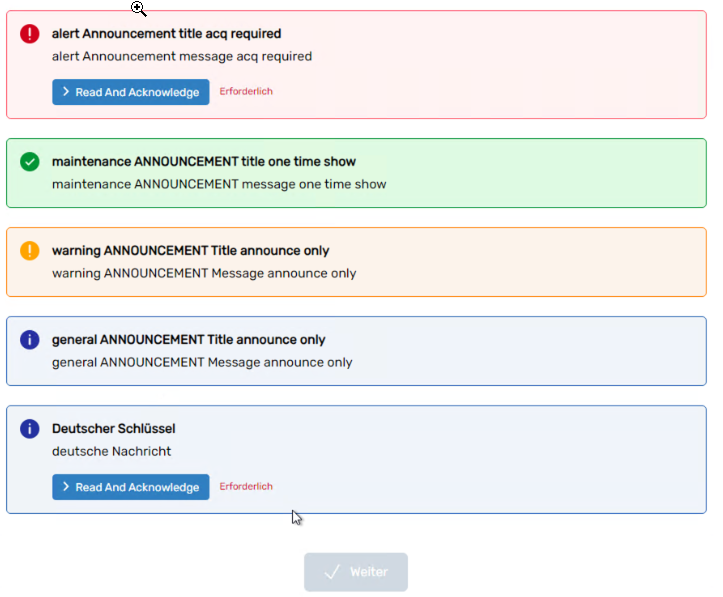
EmpowerID Announcements (Notifications)
Enterprise notification framework provides centralized communication management across all microservices, delivering personalized notifications based on user preferences and organizational policies.
Core Capabilities
The notification system supports multiple communication scenarios:
- Planned maintenance notifications
- System status change alerts
- Custom event notifications
- Targeted audience messaging
- Multi-language support through localization
Administration Interface
The EID Announcements Workflow Wizard enables administrators to:
- Create, edit, and delete notification policies
- Configure announcement content including titles, bodies, and display modes (banners/popups)
- Schedule notification delivery
- Define acknowledgment requirements
- Manage one-time or recurring messages
Announcements display consistently across all registered applications with centralized management of date ranges, content tracking, prioritization, and localization.
Microservices
IAM Shop
IAM Shop has been enhanced with capabilities improving search functionality, pre-approved access activation, process transparency, and PBAC field type flexibility.
Enhanced Person Search
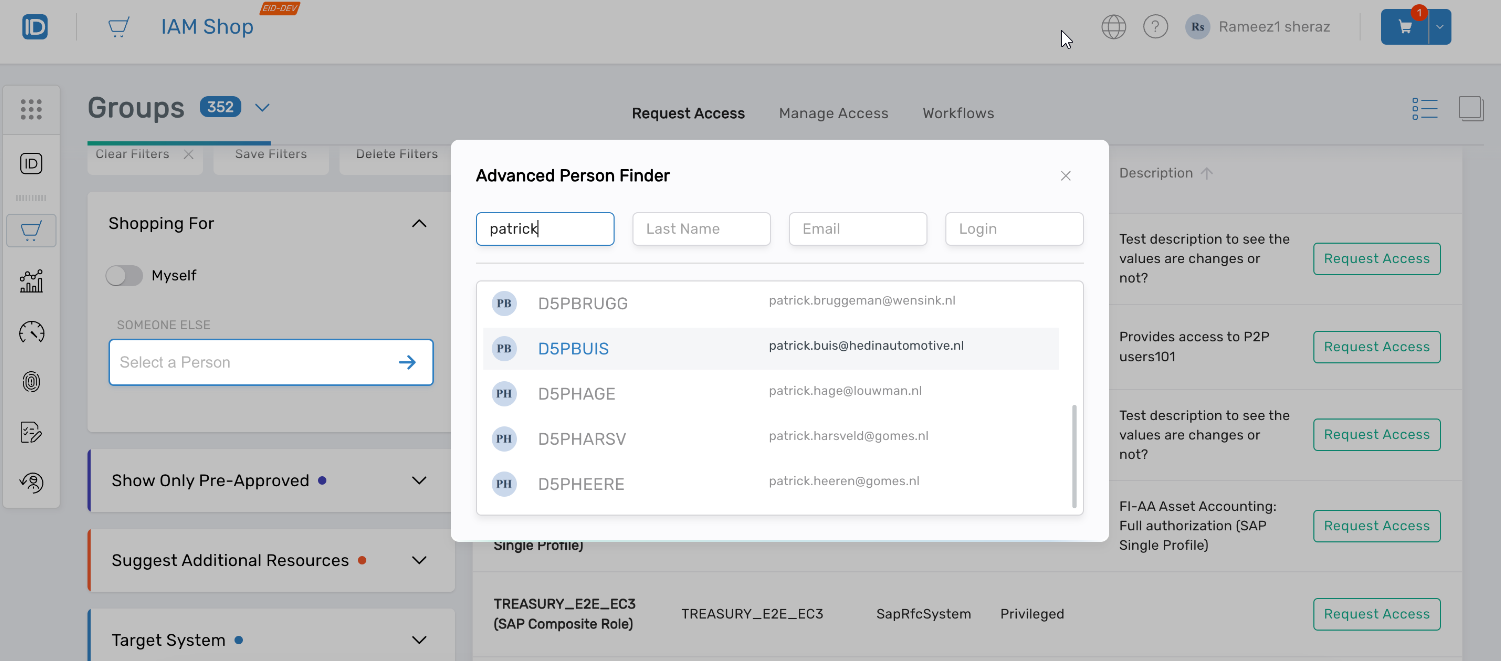
Person search supports multiple criteria during "Shopping for Someone Else" workflows, including:
- Email address
- First name
- Last name
- Full name
- Login credentials
The expanded search interface streamlines person selection, reducing time required to locate the correct identity for delegated access requests.
Streamlined Pre-Approved Access Activation
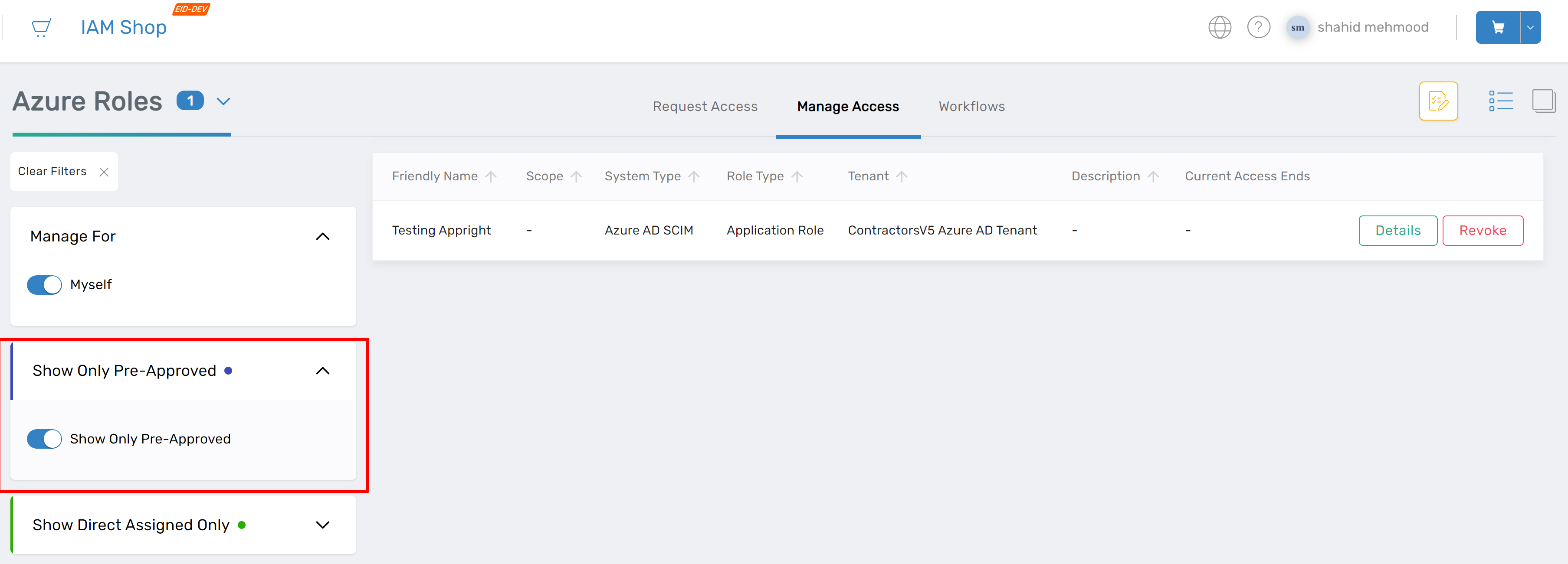
Request Access and Manage Access screens now include ActivateNow functionality for pre-approved roles when the SkipBRIfPreApproved policy is enabled. This eliminates unnecessary approval steps for:
- Application roles (appRoles)
- Role definitions (RoleDefs)
- Management roles (ManagementRoles)
The Manage Access screen displays all pre-approved roles assigned to users regardless of application eligibility status, providing complete visibility into access rights.
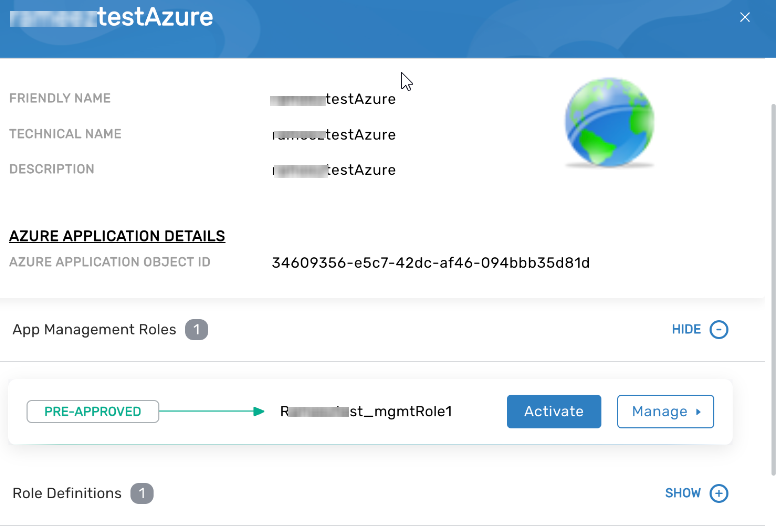
The new EnableEligibility property ensures that when an application is pre-approved or eligible, all granular roles inherit that status, streamlining access provisioning and improving transparency.
Process Step Documentation
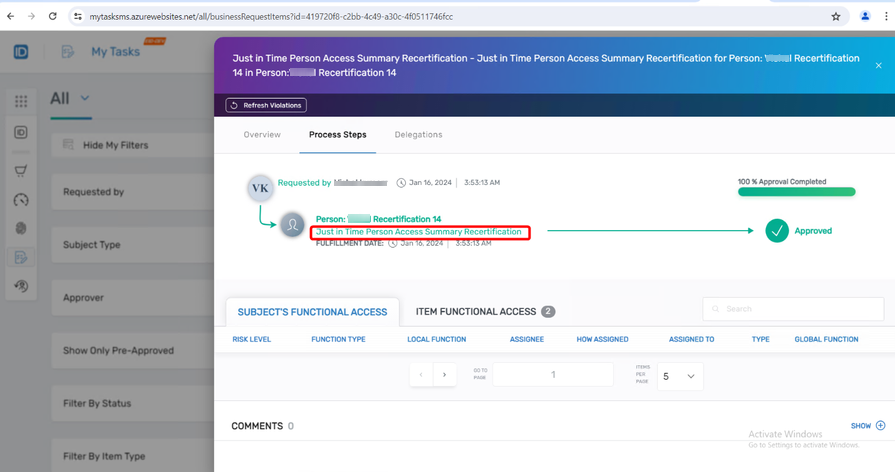
Process steps now display descriptive information derived from the LocalizedBusinessRequestItemTypeActionFriendlyName database field. Administrators can provide detailed descriptions when designing No Code Flows, ensuring users understand each workflow step's purpose and required actions.
Application Access Instructions
Contextual instructions now appear when requesting application access through IAM Shop, providing guidance for:
- Application roles (appRoles)
- Application rights (appRights)
- Application management roles (appManagementRoles)
This in-context help reduces support requests and improves user self-service capabilities.
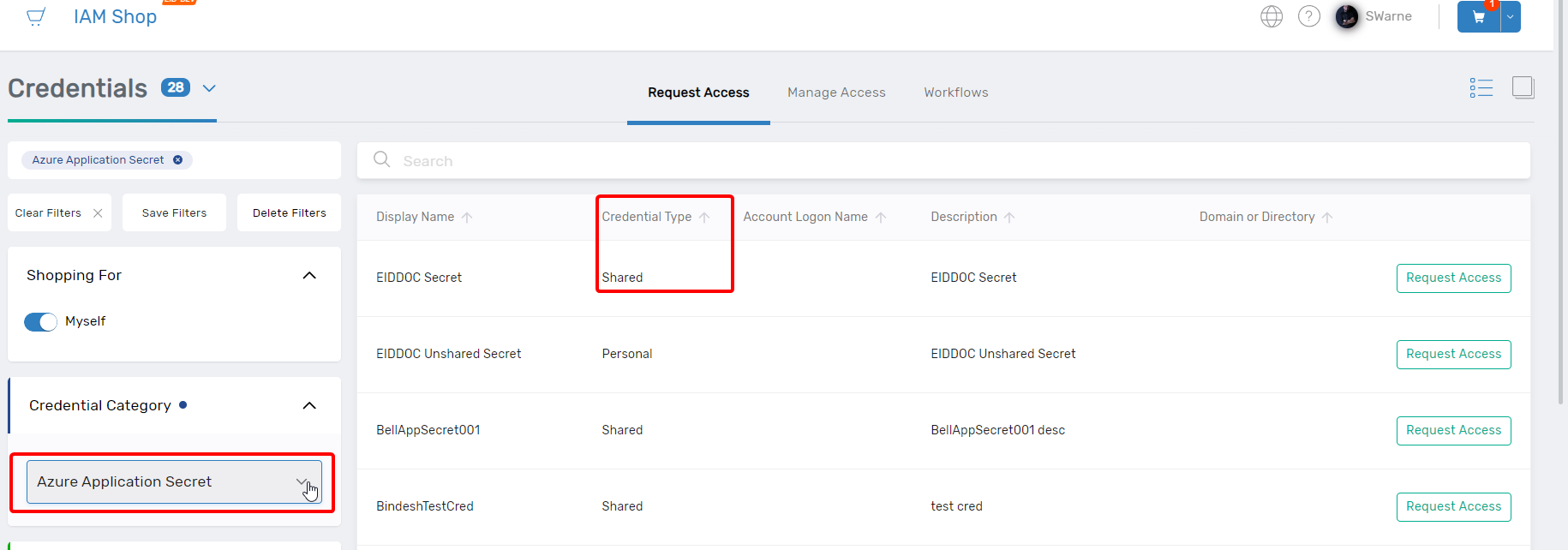
Azure App Secret Credential Visibility
The Credential Type column and filter enable administrators to quickly identify and differentiate credential types when managing Azure application secrets, supporting informed decision-making and improving secret management efficiency.
Business Request Splitting by Field Type
When enabled at the AzLocalRight level, the Split Business Request by Field Type Value setting creates separate business request items for each field type value. This enables field-value-specific approval routing, with shopping cart items corresponding to each unique field type value requiring approval.
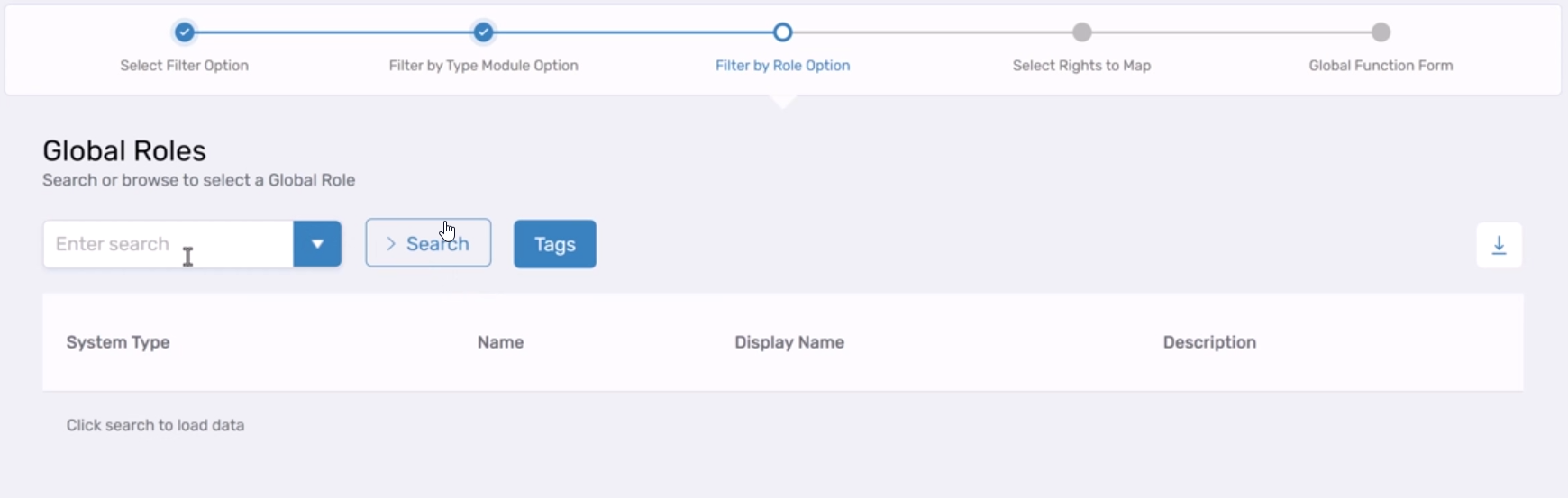
Global Function Management
The OnboardAZ Global Function workflow streamlines global permission management, enabling users to:
- Select Global Rights
- Create new global functions
- Map rights to functions
This workflow improves efficiency in managing global permissions across the platform.
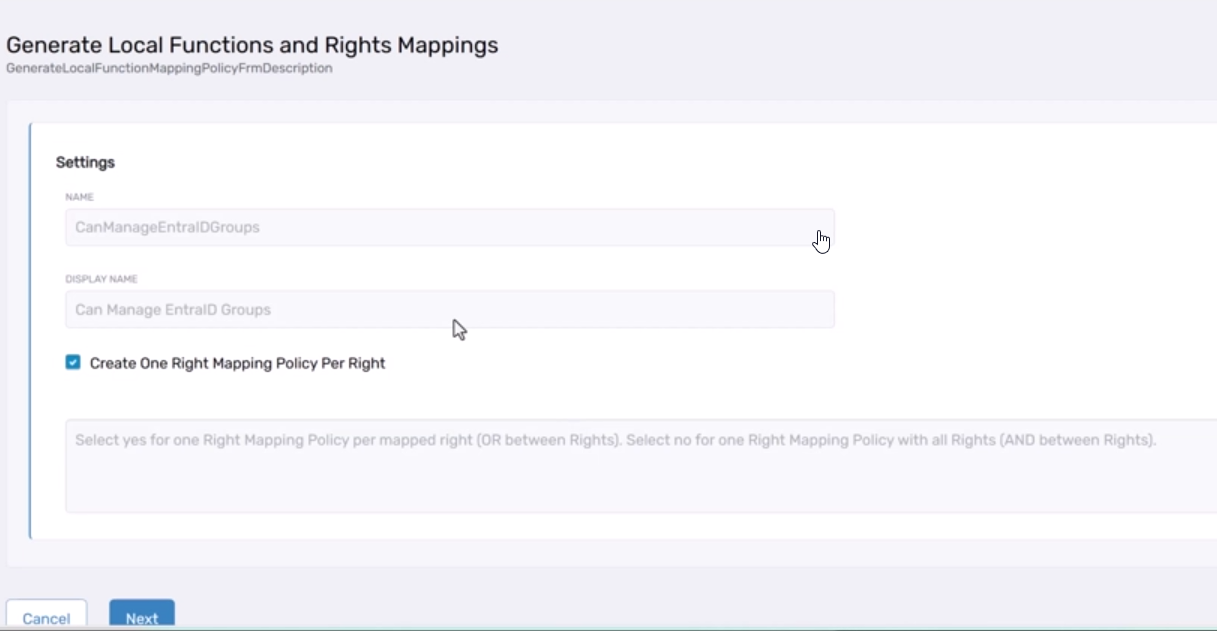
Local Function Mapping Policy Generation
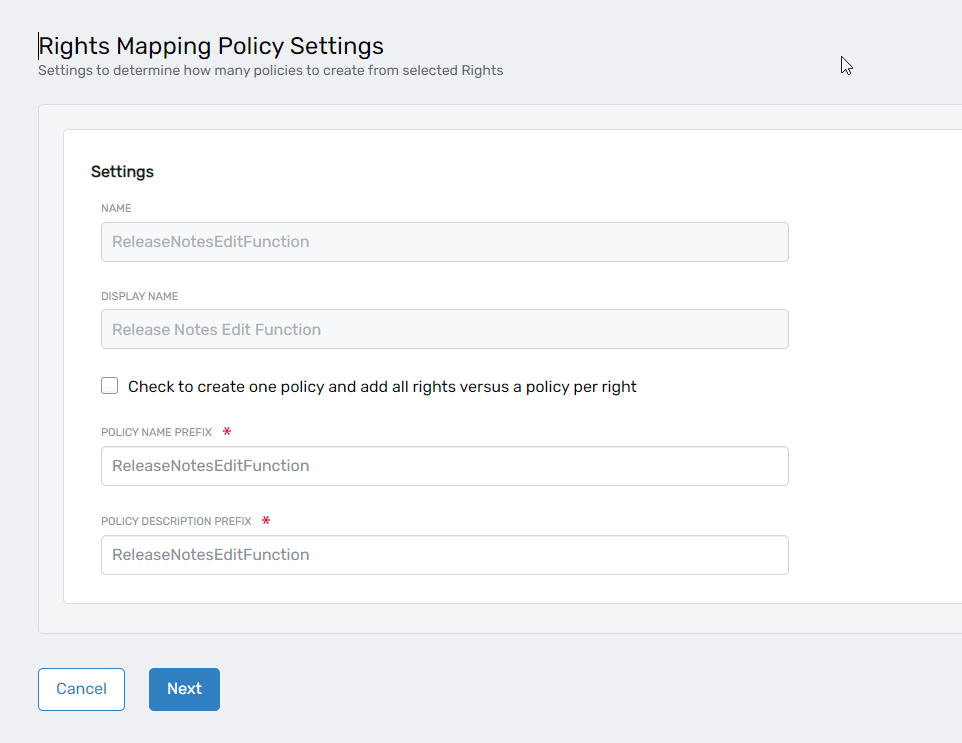
The GenerateLocalFunctionMappingPolicy workflow automates creation of Local Functions and Rights Mapping Policies. The workflow:
- Generates Local Functions for each resource system type based on Global Functions and mapped rights
- Supports consolidation of all rights into one policy per Local Function
- Optionally creates separate policies for each right
This automation reduces configuration time and ensures consistency across resource systems.
Azure Local Function Policy Onboarding
The OnboardAzLocalFunctionPolicy workflow simplifies Rights Mapping Policy creation for Azure and similar systems. Administrators can:
- Select multiple rights for policy creation
- Consolidate selected rights into one Rights Mapping Policy
- Create individual policies for each right
This streamlines policy creation while maintaining flexibility in policy architecture.
Pre-Approved Azure Roles Filter
New Pre-Approved filter in Request and Manage Access screens enables rapid identification and management of pre-approved Azure roles, optimizing access management workflows through improved search and filtering capabilities.
PBAC Field Type Flexibility
The FreeTextMultiValue SelectionRule/Control type for PBAC fields enables users and administrators to define custom key/value pairs without predefined options. This is particularly valuable when sequential ranges are inappropriate—for example, specifying company codes for purchase order approval permissions without maintaining a predefined list.
Resource Admin
Resource Admin has been enhanced with performance optimizations, expanded PBAC capabilities, and improved user experience for field type management and access control.
Optimized Location Data Retrieval
Enhanced caching mechanisms significantly improve retrieval speed for Locations associated with Groups and Management Roles, reducing latency for location-dependent operations and improving administrative efficiency.
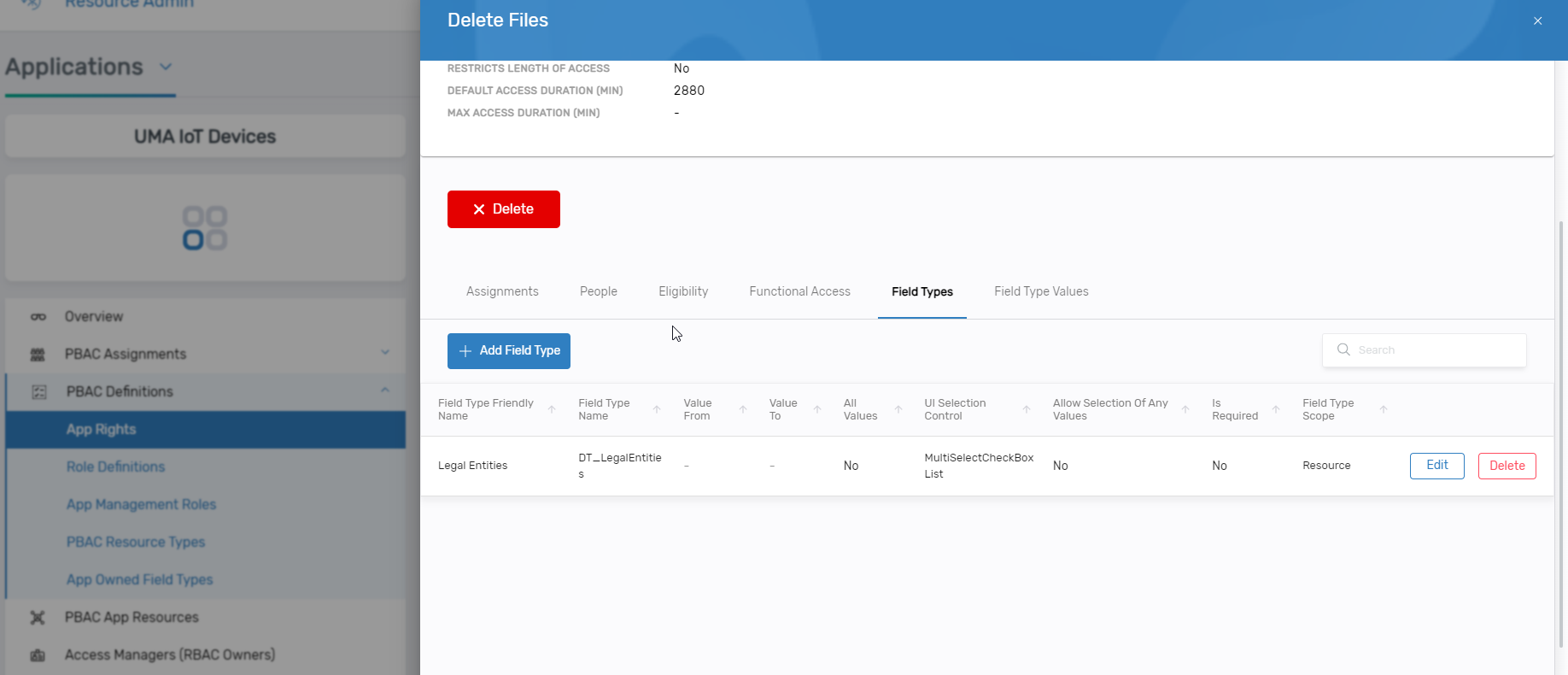
Direct Field Type Management
Resource Admins can now add, edit, and delete field types directly within the application details interface for PBAC-supported applications, eliminating context switching and streamlining field type administration.
Enhanced PBAC Approver Resolution
Approver resolution logic has been extended from PBAC Right assignments to AzLocalRole assignments. The system automatically identifies approvers based on:
- Possession of approval rights for the local right or role specified in Business Request Items
- Direct assignee status with required qualifications
This ensures only qualified approvers receive approval tasks, simplifying approval workflows and improving governance.
Streamlined App Right Management
Application rights management for PBAC Applications has been simplified with new assignment capabilities:
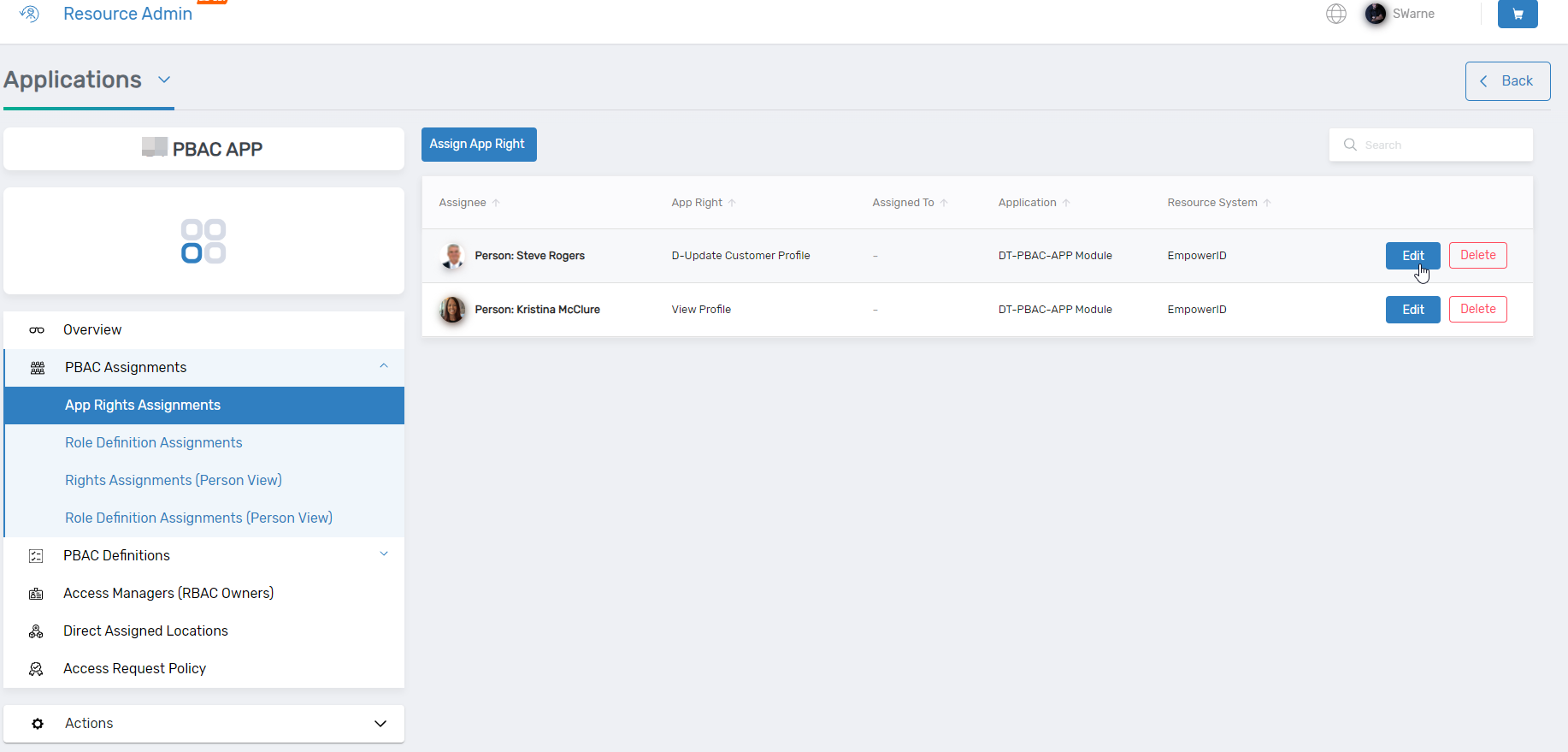
The "Assign App Right" workflow enables administrators to:
- Select the app right to grant
- Specify recipients
- Configure field type values
The Edit function allows modification of existing app rights and associated field type values, reducing time required for permissions management.
Simplified Role Definition Assignment
The "Assign Role Definition" functionality streamlines role definition assignment for PBAC Applications through a wizard workflow. Administrators can:
- Assign role definitions to individuals or groups
- Configure Field Types during assignment
- Modify role definitions and parameters via the Edit function
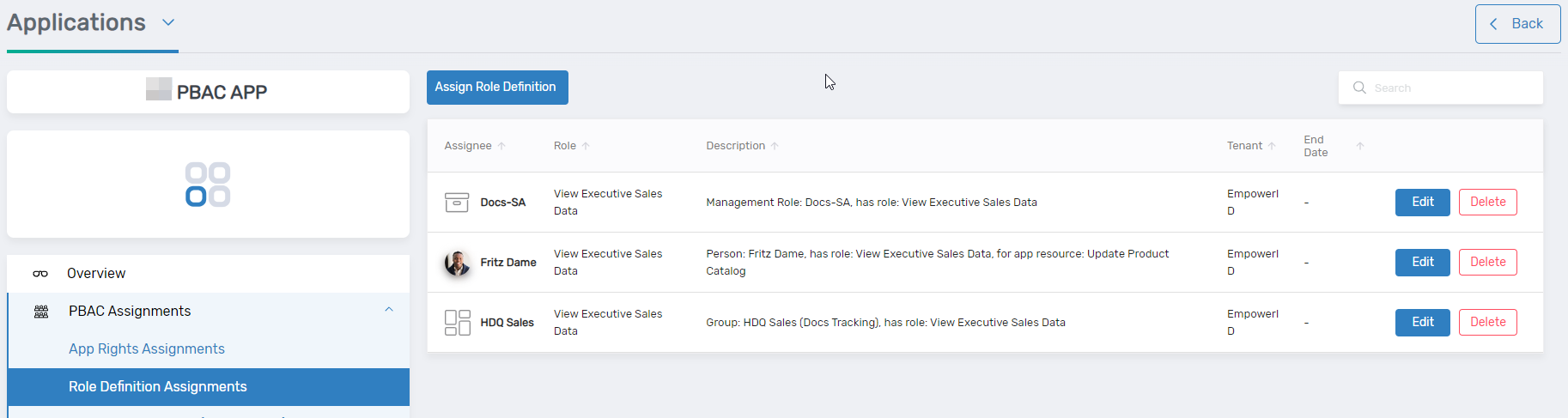
Enhanced Field Type Visibility
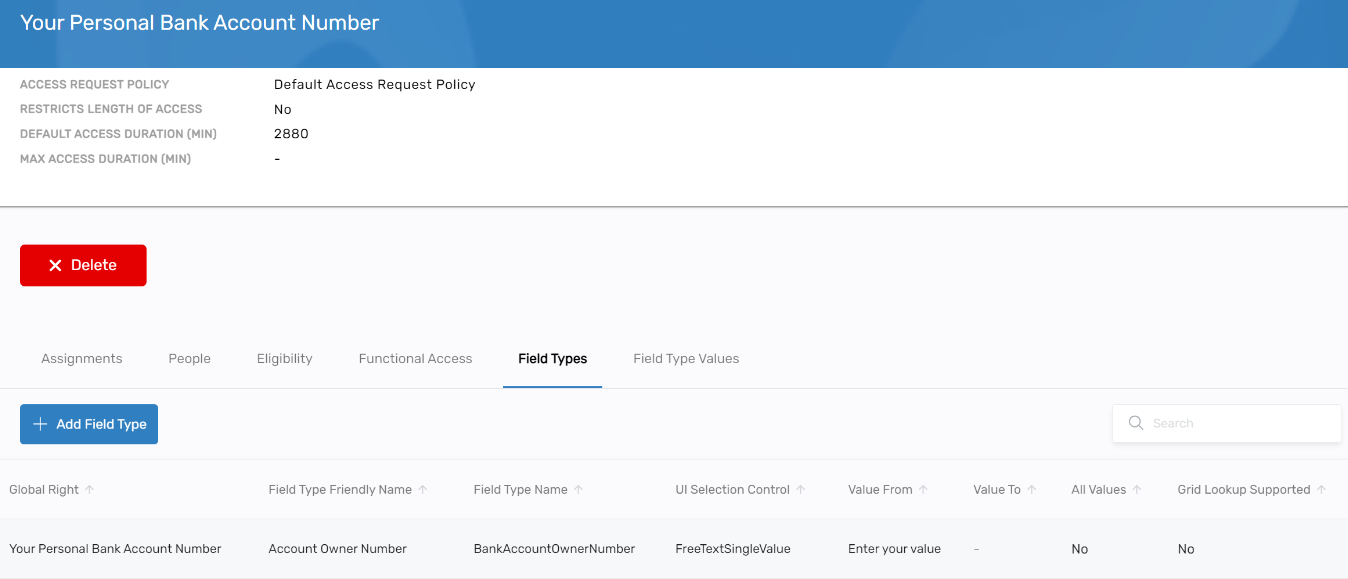
Field Types are now accessible through a dedicated tab within app rights, increasing visibility and improving management capabilities. The tab supports:
- Viewing all associated field types
- Editing existing field types
- Deleting field types
- Adding new field types via the
ConfigureApplicationAuthorizationFieldTypeworkflow
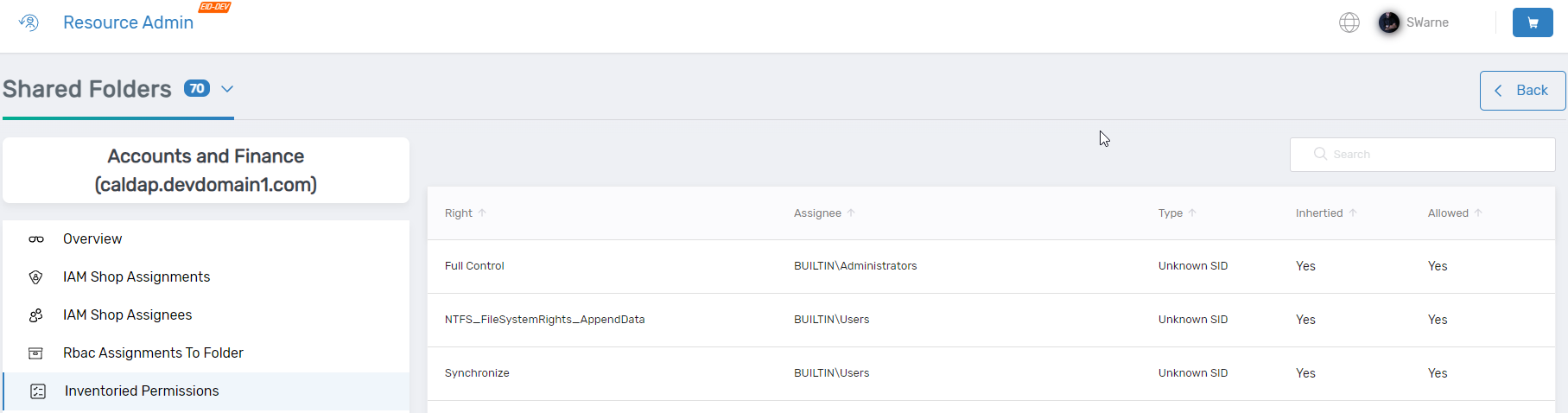
Shared Folder Permissions Access
All inventoried permissions for shared folders are now accessible within Resource Admin, eliminating the need to access legacy applications for permission management and providing unified administration capabilities.
Time-Constrained AzLocalRole Assignments
The Assign AzLocalRole operation enforces time limits defined in Access Request Policies:
- Null dates: System sets start date to current date and end date to
CurrentDatetime + TimeAccessMaximumDuration - Specified dates: System validates end date against maximum duration (
AssignAzLocalRightScope.End > CurrentDatetime + TimeAccessMaximumDuration) and adjusts if exceeded
This ensures all role assignments comply with organizational time-based access policies.
My Tasks
My Tasks has been enhanced with improved process transparency and visibility into task scheduling.
Process Step Documentation
Process steps display descriptive information sourced from the LocalizedBusinessRequestItemTypeActionFriendlyName database field, enabling users to understand workflow step purposes without additional documentation.
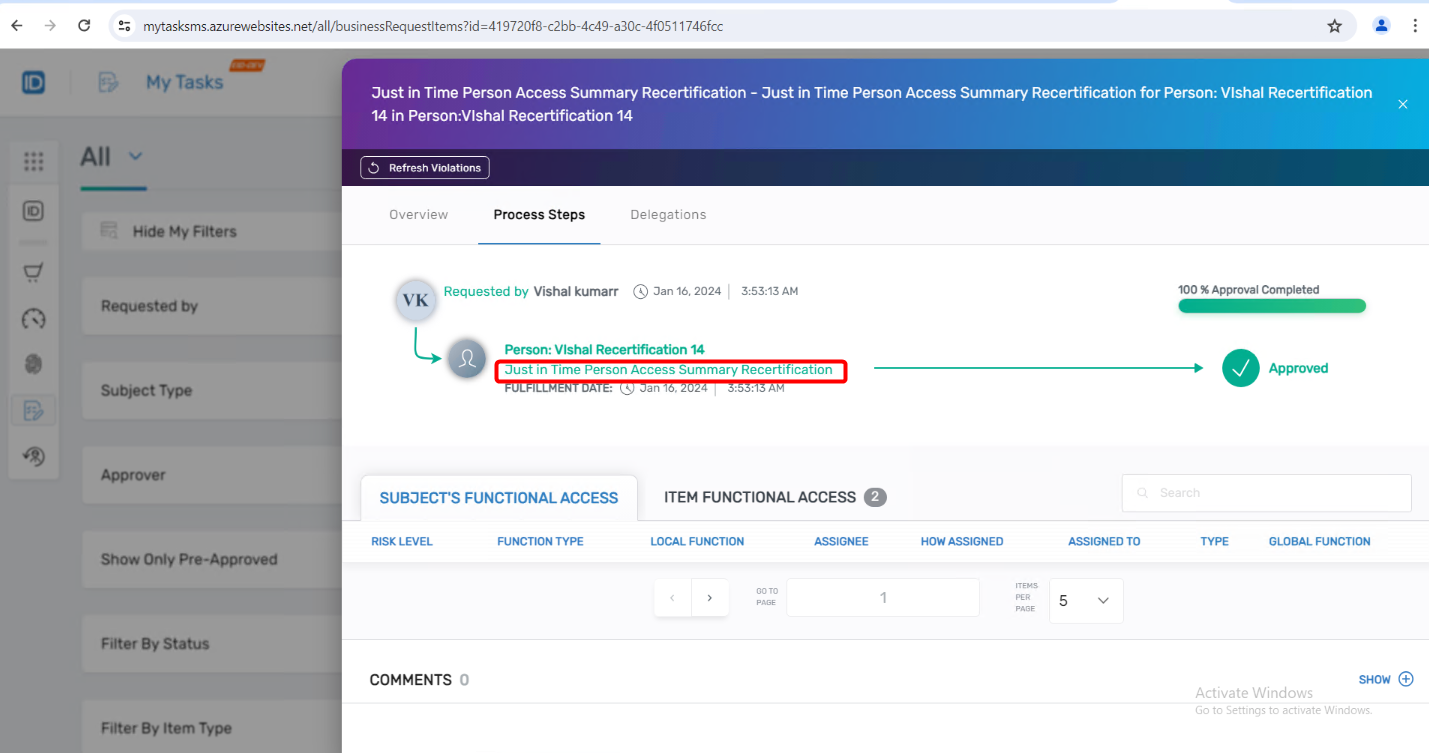
Task Start Time Visibility
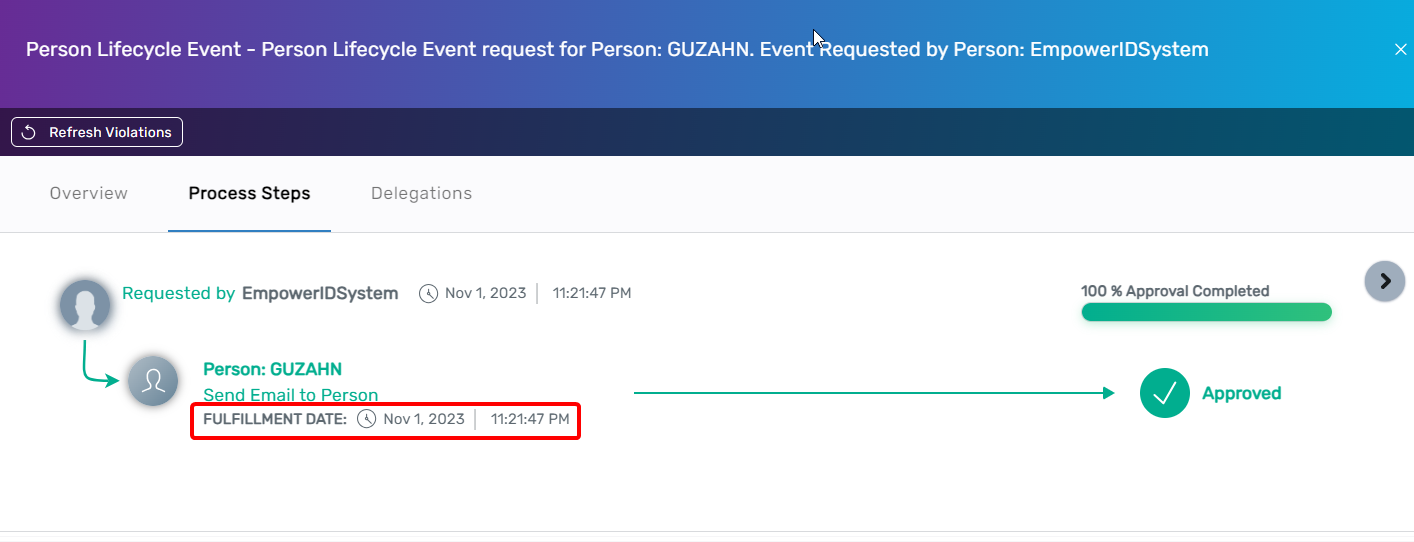
Users can now view expected task start times for process steps with "Start After X Hours" configurations. The fulfillment date displays in Business Request details, ensuring users understand when delayed steps will execute and reducing inquiries about workflow progress.
Identity Lifecycle Automation
Send Email Flow Item
The Send Email Flow Item enables automated email communication within No Code Flows, eliminating manual intervention for workflow-driven notifications.
Conditional Notification Routing
Email notifications can be routed based on workflow conditions. For example:
- Regional administrators receive notifications when employees leave specific organizational zones
- Global administrators receive notifications for other departure scenarios
This flexibility ensures appropriate stakeholders receive relevant notifications without manual intervention.
Configuration Capabilities
The Flow Item supports customization of:
- Recipients based on workflow context
- Email content and formatting
- Conditional logic for notification routing
For detailed information about the Send Email Flow Item, see Send Email Flow Item.
Security Enhancements
This release includes critical security improvements addressing authentication, encryption, and SAP integration security.
SAP Connector Modernization
The SAP integration library has been upgraded from ERPConnect to SAP .NET Connector 3.1 (SNO), delivering:
- Improved performance and compatibility
- Enhanced security through certificate-based SNC authentication
- Support for modern SAP platform requirements
S/MIME Email Signing
S/MIME signing for outgoing emails enhances email security by digitally signing all emails sent from EmpowerID. This provides:
- Message integrity verification
- Sender authentication
- Non-repudiation for compliance requirements
Digital signatures use S/MIME certificates, adding a critical security layer to email communications and supporting regulatory compliance requirements.
Platform Improvements
Enhanced Tree Loading and Search Functionality
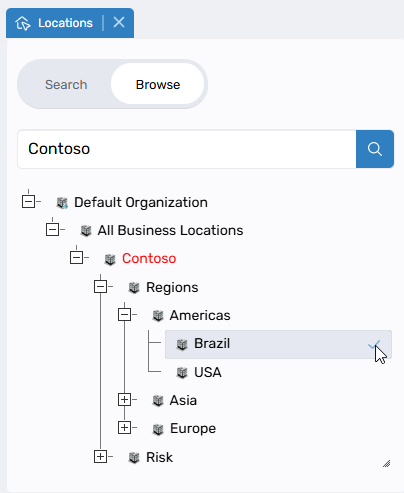
Significant performance improvements have been implemented for hierarchical navigation across location and role trees.
Dynamic On-Demand Loading
- Tree nodes load dynamically as needed rather than loading entire hierarchies
- Only required nodes are loaded, significantly improving performance for large structures
- Node expansion loads appropriate levels based on context
- Initial load times dramatically reduced for organizations with complex hierarchies
Server-Side Full Text Search
Search operations now execute at the database level, delivering:
- More accurate and comprehensive results
- Automatic loading of all parent nodes in the path to root
- Highlighted matching nodes
- Expanded tree paths displaying complete context for each match
Implementation Scope
Performance improvements implemented for:
- Location trees
- Business role trees
- External location trees
- External business role trees
Trees continuing with previous implementation (appropriate for their size):
- Application trees
- Company trees
- Catalog trees
Mapping Selection Behavior
Important changes to external entity mapping selection:
Selection Behavior:
- System automatically selects all visible children when parent nodes are checked
- Critical: Only currently loaded/expanded nodes are selected
Required User Actions:
- Expand nodes fully to select all descendants
- Nodes with "+" indicators contain unexpanded children that won't be automatically selected
- Ensure all relevant nodes are expanded before finalizing selections
These enhancements significantly improve performance for organizations with large hierarchical structures. Changes affect Business Role Mapper, External Business Role Mapper, and External Location Mapper.
For more information, see the Location Mapper Tree guide.
RBAC Performance Enhancements
Comprehensive optimizations have been implemented to improve RBAC system stability, performance, and flexibility.
Architectural Improvements
- Compiled Tables Architecture – Index views replaced by compiled tables, enhancing stability and performance
- Delegation Stability – Resolved crashes when creating ResourceTypeRole or Location delegations
- ResourceRole Optimization – Eliminated ResourceRole redundancy by utilizing Resource combined with ResourceTypeRole, maintaining flexibility without performance compromise
- GUID-Based Processing – RBAC processes and tables now use GUIDs for compiled processes while retaining INTs for reference, with synchronization methods ensuring ID consistency during migrations
Performance Optimizations
- Simplified Inheritance – Removed block Inheritance table requirement
- AssigneeHash Implementation – Significantly improved performance through optimized assignee comparison
- Comprehensive Refactor – All session tables and methods refactored with
Rbac_Compile_prefix for compilation processes, providing constant progress updates - Dynamic Compilation – New
IsCompiledOperationandIsCompiledResourceTypeRolecolumns enable on-demand compilation, eliminating need for indexed view creation and improving efficiency
System Optimization and Performance Enhancements
Bulk Business Request Updates
BusinessRequest and BusinessRequestItem have been optimized with bulk update capabilities. Multiple records update in single operations, reducing database transactions and improving execution times for large-scale access request processing.
Enhanced Location Caching
Optimized caching for Locations associated with Groups and Management Roles significantly improves data retrieval speed, reducing latency for location-dependent operations across the platform.
General Product Improvements
Email Template Enhancements
Email template capabilities have been expanded to provide more flexibility and improved user communication.
Personalized Task Delegation
The MyTasks_BusinessRequestItem_AddApprovers_FormerApprover template now addresses recipients by name when delegating tasks or adding approvers, improving clarity and task management efficiency.
Direct Business Request Links
Email templates for business requests now include direct links to specific business request items rather than generic pages. The templates EmailTemplateNameForAnyoneWithUnfinishedTasks and EmailTemplateNameForAllAuditParticipants support this enhancement, simplifying navigation and reducing time to action.
Account Store Context in Audit Notifications
Email notifications to Line Managers (Approvers) for audit processes now include account store names associated with groups being recertified, providing essential context for recertification decisions.
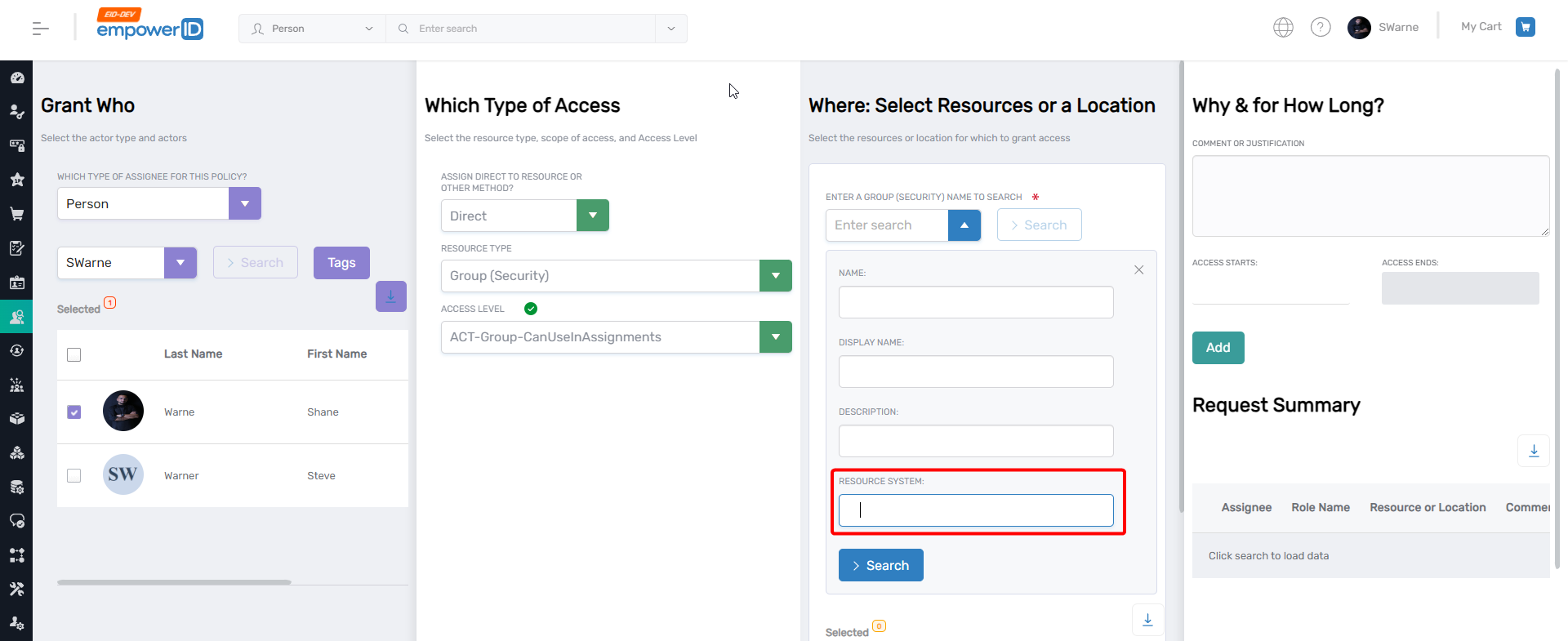
Enhanced GrantActorAccess Search
The grant actor access page now includes Resource System as a search field, enabling administrators to filter results by specific systems. This is particularly valuable when managing multiple SAP instances where group names may be identical across systems.
Expanded Person Overview Attributes
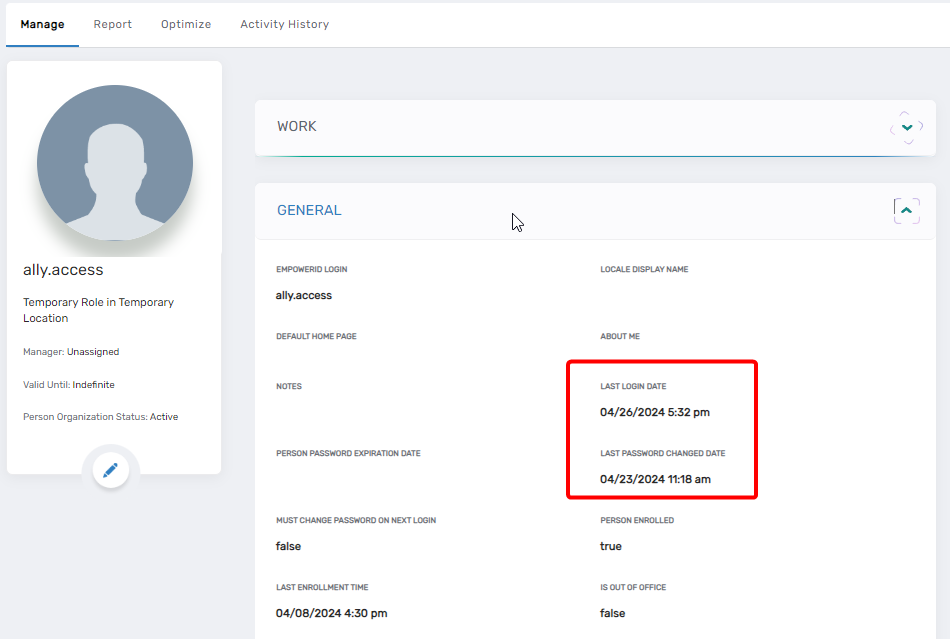
The person overview screen now displays additional attributes for administrators and managers:
- Last login date
- Last password change
System settings enable organizations to configure displayed information based on requirements, supporting improved user management, enhanced security monitoring, and compliance with security standards.
Resolved Issues
PSM MFA Workflow Resolution
Resolved an issue in the Privileged Session Management workflow where users were prompted for Multi-Factor Authentication on every workflow execution despite valid session authentication with sufficient points. The workflow now:
- Recognizes existing session authentication
- Automatically selects registered authentication methods
- Eliminates redundant MFA prompts when session points are sufficient
This improves user experience while maintaining security requirements.
Master Login Password Setting
Resolved an issue where users encountered "Failed to set password" messages after entering valid passwords during master password configuration in the UI master login. The password setting process now operates correctly without error messages.