Create Custom Alert Event Receivers
Alert Event Receivers are class libraries you develop and publish in Workflow Studio to respond to one or more Alert Events. Each one is capable of listening for and responding to any number of subscribed events that occur in a given environment. One Alert Event Receiver is capable of performing more than one task per event and each event can be subscribed to by more than one Alert Event Receiver. You can create custom Alert Event Receivers to perform any desired action when a corresponding alert to which it is subscribed occurs. You create custom Alert Event Receivers by deriving them from the base AlertEventReceiver abstract class, overriding the OnProcessAlert() method with your specific implementation of the abstract class.
In this topic, we demonstrate how to create a custom Alert Event Receiver that creates a log event and sends an email notification whenever users become locked out of their accounts.
What You'll Learn
In this tutorial, you'll create a custom Alert Event Receiver that:
- Responds to user account lockout events
- Creates audit log entries to track lockout incidents
- Sends automated email notifications to locked-out users
- Subscribes to specific alert types for event handling
Create a Custom Alert Event Receiver for Locked Out Users
Step 1: Create the Event Receiver Project
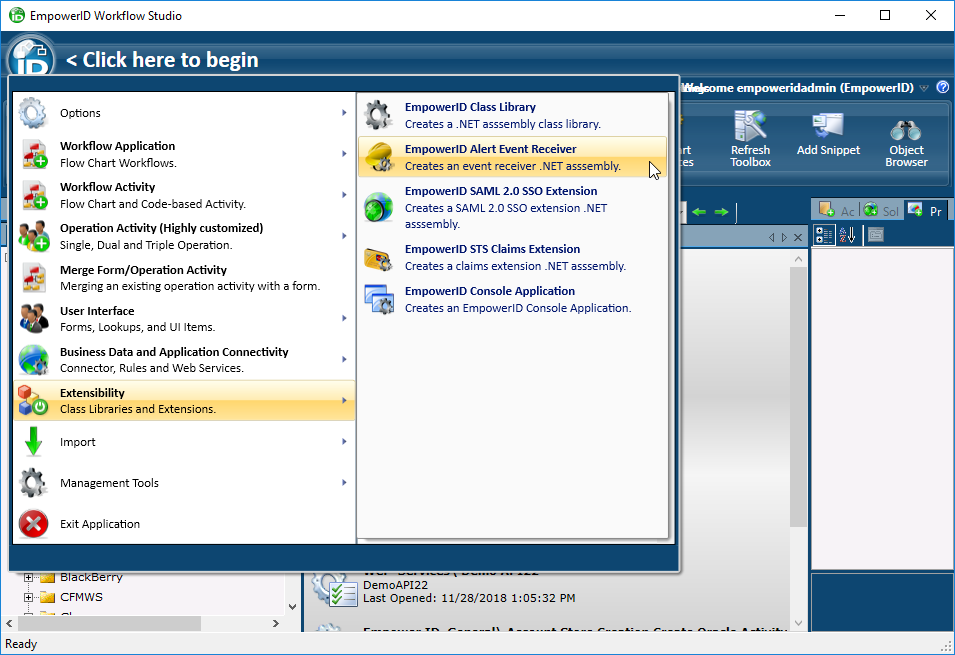
- In Workflow Studio, click the application icon to open the application menu and select Extensibility, then EmpowerID Alert Event Receiver.
- Name the event receiver and select the package under which to create it.
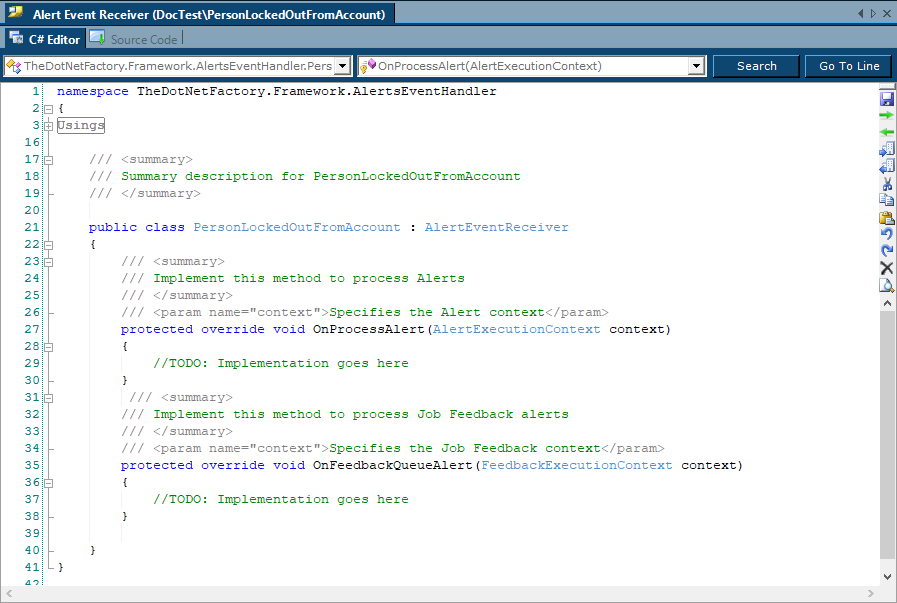
 This opens the C# Editor for the custom Alert Event Receiver. Notice that the class automatically derives from the base AlertEventReceiver class.
Step 2: Implement the OnProcessAlert Method
- From the OnProcessAlert() method, replace the TODO comment with code that does the following:
- Creates a new Person object from the locked-out user
- Calls a custom method, the AddAuditLog() method to create a new audit log entry, passing in the locked-out user as the parameter
- Calls a second custom method, the SendLockedOutEmail() method to send out email notifications, passing in the locked-out user as the parameter
The method looks like this:
protected override void OnProcessAlert(AlertExecutionContext context)
{
   Person person = (Person)context.Current.Properties["Person"];
   AddAuditLog(person);
   SendLockedOutEmail(person);
}
Step 3: Implement the AddAuditLog Method
- Below the OnProcessAlert() method, add code to create the method stub for the AddAuditLog() method and then in the method body add code to do the following:
- Create a new instance of the AuditLogOperation class, named "log." This class has methods and properties that allow you to create operation logs
- Set some properties on log and call the Insert() method to add the log event to the EmpowerID Identity Warehouse
- Write a message to DebugView if the log instance is not inserted
The method looks like this:
private void AddAuditLog(Person person)
{
   AuditLogOperation log = new AuditLogOperation();
   log.Name = "Person account locked out";
   log.FriendlyName = "Person account for " + person.FriendlyName + " has been locked out due to too many failed login attempts.";
   log.AuditLogOperationTypeID = 8;
   log.TargetResourceID = person.ResourceID;
   log.ActorPersonID = person.PersonID;
   bool success = log.Insert();
   if (!success) TheDotNetFactory.Framework.WorkflowCoreServices.Debug.WriteLine("******Insert Failed!*********");
}
Step 4: Implement the SendLockedOutEmail Method
- Below the AddAuditLog() method, add code to create the method stub for the SendLockedOutEmail() method and then in the method body add code to do the following:
- Create a new dictionary
- Add "WorkflowMessage1" to the dictionary and set it to the FriendlyName property of the person who is locked out of EmpowerID
WorkflowMessage1 is one of the EmpowerID custom email wildcards that can be used to create a custom message.
- Create a new list for holding Person objects
- Call the SendEmailAsynch() method of the AlertEmailUtility class to send an email to the locked-out person notifying them that they have been locked out of EmpowerID
The method looks like this:
private void SendLockedOutEmail(Person person)
{
   Dictionary<string,object> properties = new Dictionary<string,object>();
   properties["WorkflowMessage1"] = person.FriendlyName;
   var peopleToEmail = new E.TList<C.Person>();
   peopleToEmail.Add(person);
   TheDotNetFactory.Framework.AlertEmailUtility.SendEmailAsynch(properties, null, null, 1029, null, null, null, "English", peopleToEmail);
}
Step 5: Complete Implementation
The complete code for the event receiver looks like this:
public class PersonLockedOutFromAccount : AlertEventReceiver
{
   protected override void OnProcessAlert(AlertExecutionContext context)
   {
	Person person = (Person)context.Current.Properties["Person"];
	AddAuditLog(person);
	SendLockedOutEmail(person);
   }

   private void AddAuditLog(Person person)
   {
	AuditLogOperation log = new AuditLogOperation();
	log.Name = "Person account locked out";
        log.FriendlyName = "Person account for " + person.FriendlyName + " has been locked out due to too many failed login attempts.";
        log.AuditLogOperationTypeID = 8;
        log.TargetResourceID = person.ResourceID;
        log.ActorPersonID = person.PersonID;
        bool success = log.Insert();
	if (!success) TheDotNetFactory.Framework.WorkflowCoreServices.Debug.WriteLine("******Insert Failed!*********");
   }

   private void SendLockedOutEmail(Person person)
   {
	Dictionary<string,object> properties = new Dictionary<string,object>();
	properties["WorkflowMessage1"] = person.FriendlyName;
	E.TList<C.Person> peopleToEmail = new E.TList<C.Person>();
	peopleToEmail.Add(person);
	TheDotNetFactory.Framework.AlertEmailUtility.SendEmailAsynch(properties, null, null, 1029, null, null, null, "English", peopleToEmail);
   }
}
Step 6: Configure Alert Subscription
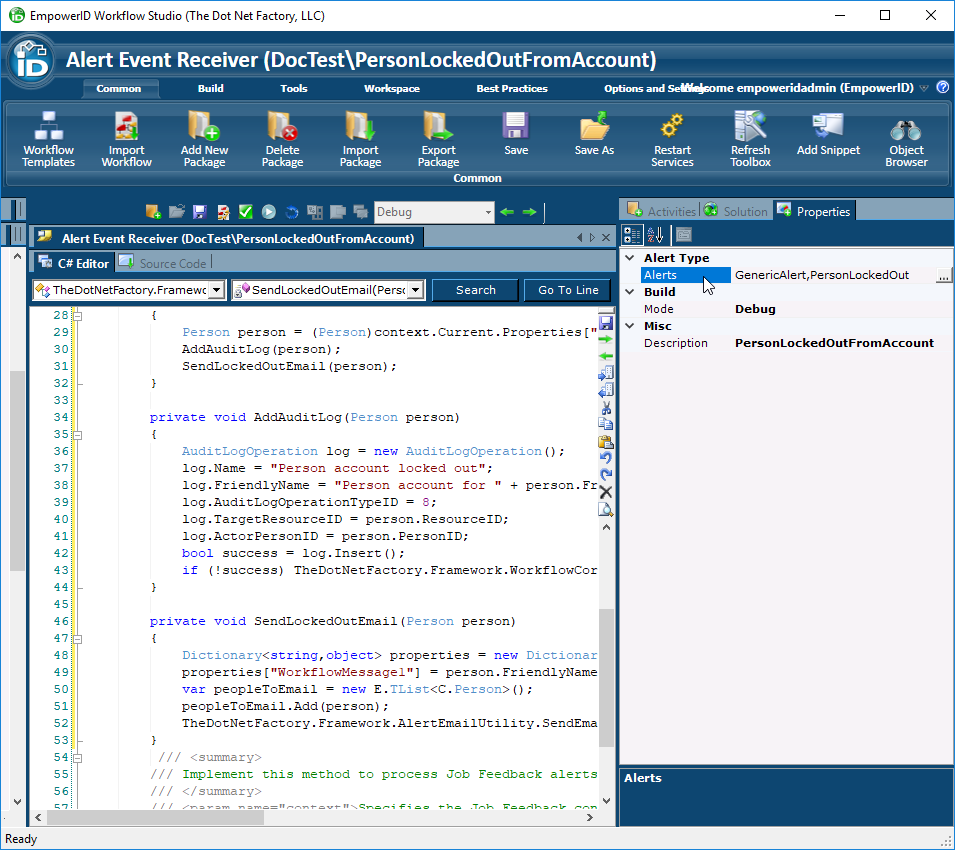
- In the Properties grid, set the Alerts property to PersonLockedOut.
Summary
In this tutorial, you created a custom Alert Event Receiver that:
- Responds to account lockout events by inheriting from the AlertEventReceiver base class
- Creates audit log entries to track lockout incidents for compliance and monitoring
- Sends automated email notifications to inform users of their account status
- Subscribes to specific alert types to ensure appropriate event handling
This Alert Event Receiver will now automatically execute whenever a user account lockout occurs, providing both logging and notification capabilities to enhance security monitoring and user experience.