Move Computers
Moving computers allows you to relocate computer objects between Active Directory organizational units (OUs) to align with organizational structure changes or administrative requirements.
Prerequisites
To move computers, you need the Initiator Access Level for the MoveComputer workflow.
Move a Computer
- On the navbar, expand Privileged Access and select Computers.
- Search for the computer you want to move and click the record to select it.
- Click the Move Computers action link.
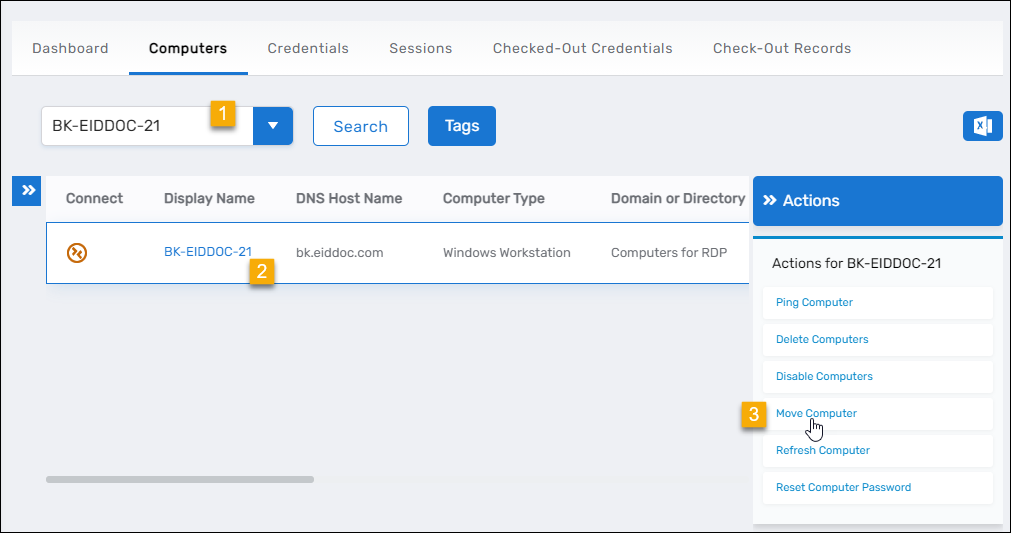
- Select the destination OU.
- Click Submit.
- Click OK to close the Operation Execution Summary.
Results
After completing the operation:
- The computer object is moved to the selected organizational unit
- The computer's distinguished name (DN) is updated to reflect the new OU path
- Access delegation and policies associated with the new OU apply to the computer
- The move operation is logged in the EmpowerID audit log
Related Topics
- Assign Computers to Locations – Organize computers within EmpowerID locations
- Onboard Computers – Initial computer setup and location assignment
- Delete Computers – Remove computers from the directory