Reset Computer Passwords
Resetting computer passwords updates the computer account password in Active Directory, which can be necessary for security maintenance or troubleshooting computer authentication issues.
Prerequisites
To reset computer passwords, you need the Initiator Access Level for the ResetPassword workflow.
Reset a Computer Password
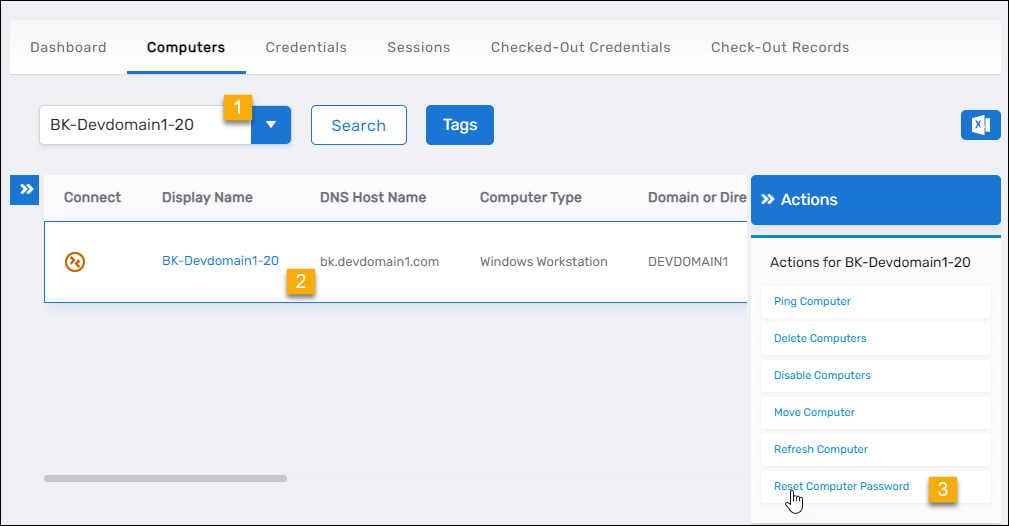
- On the navbar, expand Privileged Access and select Computers.
- Search for the computer whose password you want to reset and click the record to select it.
- Click the Reset Computer Password action link.
- Click OK to close the Operation Execution Summary.

Results
After completing the operation:
- The computer account password is reset in Active Directory
- The PasswordLastSet attribute is updated with the current timestamp
- The password reset operation is logged in the EmpowerID audit log
- The computer may need to rejoin the domain or have its secure channel reset to function properly
warning
After resetting a computer password, the computer may experience authentication issues until its secure channel with the domain is reestablished. Coordinate password resets with system administrators managing the affected computers.
Related Topics
- Disable Computers – Temporarily prevent computer authentication without resetting passwords
- Enable Computers – Re-enable disabled computers
- Delete Computers – Permanently remove computer accounts