Enable Computers
Enabling computers restores disabled computer accounts to active status, allowing them to authenticate with the domain and access network resources.
Prerequisites
To enable computers, you need the Initiator Access Level for the EnableComputer workflow.
Enable Computers
- On the navbar, expand Privileged Access and select Computers.
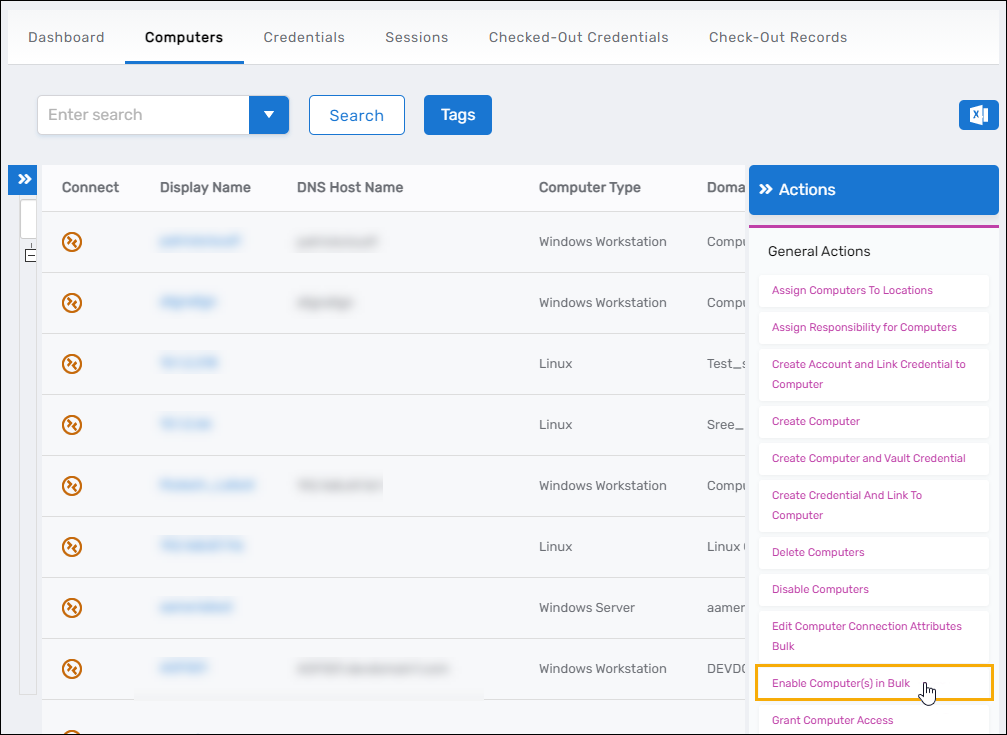
- Click the Enable Computers in Bulk action link.
- Search for the disabled computers you want to enable.
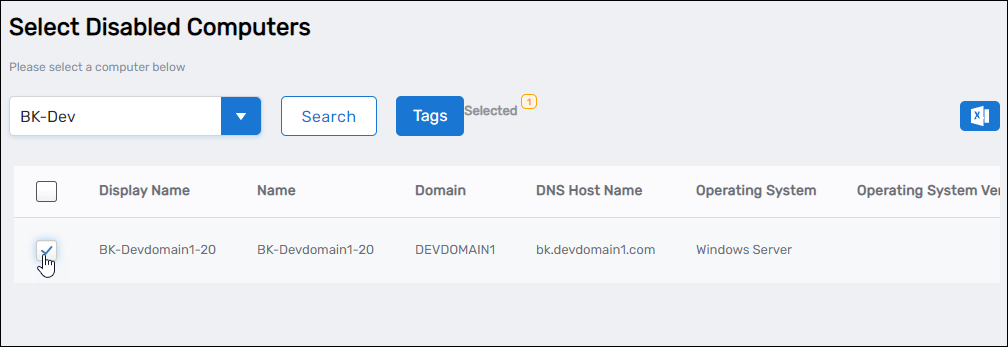
- Select the checkbox for each computer you want to enable.
- Click Submit.
- Click OK to close the Operation Execution Summary.
Results
After completing the operation:
- The selected computers are re-enabled in Active Directory
- The computers' Enabled attribute is set to True
- The computers can authenticate with the domain and access network resources
- The enable operation is logged in the EmpowerID audit log
Related Topics
- Disable Computers – Temporarily prevent computer authentication
- Delete Computers – Permanently remove computer accounts
- Restore Deleted Computers – Recover permanently deleted computers