About Custom Security Attributes
Microsoft Entra Custom Security Attributes enable organizations to define and assign custom metadata to directory objects in Microsoft Entra ID. This feature extends the standard directory schema, allowing you to store business-specific information that supports access control, resource management, and compliance requirements.
EmpowerID provides native integration with Microsoft Entra Custom Security Attributes, enabling you to manage these attributes through familiar identity governance workflows. This integration brings attribute management under the same governance framework used for other identity and access resources, including approval workflows, audit trails, and policy-based controls.
Custom Security Attributes
Custom Security Attributes are business-defined metadata fields that you create and assign to users, service principals, and applications in your Microsoft Entra tenant. Unlike extension attributes or directory schema extensions, Custom Security Attributes are tenant-specific and managed within your organization's Entra tenant. They support multiple data types and value configurations while remaining isolated from the core directory schema. This isolation prevents conflicts with standard directory operations while maintaining governance and administrative access controls.
Attribute Structure
Custom Security Attributes are organized in a two-level hierarchy. Attribute sets serve as logical containers that group related attributes. Each set has a unique name within the tenant and can contain up to 500 individual attributes. Individual attributes define the actual metadata fields with specific data types, value configurations, and validation rules. Each attribute must have a unique name within its containing set.
Supported Object Types
Custom Security Attributes can be assigned to:
- Users - Standard user accounts in Microsoft Entra ID
- Service Principals - Enterprise applications and managed identities
- Applications - Registered applications in Microsoft Entra ID
Custom Security Attributes cannot be assigned to groups (security groups or Microsoft 365 groups).
Custom Security Attributes cannot be assigned to groups. All attribute assignments must target individual user accounts or service principals. Additionally, only Microsoft Entra objects are supported—on-premises Active Directory objects that are not synchronized to Entra cannot receive Custom Security Attribute assignments.
Integration Capabilities
EmpowerID's integration with Microsoft Entra Custom Security Attributes provides comprehensive governance and management capabilities.
Synchronization
- Bidirectional sync between EmpowerID and Microsoft Entra ID
- Real-time updates when attributes are created or modified
- Complete inventory management of attribute sets, attributes, and assignments
- Assignment tracking for all users and service principals
Governance
- Approval workflows for attribute assignment requests
- Policy-based access control determining who can assign attributes
- Eligibility rules defining which users can request or receive attributes
- Time-bound assignments with automatic expiration
Management
- IAM Shop for self-service attribute requests
- Direct assignment through Resource Admin interface
- Bulk operations for managing multiple attributes or assignments
- Complete assignment lifecycle from request through fulfillment
Compliance and Audit
- Complete audit trails for all attribute changes
- Assignment history from initial request through fulfillment
- Compliance reporting for attribute usage and assignments
- Risk assessment during assignment request process
Attribute Data Types
Custom Security Attributes support three data types, each designed for specific use cases.
String attributes store text-based values up to 256 characters in length. They are suitable for department names, job titles, project codes, location identifiers, and free-text comments.
Integer attributes use 32-bit signed integer values and are commonly used for employee IDs, cost center numbers, building or floor numbers, priority levels, and numeric classifications. Integer attributes are designed for storage and identification, not mathematical operations. Use string types for numeric codes that won't be calculated.
Boolean attributes store true or false values and are ideal for approval flags, status indicators, compliance flags, and feature toggles.
Attribute Value Configurations
Attributes can be configured to accept values in four different ways, determined by two settings: whether the attribute allows multiple values, and whether it restricts input to predefined values only.
Single Value, Free Text
Attributes configured this way accept one value of any text up to 256 characters. Use this configuration for unique identifiers, open-ended comments, or custom notes where predefined values are impractical.
Example: A "Notes" attribute where administrators can enter custom information about a user's account.
Single Value, Predefined
Attributes configured this way accept only one value selected from a predefined list. Use this configuration when attributes must conform to a controlled vocabulary and only one selection makes sense.
Example: An "EmploymentType" attribute with predefined values: Full-Time, Part-Time, Contractor, Intern.
Multiple Values, Free Text
Attributes configured this way accept multiple values, each up to 256 characters, with no restriction on what values can be entered. Use this configuration for tags, skills, or other metadata where flexibility is important and values cannot be predicted.
Example: A "Skills" attribute where users can enter any technical skills they possess: "Python", "Azure", "Project Management".
Multiple Values, Predefined
Attributes configured this way accept multiple values, but all values must come from a predefined list. Use this configuration when users need multiple selections from a controlled vocabulary.
Example: A "Projects" attribute with predefined values: Project Alpha, Project Beta, Project Gamma. A user can be assigned to multiple projects simultaneously.
Approval Workflows
When attributes are requested through IAM Shop, Business Requests are created and routed according to the configured Access Request Policy. These policies define who must approve the request (managers, role owners, risk owners), whether approval stages are sequential or parallel, and how many approvals are needed at each stage. The policies also specify auto-approval conditions for scenarios where approval should be automatic, along with timeout and escalation actions taken if approvals are delayed. Approval policies are configured during the attribute eligibility setup process and can vary by attribute sensitivity and organizational requirements.
Integration Architecture
The integration between EmpowerID and Microsoft Entra Custom Security Attributes relies on several key components working together.
The Custom Security Attributes Inventory Job is a system job that synchronizes attribute sets and attributes from Microsoft Entra ID to EmpowerID. This job runs on a configurable schedule (recommended every 6-12 hours) and discovers new attribute sets and attributes, updates attribute definitions and predefined values, and must remain enabled for proper synchronization.
Assignment inventory functionality is enabled through the EnableCustomSecurityAttributesAssignmentInventory configuration parameter. When enabled, this parameter synchronizes attribute assignments between systems, tracks assignment changes and updates, and is required for assignment visibility in EmpowerID.
Data Flow
The data flow for Custom Security Attributes follows a specific sequence through the integrated systems.
When an attribute set is created in either EmpowerID or Microsoft Entra ID, it is synchronized to both systems. Attributes defined in either system are synchronized bidirectionally to maintain consistency. When a user requests an attribute through IAM Shop, the request is routed to approvers based on the configured policy. Once approved, the assignment is created in Microsoft Entra ID via API, and then synchronized back to EmpowerID for inventory and reporting purposes.
Accessing Custom Security Attributes
Custom Security Attributes are managed through the EmpowerID Resource Admin interface. To access this functionality, navigate to your organization's portal for Resource Admin, select Applications from the navigation dropdown, and click Custom Security Attributes.
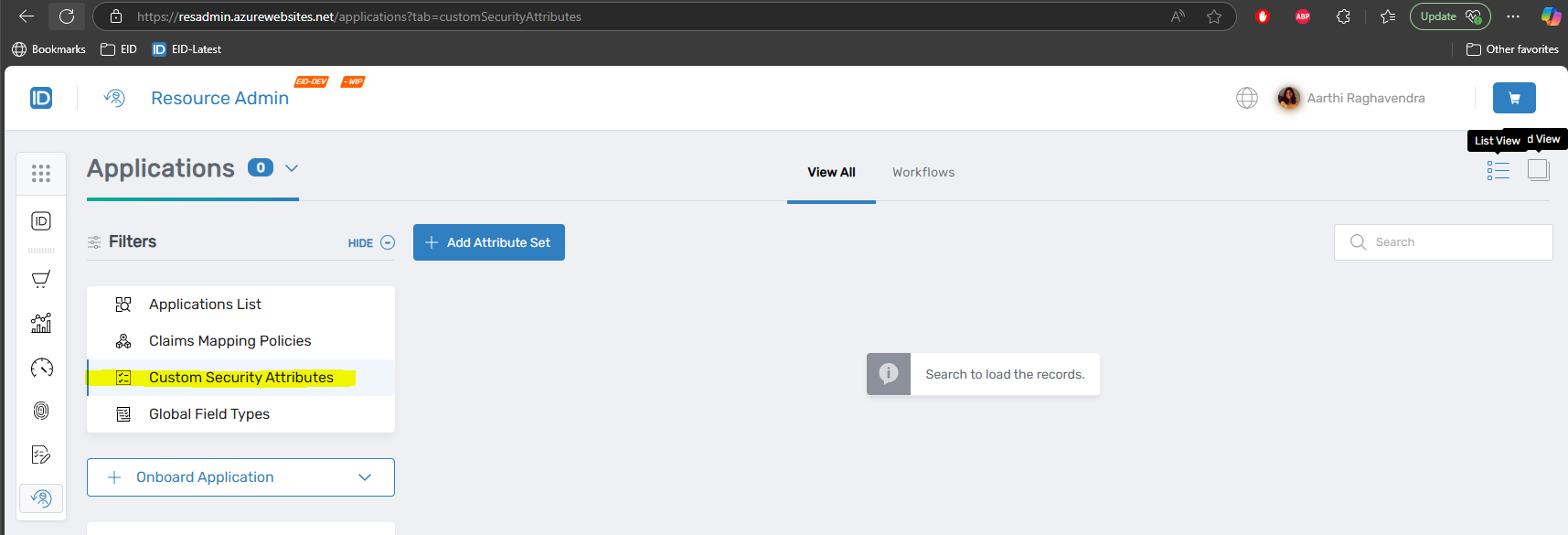 Custom Security Attributes in Resource Admin
The main interface displays all attribute sets configured in your Microsoft Entra tenant and provides access to attribute set details and configuration, active and deactivated attributes within each set, current assignments for users and service principals, and management functions for attributes and assignments.
Configuration Prerequisites
Before implementing Custom Security Attributes in EmpowerID, several requirements must be met in both Microsoft Entra and EmpowerID systems.
Microsoft Entra Requirements
Your Microsoft Entra environment must have a Microsoft Entra ID P1 or P2 license, with P2 recommended for advanced features. User accounts managing Custom Security Attributes require the Attribute Assignment Administrator role or higher in Microsoft Entra ID, along with permissions to manage Custom Security Attributes in the tenant.
The EmpowerID service principal needs specific API permissions granted and admin-consented: CustomSecAttributeAssignment.ReadWrite.All, CustomSecAttributeDefinition.ReadWrite.All, User.Read.All, and Application.Read.All.
EmpowerID Configuration
The EmpowerID environment requires a configured and active Microsoft Entra account store with a successful connection test to Microsoft Entra ID and appropriate API permissions granted and admin-consented. The Custom Security Attributes Inventory job must be enabled in Resource System settings, scheduled to run at appropriate intervals, with at least one successful job execution completed. Additionally, the EnableCustomSecurityAttributesAssignmentInventory parameter must be set to true and configured in the Microsoft Entra Resource System.
Both the Custom Security Attributes Inventory job and the EnableCustomSecurityAttributesAssignmentInventory parameter must be enabled for proper functionality. Disabling either will prevent synchronization and assignment management.
Attribute Management Workflow
The typical workflow for implementing Custom Security Attributes in EmpowerID:
- Configure Prerequisites - Ensure account store, inventory jobs, and configuration parameters are properly set up
- Create Attribute Sets - Define logical groupings for related attributes
- Create Attributes - Specify data types, value configurations, and validation rules
- Configure Eligibility - Set up IAM Shop visibility and approval policies
- Assign Attributes - Enable users to request or administrators to directly assign attributes
- Monitor and Manage - Track assignments, process approvals, and manage the attribute lifecycle
Use Cases
Custom Security Attributes support a variety of organizational needs. For access control, attributes can define access levels, clearances, or authorization categories that are then used in conditional access policies or application authorization rules. Organizations can store organizational metadata such as department, cost center, project membership, or other information that supports reporting and resource allocation.
Compliance tracking becomes easier when attributes track compliance status, training completion, certification dates, or other compliance-related metadata required for audit and regulatory purposes. Applications that consume Custom Security Attributes can use them for application-specific authorization or personalization through application integration. Finally, workforce classification allows organizations to classify employees by type (full-time, contractor, intern), location, status, or other HR-related categories that inform access decisions.
Relationship to Other EmpowerID Features
Custom Security Attributes integrate seamlessly with other EmpowerID capabilities. Attributes can be requested through the IAM Shop using the same self-service interface used for roles, groups, and other resources. Attribute requests follow the same Business Request approval workflow pattern as other access requests, creating consistency in the user experience. In Resource Admin, attributes are managed alongside other directory resources in a unified interface, reducing the learning curve for administrators.
From a reporting perspective, attribute assignments appear in standard access reports and can be included in custom reports, providing comprehensive visibility into attribute usage. All attribute changes are captured in EmpowerID's audit logs with the same level of detail as other identity changes, ensuring complete audit trails for compliance purposes.
Next Steps
To implement Custom Security Attributes in EmpowerID:
- Configure EmpowerID for Custom Security Attributes - Enable required jobs and parameters
- Create an Attribute Set - Organize related attributes into logical containers
- Create Attributes - Define specific metadata fields with data types and value configurations
- Activate and Deactivate Attributes - Manage attribute lifecycle and visibility
For ongoing management:
- Edit Attributes - Modify descriptions and manage predefined values