About Workflow Studio
Workflow Studio is EmpowerID's integrated development environment (IDE) designed specifically for developers to create, modify, and extend workflows. With Workflow Studio, you gain access to a comprehensive set of tools that streamline the design and customization of workflows to fit the unique needs of your organization.
Key Features
Pre-built Workflow Templates – Workflow Studio offers a vast library of pre-built workflows, covering common IAM and SSO scenarios. Developers can leverage these templates to save time and effort, ensuring a solid foundation for their custom workflows.
Visual Process Designer – The intuitive drag-and-drop interface of Workflow Studio allows developers to easily design and modify workflows without extensive coding. The visual process designer simplifies the creation of complex workflows and enables rapid development.
Extensibility and Customization – Workflow Studio is built with extensibility in mind, empowering developers to create custom workflow activities, integrate with third-party APIs, or develop unique functionality to address specific organizational needs.
Version Control and Collaboration – Workflow Studio supports version control and collaboration features, allowing development teams to work together efficiently, track changes, and maintain a history of workflow modifications.
Debugging and Testing – Workflow Studio includes debugging and testing tools that enable developers to validate and troubleshoot their workflows before deploying them in a production environment.
Workflow Studio Interface
The Workflow Studio interface consists of several key areas:
- Solution Explorer – Browse and manage your workflow projects, packages, and components
- Design Surface – Visual canvas for building workflows using drag-and-drop functionality
- Toolbox – Access to activities, forms, and other workflow components
- Properties Panel – Configure settings and properties for selected workflow elements
- Code Editor – Write custom code for advanced workflow logic
- Source Control – Manage version control and track changes to your workflows
![Workflow Studio interface overview]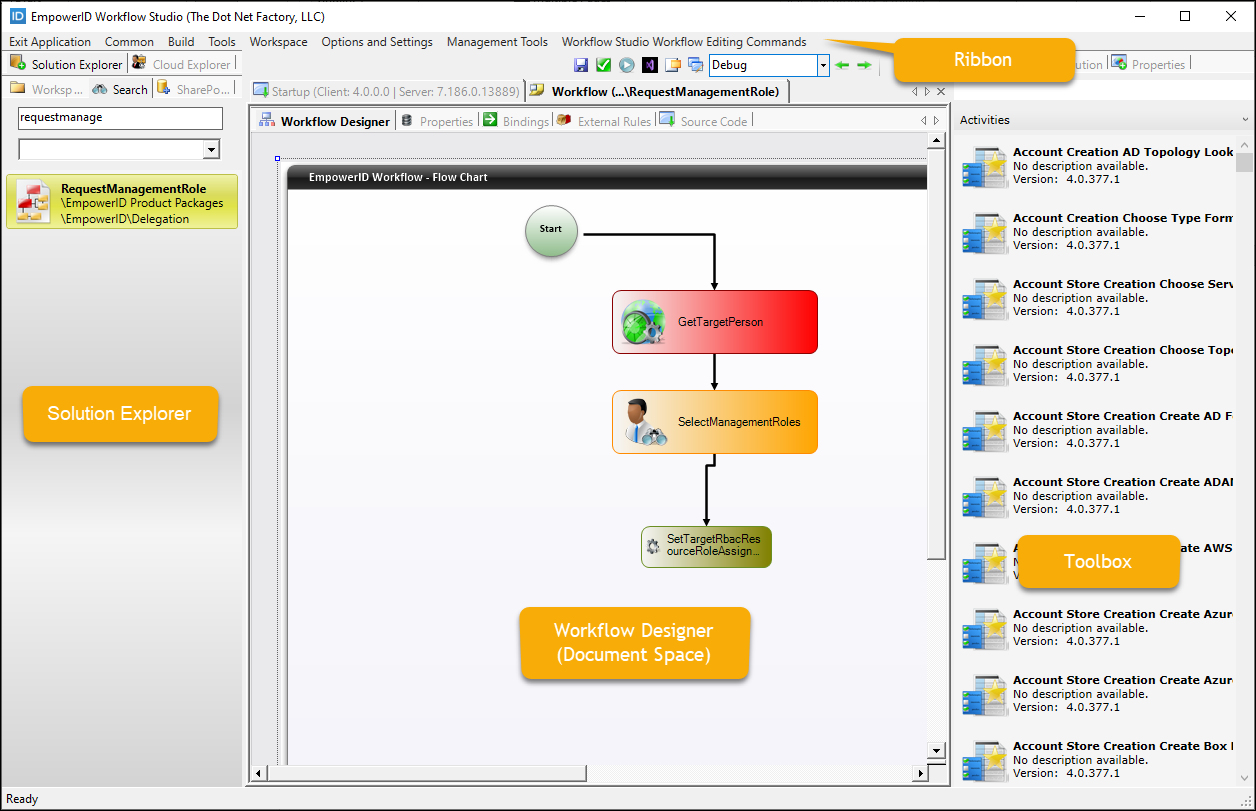 The Workflow Studio IDE showing key interface components
Understanding Workflows
In EmpowerID, workflows serve as the primary method for users to engage with IT resources to achieve specific organizational objectives. A workflow is composed of various components working together:
- Forms – User interface elements for data input
- Activities – Building blocks that define workflow logic and operations
- Business Rules – Conditional logic that controls workflow flow
- Escalations – Time-based triggers for automated actions
To learn more about these components and how they work together, see Overview of Workflows.
Next Steps
- Install Workflow Studio to set up your development environment
- Learn about the IDE to understand the interface components
- Review Development Guidelines for best practices
- Explore Concepts to understand workflow architecture
- Build your first workflow with a hands-on tutorial