Workflows Overview
A workflow is a sequence of activities that mirrors the steps in a business process. It provides a logical, orderly representation of the actual tasks carried out by individuals or systems interacting with a business model. In EmpowerID, workflows serve as the primary method for users to engage with IT resources to achieve specific organizational objectives.
Workflow Architecture
There are three primary layers in a workflow:
Process Layer – This layer represents the logical flow of the activities within a workflow. It defines the sequence and conditions of tasks, decision points, branching, and parallel execution paths.
Data Layer – The data layer captures and manages the information processed throughout the workflow. It includes input and output data, intermediate variables, and any data transformations or manipulations required by the workflow activities.
Presentation Layer – This layer is specific to user-centric workflows that require human interaction. It provides the user interface (UI) through which end-users interact with the workflow, input data, or make decisions.
In the EmpowerID model, users never directly interact with a workflow; rather, they interact with what is known as a request workflow. A request workflow is one of the resource types registered in the EmpowerID Identity Warehouse that is related to resource acquisition and management. A specific request workflow is an Identity Warehouse resource record corresponding to an EmpowerID workflow that is used to control who may interact with the workflow.
Workflow Components
A typical EmpowerID workflow is comprised of several components that work together to create automated business processes:
- Forms – User interface elements that enable data input and collection throughout the workflow
- Activities – Building blocks that encapsulate specific logic and operations within the workflow
- Business Rules – Conditional logic that controls workflow flow based on runtime conditions
- Escalations – Time-based triggers that ensure workflows don't idle indefinitely
Depending on the purpose of the workflow, not all of these components need to be present.
How Workflows Execute
Using these components, the process of a typical EmpowerID workflow follows this pattern:
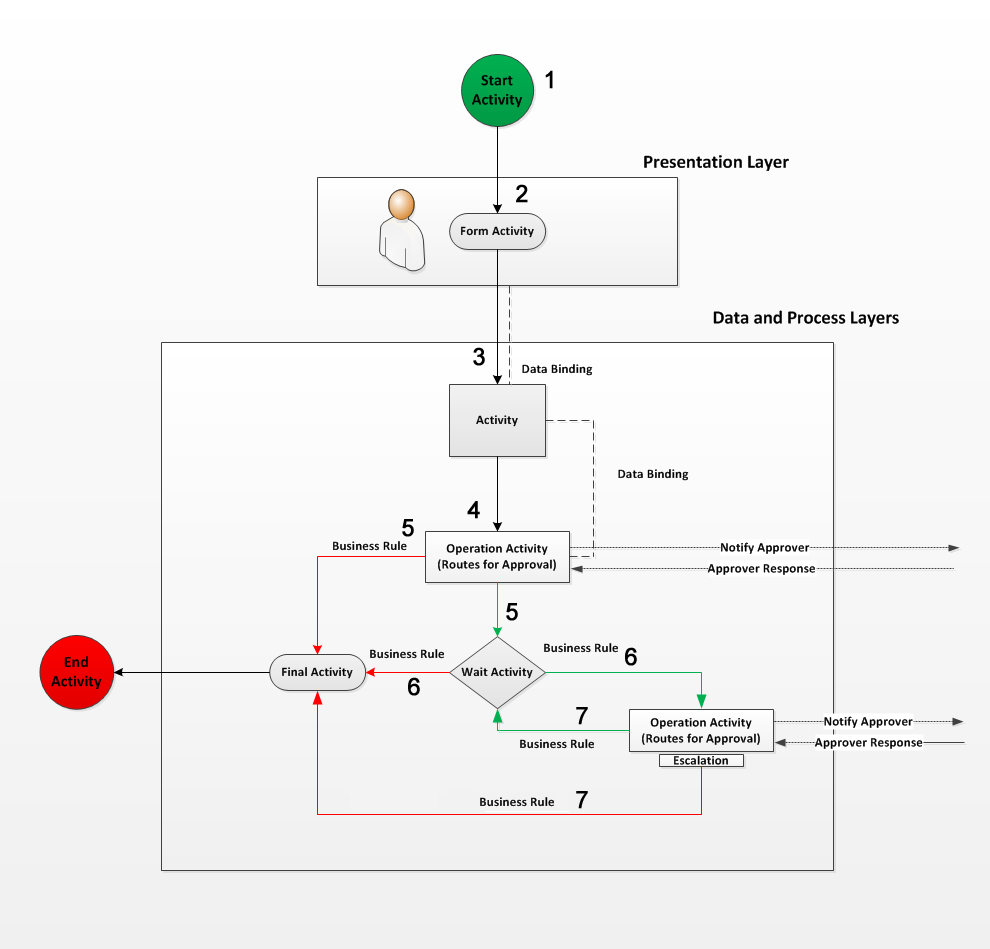 The three workflow layers working together to execute a business process
The typical workflow process can be outlined as follows:
- A user initiates the workflow.
- EmpowerID presents a form or lookup (the Presentation Layer) to the user, which requires data input.
- The data entered in the form or lookup is bound to a second activity, which uses the data to perform some type of work.
- The workflow progresses to an Operation Activity, which checks the access of the user initiating the workflow before allowing its code to be executed. If the user lacks the authority to proceed, EmpowerID routes the operation to designated approvers, placing a task on their dashboards and sending email notifications as appropriate. At least one approver must approve the request before the workflow can progress.
- The process flows to one of two activities based on the response of the approver and the logic of the Business Rule applied to the lines connecting the Operation activity to those activities. The red line represents the process flow if the approver denies the request, and the green line represents the process flow if the approver approves the request.
- If the request is approved, the workflow proceeds to the Wait activity (designated by the diamond shape), which idles the workflow for a predetermined period to allow the initiator to perform some tasks. If the request is denied, the workflow proceeds to the Final activity (designated by the oval shape) and exits the workflow.
- Once the idle time passes, the process flows either to the second Operation activity or the Final activity, depending on the logic of the Business Rule applied to the two lines connecting the Wait activity to those activities.
- If the request is approved, the workflow loops back to the Wait activity, where the process outlined in step 6 repeats itself. If the request is denied, the workflow proceeds to the Final activity and exits the workflow.
This workflow example demonstrates how EmpowerID uses various components to manage and control the flow of a typical process, ensuring that tasks are performed as expected and that users with appropriate permissions can execute the necessary operations.
Workflow Types
EmpowerID supports different workflow types for various development scenarios:
Flow Chart Workflows – Provide the most flexibility with multiple entry and exit points, supporting complex branching logic and Business Rules. These are the most common workflow type for business processes.
Sequential Workflows – Execute activities in a linear, top-to-bottom order. These are simpler but less flexible than Flow Chart workflows.
State Machine Workflows – Model workflows as a set of states, events, and transitions. Useful for processes that can be in one of several states at any given time.
Request Workflows
For each workflow used in EmpowerID, there must exist at least one request workflow resource. Request workflows are what is used to secure workflows developed in Workflow Studio. They define:
- Who can initiate the workflow
- Whether anonymous access is allowed
- The URL endpoint for the workflow
- Associated permissions and access controls
When you publish a workflow, Workflow Studio prompts you to create a request workflow resource, ensuring that proper security is in place before the workflow can be used.
Next Steps
- Learn about Forms and how they capture user input
- Understand Activities and their role in workflow logic
- Explore Business Rules for conditional workflow flow
- Review Escalations for time-based workflow management
- Get started with creating your first workflow