Azure EasyAuth Module
The EmpowerID Azure EasyAuth Http Module (AzEasyAuth HttpModule) is an in-process component that enables legacy .NET web applications to transition Identity Management to the Azure App Service environment. This HTTP module allows you to utilize the built-in authentication/authorization capabilities of the Azure App Service with little or no code changes to your legacy apps.
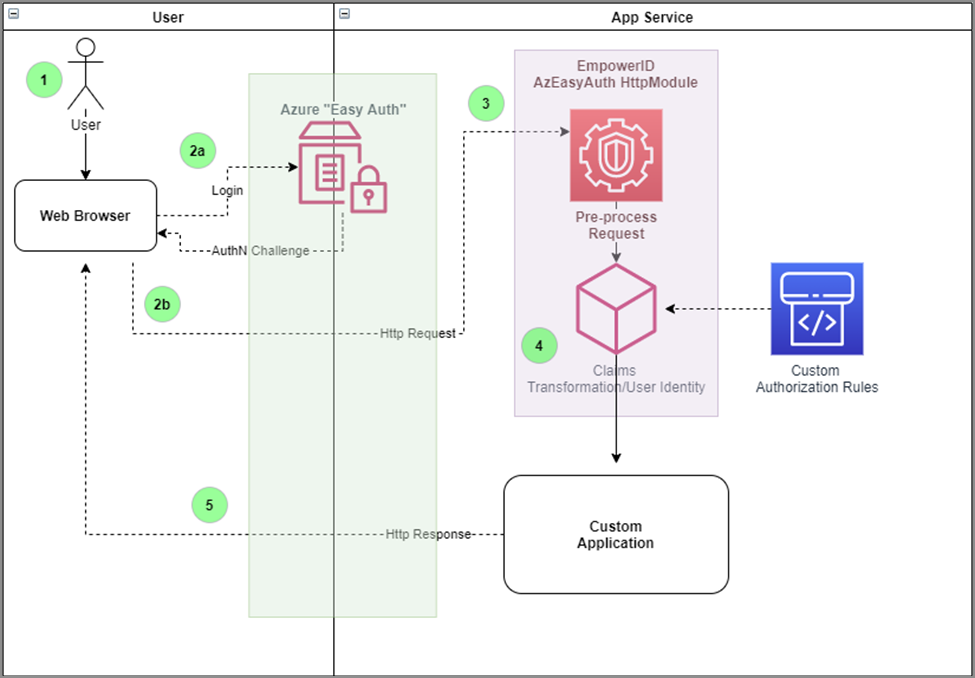
AzEasyAuth HttpModule will pre-process requests, user claims transformation, and identity generation before your application receives and processes the HTTP request. The figure below shows the typical process flow involving the AzEasyAuth HttpModule.
The given process diagram depicts an environment with Azure Active Directory as the authentication provider, and an application configured to use the AzEasyAuth HttpModule.
Step 1: Register Easy Auth HTTP Module
Assembly information of Easy Auth HTTP Module
- Class: EasyAuthHttpModule
- Assembly: EmpowerID.AzEasyAuth.HttpModule.dll
- Platform: .NET Framework 4.7.2
-
Register the HTTP module as below in the Web.config file of the web application you wish to enable the AzEasyAuth HttpModule.
<system.webServer>
  <modules>
    <add name="EasyAuthHttpModule" type="TheDotNetFactory.Framework.ClassLibrary.EasyAuthHttpModule,EmpowerID.AzEasyAuth.HttpModule, Version=4.0.180.1, Culture=neutral, PublicKeyToken=2d2253f74d4496ef" />
  </modules>
  <validation validateIntegratedModeConfiguration="true" />
</system.webServer> -
You may also add a custom claims transformer using the "ClaimsTransformer" in the app setting, as shown below. The value of this setting is the assembly fully qualified name of the type that implements the
ClaimsTransformerabstract class in theEmpowerID.AzEasyAuth.HttpModule.dllassembly.<appSettings>
<add key="ClaimsTransformer" value="AzEasyAuthAppTemplate.MsClaimsIdentity,AzEasyAuthAppTemplate"/>
</appSettings>
Step 2: Implement the Custom Claims Transformer
- Create a Class Library project and reference the AzEasyAuth HttpModule assembly,
EmpowerID.AzEasyAuth.HttpModule.dll. - Add a class (i.e., MsClaimsIdentity) that derives from the
ClaimsTransformerabstract class. - Implement the
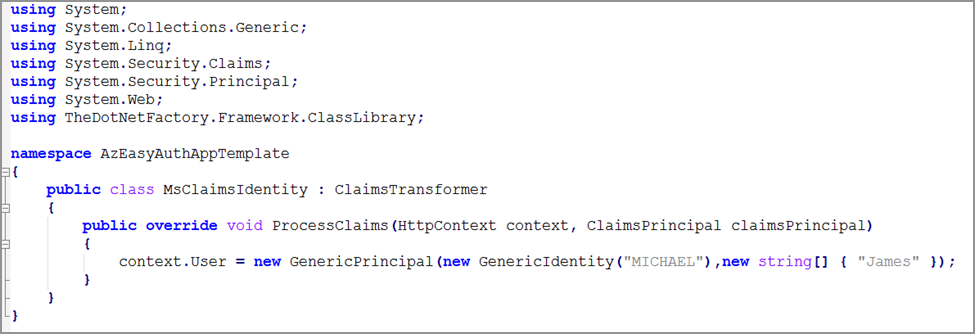
ProcessClaims()method and set theHttpContext.Userconsistent with your application.