Approval Engine Overview
The EmpowerID Approval Engine manages the authorization of access requests submitted through workflows. When users request access to resources, the Approval Engine routes these requests to appropriate approvers based on configurable policies, tracks approval decisions, and coordinates multi-level approval processes. This article explains how the Approval Engine evaluates workflow permissions, applies approval policies, and routes requests through approval workflows.
Workflow Approval Routing
Organizations can configure whether workflows require approval or execute directly based on RBAC permissions. Each workflow has a "Do not generate a business request (no approval)" setting that controls this behavior. This setting is enabled by default for most workflows.
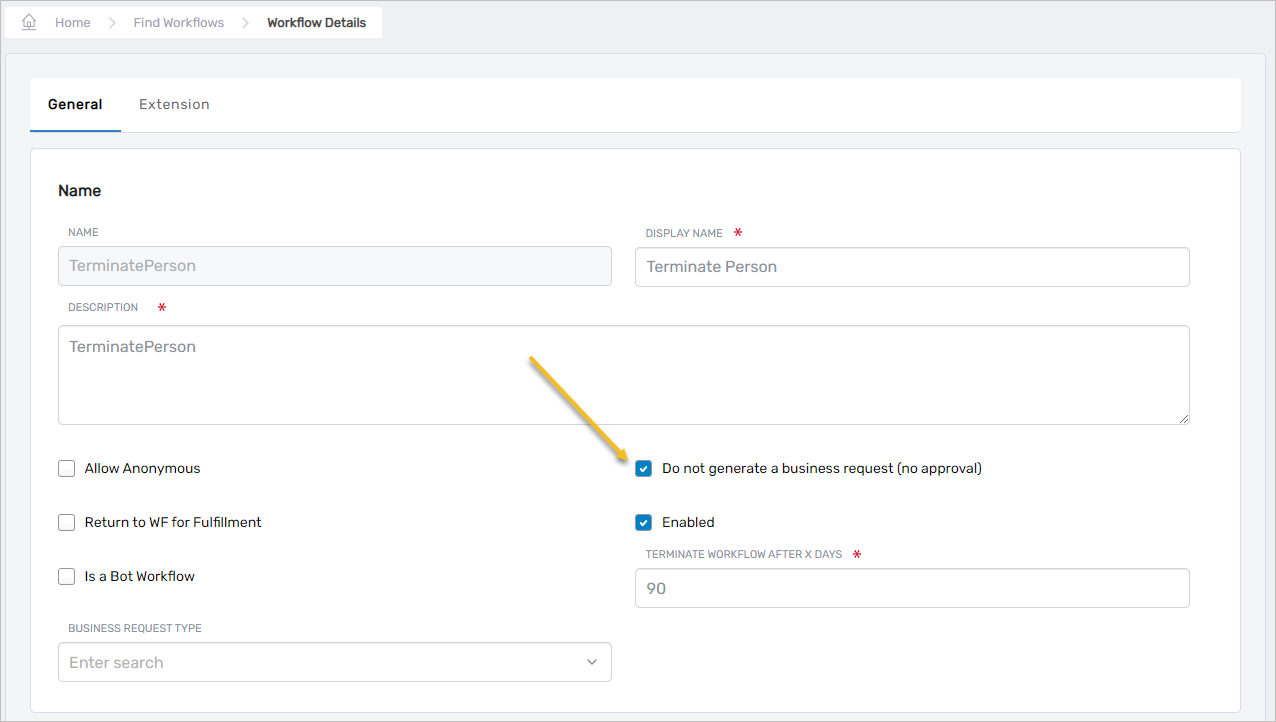
Direct Execution Mode
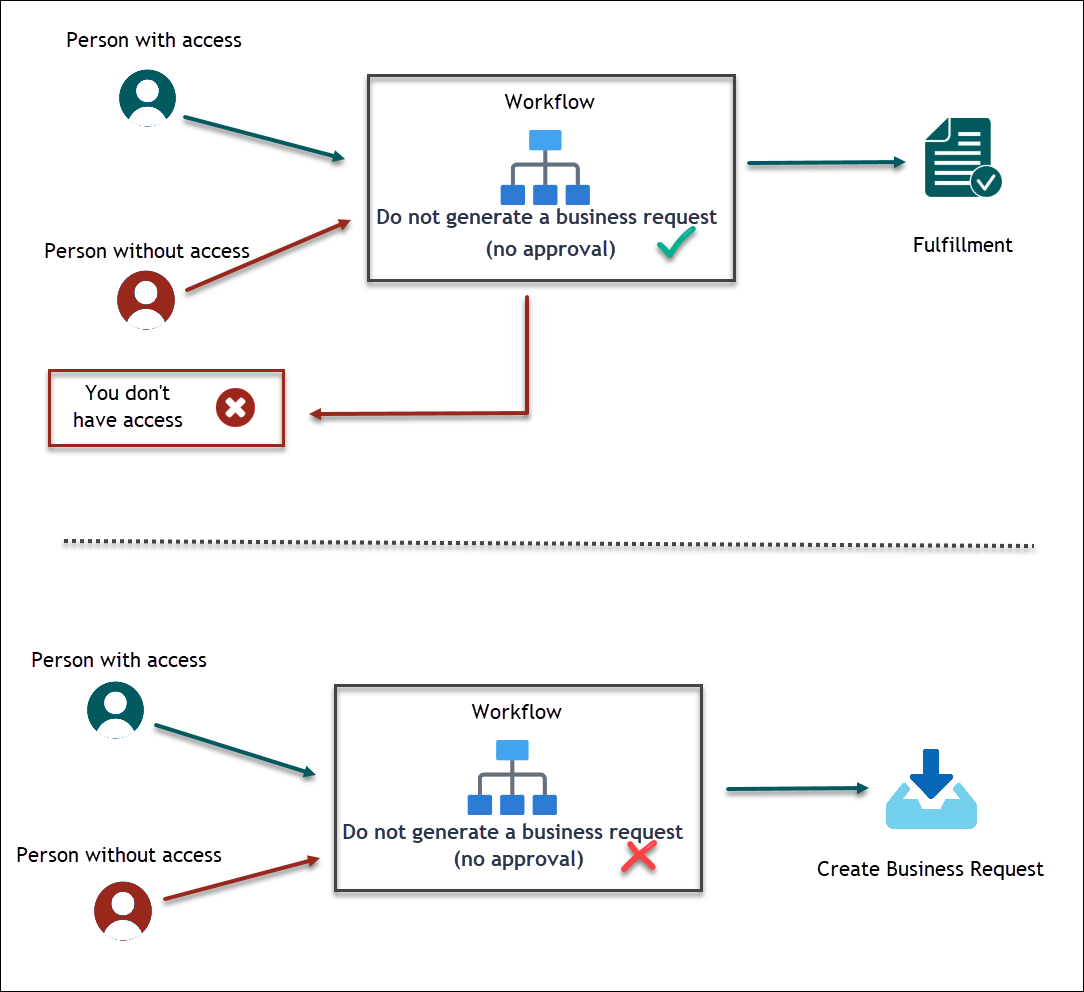
When the "Do not generate a business request (no approval)" setting is enabled, EmpowerID evaluates whether the person executing the workflow possesses the necessary RBAC access to perform the operations. If authorized, the workflow proceeds immediately. If not authorized, EmpowerID informs the person of insufficient access and terminates the workflow.
No approval routing occurs in this mode. This approach reduces approval task volume and streamlines workflows where the user's existing permissions provide sufficient authorization.
Approval-Required Mode
When the "Do not generate a business request (no approval)" setting is disabled, the workflow must be associated with a Business Request Type and will always require approval—even if the individual has sufficient RBAC authority to execute the workflow operations directly.
Operations within the workflow that generate Business Request Items must have an appropriate Business Request Item Type Action associated with them. The Business Request Type categorizes workflows and enables flexible approval routing by grouping related access requests. This configuration, combined with Access Request and Approval Policies, allows organizations to consolidate related access requests into a single approval bundle, specify approval routing, and define the number of approvals required before fulfillment.
Approval Policies
When users shop for resources in the IAM Shop and submit their orders, EmpowerID sends these items as Business Requests to the approval system. Approval Policies route these requests and define multi-tiered approval processes based on organizational requirements.
Policy Components
The Approval Policy architecture consists of interconnected components that work together to control approval routing and decision-making. The diagram below illustrates how these components relate to each other and integrate with workflows and access policies.
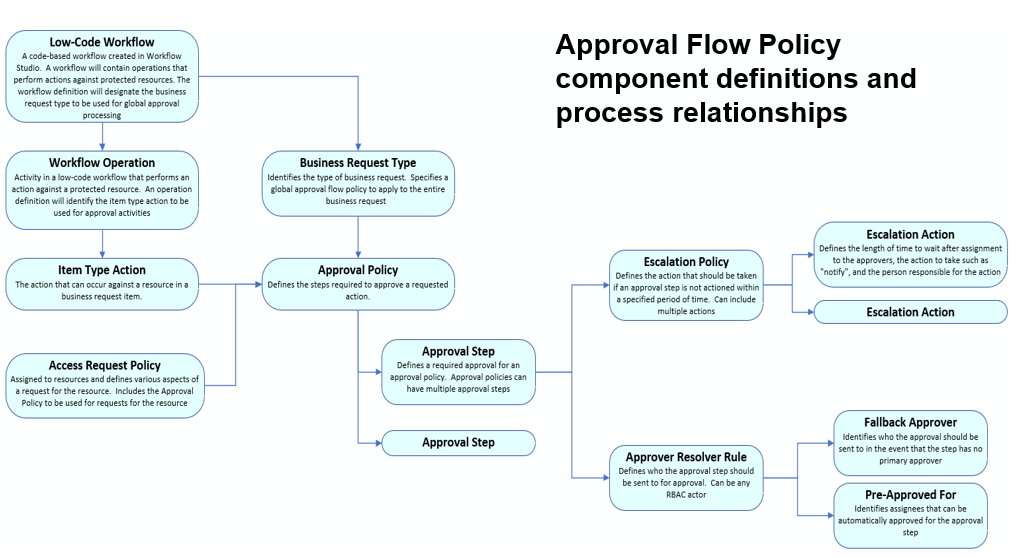
Key policy components include:
Business Request Type
Identifies the type of business request and specifies a global approval policy to apply to the entire Business Request. Examples include "IT Shop Request," "Role Assignment Request," or "Privileged Access Request." Approval policies can stipulate multiple approval levels for specific Business Request Types before fulfillment. Approval flow at the Business Request level is sometimes called global-level approval flow.
Approval Policy
Defines the steps required to approve an action. Approval Policies can be applied at the Business Request level (global) or at the item level for specific Item Type Actions. Policies specify the approval workflow, the number of steps, and escalation behavior.
Approval Steps
Sequential stages that define the approval levels required for fulfillment. Each step represents an approval stage that must be completed before the request progresses. Steps can be configured for step-level fulfillment, which executes a workflow based on the approval decision at that step. Step-level fulfillment is commonly used to perform actions when an approver rejects a request, stopping forward processing of the approval flow. Standard fulfillment only executes when all steps are approved.
Approver Resolver Rules
Logic that determines who receives approval tasks for each step. Rules can route tasks based on organizational relationships (manager, resource owner), specific roles, or other criteria. Multiple resolver rules can be configured, with fallback options if the primary resolver yields no results.
Fallback Approver
Identifies who the approval should be sent to if the approval step has no primary approver. This ensures that approval tasks are always routed to someone who can make a decision, preventing requests from stalling when standard resolver rules produce no results.
Pre-Approved For
Identifies assignees who can be automatically approved for the approval step. When a request involves pre-approved assignees, the system bypasses manual approval and proceeds directly to the next step or to fulfillment. This reduces approval burden for routine, low-risk requests.
Escalation Policy
Defines the action that should be taken if an approver does not respond within a specified period of time. Escalation actions can include notifications, adding additional approvers, auto-closing steps, or other interventions to prevent approval delays.
Escalation Actions
Specific actions to take when an escalation policy is triggered. Actions include notifying the approver or their manager, adding assignees to the approval step, auto-closing the step with a specific decision, or executing custom workflows. Each action can be configured with timing and conditions.
Access Request Policy
Assigned to resources and defines various aspects of how requests for that resource are handled. The Access Request Policy includes the Approval Policy to be used for requests involving the resource, eligibility rules, risk levels, and other request processing parameters.
Note: EmpowerID includes a Default Access Request Policy that most resources use automatically. This policy enables optional time-restricted access, allowing users and approvers to set access durations on a per-request basis. Custom Access Request Policies are primarily used for privileged access management scenarios that require enforced time restrictions, MFA requirements, or specialized credential management. For information on configuring Access Request Policies for privileged access scenarios, see the Privileged Access Management documentation.
Item Type Action
The action that can occur against a business request item. Examples include "Add Account to Group" or "Assign Azure License." Each Item Type Action can have its own approval requirements, allowing different operation types to follow different approval paths even within the same Business Request.
Workflow Operation
An activity in a low-code workflow that performs an action against a protected resource. The workflow definition designates the Business Request Type to be used for global approval processing and specifies which operations generate Business Request Items requiring approval.
Item Level Approval
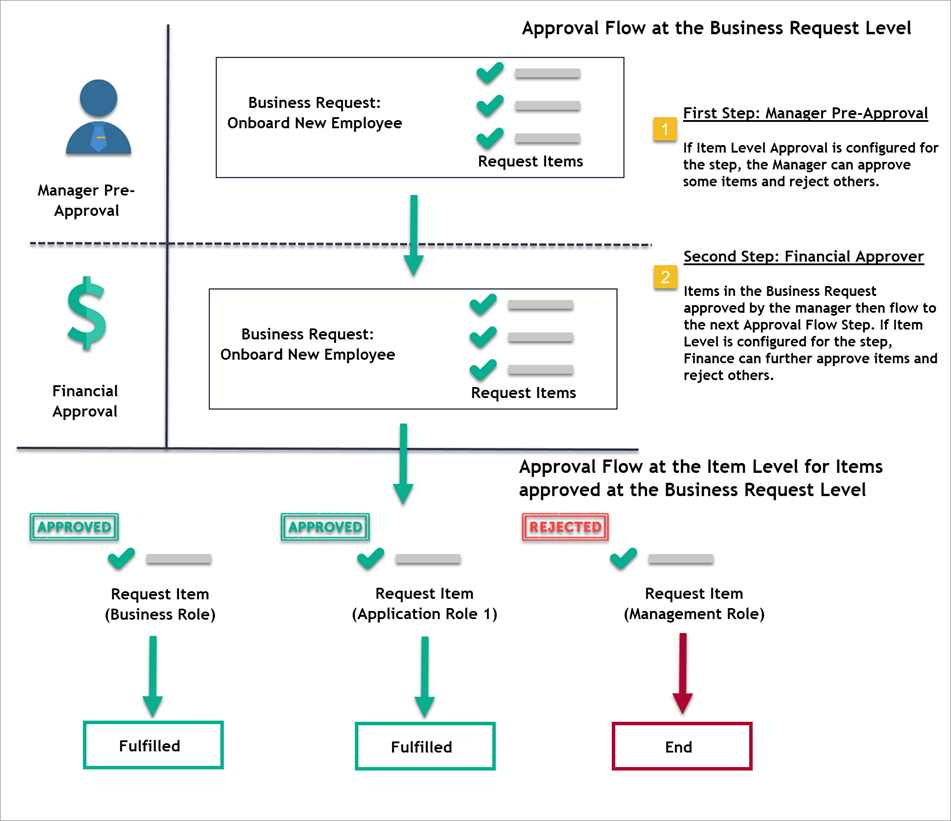
A configuration that allows approvers to make decisions on individual items within a Business Request rather than approving or rejecting the entire request. This enables granular control when requests contain multiple unrelated resources. When enabled, approvers can approve some items while rejecting others based on individual merit.
Approval Flow Logic
EmpowerID's approval flow evaluates requests at two levels: the Business Request level and the individual item level. Requests must pass through both evaluation stages to reach fulfillment.
If a Business Request is rejected at any step during approval, the process terminates. Only items approved at the Business Request level progress to item-level evaluation, where they can be approved or rejected individually.
Business Request Level Evaluation
The Approval Engine examines the Business Request Type to determine which Approval Policy applies. The policy determination follows this hierarchy:
- Check for Approval Policies defined for the Business Request Type in the Access Request Policy
- If no type-specific policy exists, check the Approval Policy directly on the Business Request
- Apply default system policies if neither of the above are configured
Business Request level approval applies to the entire request. Rejection at this level terminates all items in the request.
Item Level Evaluation
After passing Business Request level approval, the Approval Engine evaluates individual items. The item evaluation follows this hierarchy:
- Check the Item Type Action for Approval Policies defined in the Access Request Policy
- If no policy-specific configuration exists, check the Item Type Action for a specific Approval Flow Rule
- If no Approval Flow Rule is set, apply the Approval Policy specified in the item's Access Request Policy
Item-level approval enables different approval requirements for different operation types within the same Business Request. For example, adding a user to a standard group might require manager approval, while adding them to a privileged group requires security team review.
For detailed information on how EmpowerID determines which Approval Policy applies based on precedence, see Understanding Approval Steps.
Fulfillment Process
Once all approval levels are completed, approved Business Request Items proceed to fulfillment. The fulfillment process executes the actual operations—provisioning accounts, granting permissions, or performing other approved actions.
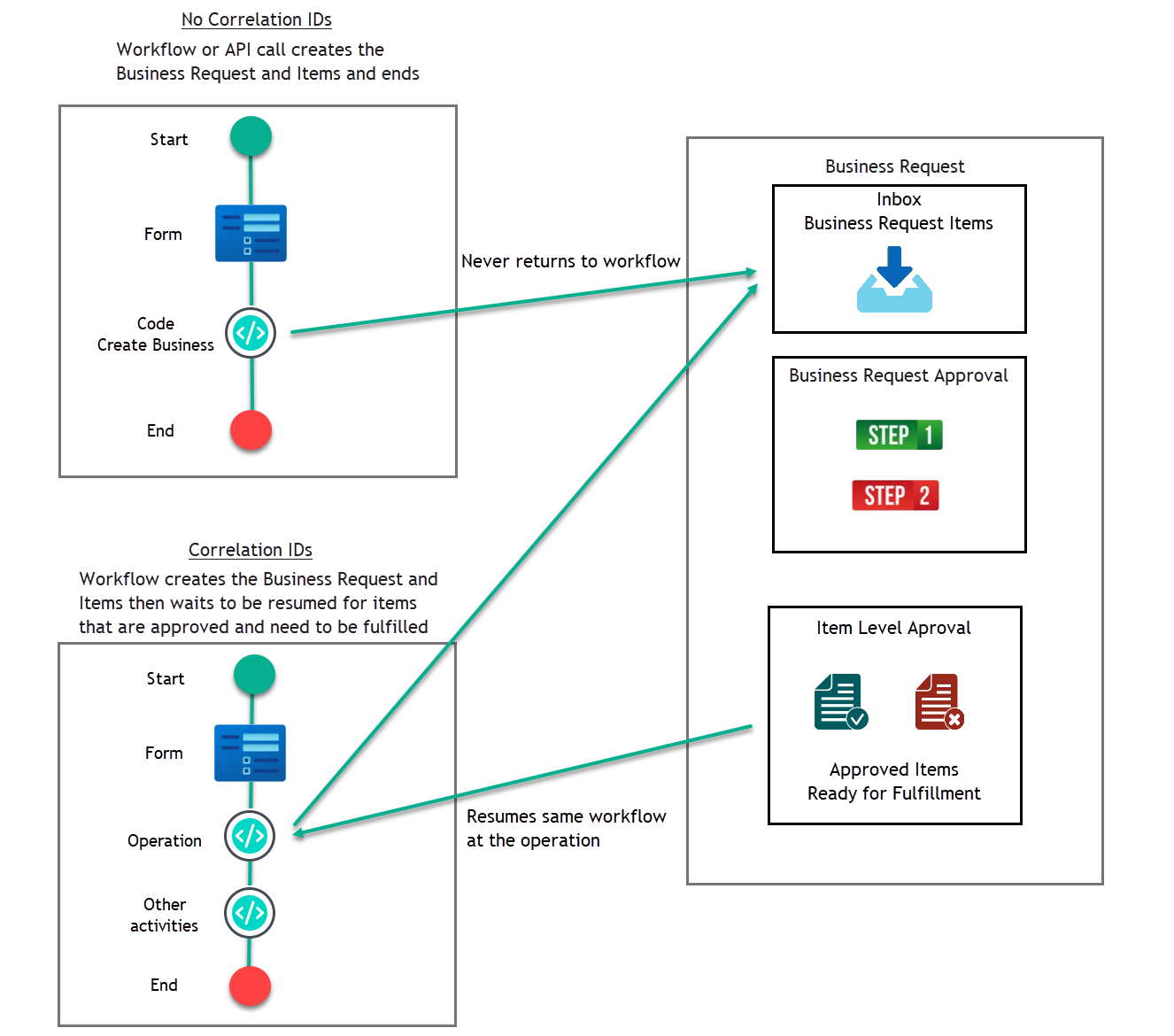
The Business Request Item Fulfillment Job identifies items ready for fulfillment and initiates their processing. Items are handled based on whether they are associated with Correlation IDs:
Fulfill in Different Workflow (No Correlation ID)
Items without Correlation IDs are directed to the fulfillment workflow specified for their Item Action Type. For example, if a user is to join a Management Role, the designated workflow for that action fulfills the item. These items do not return to the initial workflow operation; the calling workflow exits after approval.
Fulfill in Initial Workflow (Correlation ID)
Items with Correlation IDs are routed back to the originating workflow operation where approval was required. The workflow resumes execution with the approved context.
The "Return to WF for Fulfillment" setting controls whether workflows use Correlation IDs. Enable this setting when workflows need to continue execution after approval. Disable it when separate fulfillment workflows should handle approved items. This setting can be configured on the Edit One page of any workflow in the EmpowerID UI.
For detailed information about the fulfillment architecture and how Business Request Items are processed, see Understanding Request Fulfillment.
Notifications
Throughout the approval process, EmpowerID sends notifications to approvers, initiators, and other stakeholders. The notification system delivers automated alerts when approval tasks are assigned, when decisions are made, and when requests progress through the approval workflow.
Business Request notifications are triggered by events such as request creation, approver assignment, approval decisions, and fulfillment completion. The system notifies different participant types—initiators, approvers, managers, and target persons—based on configured notification policies.
Administrators configure notification policies to determine which events trigger notifications, who receives them, and how they are delivered (email, in-application inbox, or both). Users can customize their notification preferences for non-critical notifications while administrators enforce delivery of critical approval-related alerts.
For comprehensive information about Business Request notifications, including event types, participant roles, notification policies, and configuration procedures, see About EmpowerID Notifications and Emails.
Related Topics
Approval Configuration
- Understanding Approval Steps - Learn about approval step concepts, policy precedence, and version control
- Create Approval Steps - Create and configure approval steps with resolver rules and fallback approvers
- Create Approval Policies - Define approval policies with multi-step workflows and auto-approve logic
- Test Approval Flow - Verify that approval routing works as intended with comprehensive testing procedures
Business Request Management
- Business Request Lifecycle Management - Manage request expiration and status processing