What is an Organization?
In EmpowerID, an Organization refers to a top-level parent location within the Business Location structure, which can represent a business unit, geographical region, or functional grouping within a company's organizational hierarchy. Organizations serve as logical aggregation points in a location hierarchy, connecting lower-level locations together in a unified sub-tree.
Objects assigned to these lower-level child locations are considered to be part of the higher-level organization, allowing for efficient management through organization-based delegation. These organization locations are designated as "Organization - Security Container" location types during location configuration.
Organizations are a special type of Location in EmpowerID. While all Organizations are Locations, not all Locations are Organizations. The "Organization - Security Container" designation enables special delegation capabilities that scope access based on organizational membership.
Organization Examples
Organizations within EmpowerID can represent various aspects of a business structure. The following examples demonstrate how organization locations can be configured to match different organizational models.
Example 1: Business Units
In this scenario, the Finance Division and Sales Division are configured as organization locations representing business units. Each of these higher-level business units includes department locations under them, which are considered part of the organization.
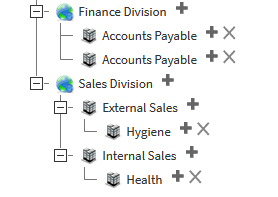
Furthermore, any objects assigned to these child locations, such as people, groups, or accounts, are also considered to belong to the organization. For instance:
- Finance Division (Organization)
- Accounts Payable (Department)
- Accounts Receivable (Department)
- General Ledger (Department)
All people and resources in the Accounts Payable, Accounts Receivable, and General Ledger departments belong to the Finance Division organization.
Example 2: Geographic Regions
In this case, Europe and North America are configured as organization locations representing geographic regions. Each of these higher-level regions includes country and city locations beneath them, which are considered part of the organization.
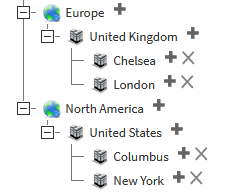
Additionally, any objects assigned to these child locations, such as people, groups, or accounts, are also considered to belong to the regional organization. For instance:
- North America (Organization)
- United States (Country)
- New York (City)
- Columbus (City)
- United States (Country)
All people and resources in New York and Columbus belong to the United States location, which in turn belongs to the North America organization.
Example 3: Long-Running Enterprise Projects
In this example, the Messaging Migration and Infrastructure Upgrade projects are configured as organization locations representing long-running enterprise projects. Each of these projects includes project teams beneath them, which are considered part of the project organization.
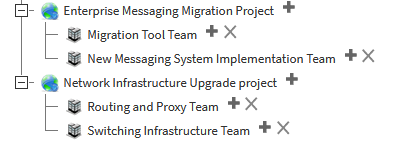
Moreover, any objects assigned to these child locations, such as people, groups, or accounts, are also considered to belong to the organization. For instance:
- Enterprise Messaging Migration Project (Organization)
- Migration Tool Team (Project Team)
- New Messaging System Implementation Team (Project Team)
- Switchover Infrastructure Team (Project Team)
All people and resources on these project teams belong to the Enterprise Messaging Migration Project organization.
Organizations can be structured to match your business needs. Whether you organize by business function, geography, project, or a hybrid approach, the Organization - Security Container designation enables consistent delegation patterns across your structure.
How Organizations Enable Delegation
Organizations in EmpowerID can be utilized for delegation, allowing permissions or visibility for objects within a person's organization. Delegation options include:
- "People in Organizations I belong to" — Includes all people assigned to locations below the organization location common to where the person is located
- "Security Groups in Organizations I Belong to" — Includes all security groups assigned to locations below the organization location common to where the person is located
These delegation scopes enable organization-wide management capabilities without requiring individual assignments to every person or group within the organization.
How the RBAC Engine Determines Organization Membership
In order to determine what organization(s) a person belongs to, the EmpowerID RBAC engine finds the location that a person is assigned to and begins evaluating the location tree upward from that point until it finds a location that is designated as an organization type of location.
The following process illustrates how this works:
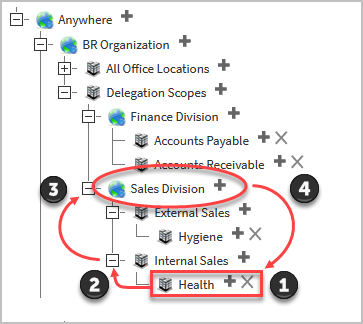
Step 1: Find Person's Location
A person is assigned to a specific location (e.g., the Health location).
Step 2: Evaluate Parent Location
The RBAC engine moves up the location tree to determine if the parent location (e.g., Internal Sales) is an organization.
Step 3: Continue Upward if Needed
If the parent location is not an organization, the RBAC engine continues moving up the tree until it finds a location designated as an organization type (e.g., Sales Division).
Step 4: Assign Delegation
Once the RBAC engine identifies an organization, it determines that the person belongs to that organization and assigns the appropriate delegation to the objects in all locations below the organization location.
The RBAC engine will continue traversing up the location tree until it finds a location designated as "Organization - Security Container." This ensures that every person is associated with at least one organization for delegation purposes.
Configuration Considerations
When configuring delegations by organization, caution should be taken to ensure correct configuration. Incorrect configurations can lead to unintended delegations with broader scope than intended.
Potential Issues
If the RBAC engine cannot find an organization location close to where a person is assigned, it will continue moving up the tree until it encounters an organization. This can potentially grant more permissions than intended if the organization boundary is higher in the tree than expected.
Example Scenario:
If you intend for people in the "Health" location to belong to the "Internal Sales" organization, but "Internal Sales" is not configured as an "Organization - Security Container," the RBAC engine will continue up the tree. If the next organization it finds is "Sales Division" at a higher level, people in Health will be granted access to all locations under Sales Division, not just Internal Sales.
Fixing Configuration Issues
To fix such issues, administrators should ensure that the correct location is configured as an "Organization - Security Container." Once this configuration is updated, the RBAC engine will properly evaluate the person's organization assignment during its next evaluation.
Steps to correct:
- Identify the intended organization boundary in your location hierarchy
- Navigate to the location's configuration
- Set the location type to "Organization - Security Container"
- Allow the RBAC engine to re-evaluate during its next scheduled run
Always verify that locations intended to serve as organization boundaries are properly configured as "Organization - Security Container" types. Incorrect configuration can result in overly broad delegation scope, granting users access to more resources than intended.
Organizations vs. Locations
Understanding the distinction between Organizations and standard Locations is important for proper configuration:
| Aspect | Standard Location | Organization |
|---|---|---|
| Type | Generic container for resources | Special type of Location |
| Designation | Various location types | "Organization - Security Container" |
| Delegation Scope | Specific to that location | Includes all child locations below |
| RBAC Engine | Not used for organization membership | Defines organization boundaries |
| Use Case | Organize resources hierarchically | Enable organization-wide delegation |
Organizations are Locations with special properties that make them ideal for defining delegation boundaries and scoping administrative access across multiple child locations.
Summary
Organizations in EmpowerID provide a powerful mechanism for structuring delegation and access control across your enterprise. By designating key locations as "Organization - Security Container" types, you create logical boundaries that enable:
- Organization-wide delegation without individual assignments
- Hierarchical access control that cascades to child locations
- Flexible organizational models including business units, geographic regions, and project teams
- Automated organization membership determined by the RBAC engine based on location assignments
Proper configuration of Organizations ensures that delegation scope aligns with your business structure and security requirements, providing efficient access management at scale.