Overview of PBAC Membership Policies
Organizations need access to update automatically as people change roles, join projects, or transfer departments. Manual group and role assignments create administrative overhead and risk outdated permissions. PBAC Membership Policies solve this by evaluating user attributes in real-time to determine group and role memberships dynamically.
PBAC Membership Policies in EmpowerID define rules that determine how users and other entities—collectively known as actors—are included in specific groups, roles, or collections. These policies evaluate attributes assigned to actors, ensuring that access remains aligned with current organizational needs without manual intervention.
PBAC Membership Policies determine WHO gets access by controlling group and role assignments based on attributes. PBAC Authorization Policies determine WHAT users can do by evaluating field types to grant specific app rights and permissions. For more on authorization, see About EmpowerID PBAC.
How PBAC Membership Policies Work
PBAC Membership Policies continuously evaluate actor attributes against defined conditions to automatically manage group and role memberships:
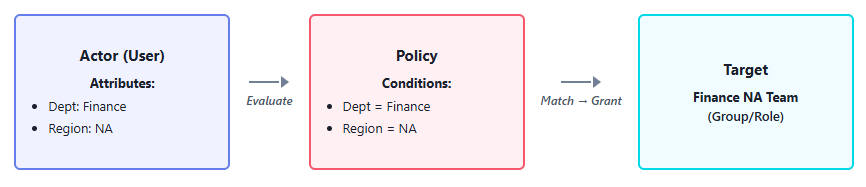
The evaluation process:
- Attributes are assigned - Actors receive attributes like Department: Finance or Region: North America
- Policies evaluate conditions - The system checks if actor attributes match policy requirements
- Membership updates automatically - When conditions match, actors are added to the target group or role; when conditions no longer match, they are removed
Real-World Example
When Sarah transfers from Marketing to Finance:
Before Transfer:
- Sarah's Department attribute: Marketing
- Sarah is a member of: Marketing Team group
After Transfer:
- Sarah's Department attribute changes to: Finance
- PBAC Membership Policy evaluates the change
- Sarah automatically:
- Loses membership in Marketing Team group
- Gains membership in Finance Team group
- No manual intervention required
This ensures Sarah immediately loses access to marketing resources and gains access to finance resources the moment her department changes.
Key Components of PBAC Membership Policies
Field Types
Field Types define the categories of attributes that policies evaluate to determine membership eligibility. These are the same Field Types used throughout EmpowerID's PBAC system—categories like Department, Region, Project, or Clearance Level that represent organizational attributes.
For instance, a Department Field Type might include values like "HR," "Finance," and "IT," allowing membership policies to filter actors based on their departmental assignments.
Field Types serve dual purposes in PBAC: they determine membership in groups and roles (Membership Policies) AND control access to specific resources (Authorization Policies). For more on Field Types, see Understanding Field Types in EmpowerID PBAC.
Field Type Values
Field Type Values are the specific options within a Field Type that determine membership conditions. These values are assigned to actors and evaluated by policies.
Examples:
- A Region Field Type includes values like "North America" or "Europe"
- A Department Field Type includes values like "Finance," "HR," or "IT"
- A membership policy might require Region = "North America" for access to regional resources
Attribute Conditions
Attribute Conditions define the rules within membership policies that must be satisfied for an actor to qualify for membership. These conditions combine Field Types and Field Type Values into requirements that policies evaluate.
Examples:
- Simple condition: Department = Finance
- Multiple conditions: Department = Finance AND Region = Europe
- Multiple values: Department = Finance OR Department = Accounting
Actors must meet all specified conditions to qualify for membership in the policy's target.
PBAC Attributes for Actors
PBAC Attributes are the actual Field Type values assigned to actors (users, Business Roles, Locations). These attributes represent contextual information that policies evaluate.
Examples:
- User John Smith has attributes: Department = Finance, Region = North America
- User Maria Garcia has attributes: Department = HR, Region = Europe
- Only John qualifies for a policy requiring Department = Finance AND Region = North America
When an actor's attributes change, the system automatically reevaluates all relevant membership policies and updates group and role assignments accordingly.
Membership Types
PBAC Membership Policies can grant different types of membership status, controlling how memberships are assigned and whether approval is required:
| Membership Type | Description |
|---|---|
| Member | Automatically assigns actors to the target group or role when conditions match. If Auto-Approve is disabled, generates Business Requests for approval. |
| Eligible | Marks actors as eligible for membership, allowing them to request access through the IAM Shop. |
| Pre-Approved | Grants automatic membership without requiring additional approval workflows. |
| Suggested | Displays the membership as a suggestion in the IAM Shop for actors who might benefit from it. |
Policy Execution and Scheduling
PBAC Membership Policies execute on a scheduled basis, evaluating all actors against policy conditions during each execution cycle. Administrators configure the execution frequency when creating policies, with the default being once every 24 hours.
During each execution:
- The system evaluates all actors who might qualify for the policy
- Attributes are compared against the defined conditions
- Memberships are added or removed based on current attribute values
- Changes are logged for audit purposes
This scheduled execution ensures that memberships remain current as organizational data changes, while avoiding the performance impact of constant real-time evaluation.
Configuration Workflow
Implementing PBAC Membership Policies follows a logical sequence:
- Create Field Types - Define the attribute categories (Department, Region, Project) that represent organizational structure
- Add Field Type Values - Define the specific values for each Field Type (Finance, North America, Project Alpha)
- Create Membership Policies - Define the target groups or roles and select the membership type
- Add Attribute Conditions - Specify which Field Types and values actors must have to qualify
- Assign Attributes to Actors - Give users the attributes that policies will evaluate
- Monitor Execution - Verify that policies are assigning memberships correctly
Next Steps
To implement PBAC Membership Policies in your organization:
- Create Field Types to define the attribute categories for your policies
- Create PBAC Membership Policies targeting specific groups or roles
- Add Attribute Conditions to specify membership requirements
- Assign PBAC Attributes to actors to enable policy evaluation