OAuth 2.0 Resource Owner Password Grant
The Resource Owner Password grant is for issuing tokens to trusted applications in response to the submission of a user’s username and password. This flow bypasses the authorization endpoint as all tokens are returned directly from the token endpoint. The sequence for this flow is as follows:
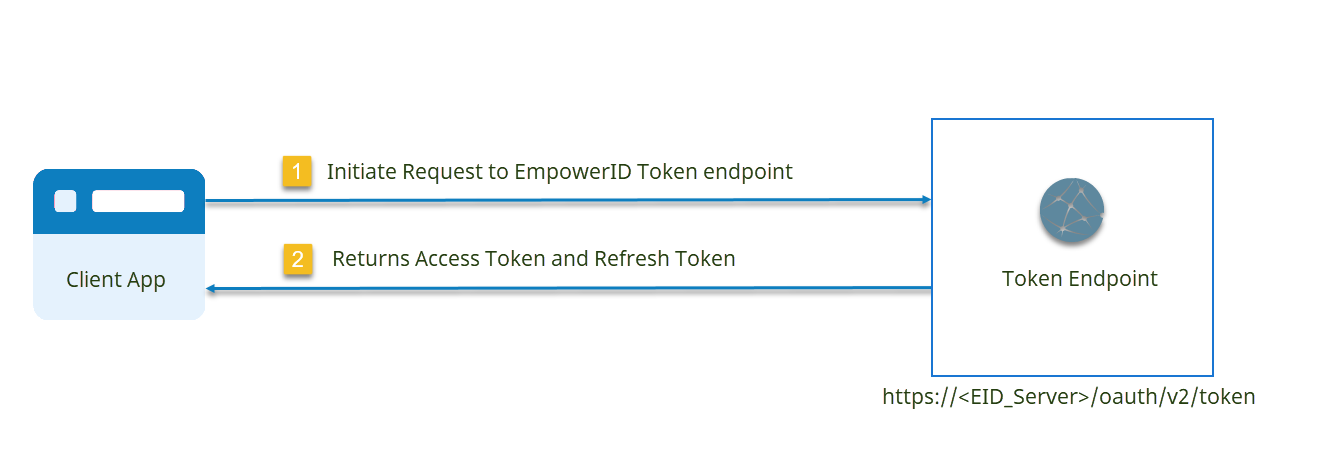
- The client application initiates the flow by sending credentials directly to the EmpowerID token endpoint with the required parameters. These parameters are discussed below.
- The token endpoint returns an access token, a refresh token and an ID token (if OpenID Connect flow is indicated).
You can download sample .NET framework code at https://dl1.empowerid.com/files/OAuthTestSampleCode.zip.
OAuth Discovery Endpoint
https://<EID Server>/oauth/.well-known/openid-configuration
Resource Owner Password Grant
-
Initiate a request to the EmpowerID Token endpoint,
https://<EID Server>/oauth/v2/tokenPOST /oauth/v2/token HTTP/1.1
Host: <EID Server>
Content-Type: application/x-www-form-urlencoded
Authorization: Basic base64Encode(<username>:<password>)
Cache-Control: no-cache
client_id={The Client ID of the OAuth app you registered in EmpowerID}
&client_secret={The Client Secret of the OAuth app you registered in EmpowerID}
&grant_type=password
&scope=openidHeader Parameter Required/Optional Description Authorizationrequired Base64 encoded value of the username and password of the EmpowerID Person requesting the token base64Encode(<username>:<password>)Content-Typerequired Must be application/x-www-form-urlencoded.POST Body Parameter Required/Optional Description client_idrequired Must be the EmpowerID OAuth application client identifier. client_secretrequired Must be the EmpowerID OAuth application client secret. grant_typerequired Must be passwordscoperequired A space-separated list of strings that the user consents to. Values include openidfor OpenID Connect flow. -
Returns access token and refresh token (optionally ID token) in the response
{
  "access_token": "xxxxxxxxxxxxxxxxxxxxxx",
  "token_type": "Bearer",
  "expires_in": 3600,
  "refresh_token": "xxxxxxxxxxxxxxxxxxxxxx",
  "id_token": "xxxxxxxxxxxxxxxxxxxxxx",
  "id": "xxxxxxxxxxxxxxxxxxxxxx"
}
Resource Owner Password Grant using .NET Client Library
-
Initialize
ClientSettingsby passing theclient_id,client_secret,redirect_uri,token_endpoint,authorization_endpoint,tokeninfo_endpointanduserinfo_endpoint. Also initialize a newResourceOwnerPasswordGrantby passing theclientSettingsmodel.var clientSettings = new ClientSettings(
"client_id",
"client_secret",
"redirect_uri",
"https://<EID Server>/oauth/v2/token",
"https://<EID Server>/oauth/v2/ui/authorize",
"https://<EID Server>/oauth/v2/tokeninfo",
"https://<EID Server>/oauth/v2/userinfo");
var handler = new ResourceOwnerPasswordGrant(clientSettings); -
Call the
GetAccessToken()method to retrieve theaccess_token,refresh_token, and other token related information.AccessTokenResponseModel responseModel = null;
try
{
responseModel = handler.GetAccessToken<AccessTokenResponseModel>
(RequestMethod.POST,
ParameterFormat.FormUrlEncoded,
"username",
"password",
"openid");
}
catch (Exception e)
{
//Handle error
}