Searching for Identities
EmpowerID's search engine provides powerful capabilities for locating information about user accounts, people, groups, and other organizational resources. The search functionality is designed to help administrators and users quickly find and manage identities across the organization.
Search Capabilities Overview
Each resource type in EmpowerID has a dedicated Find page with features including:
- Locations tree for hierarchical navigation
- Basic search fields for simple queries
- Advanced search options for complex filtering
- Results grid displaying matching resources
- Contextual action links for resource management
EmpowerID provides two search modes to accommodate different scenarios:
Basic Search
Ideal for locating specific resources when you know a key identifier:
- Enter a search term (name, logon name, email address)
- EmpowerID returns exact matches based on searchable attributes
- Quick and efficient for single-resource lookups
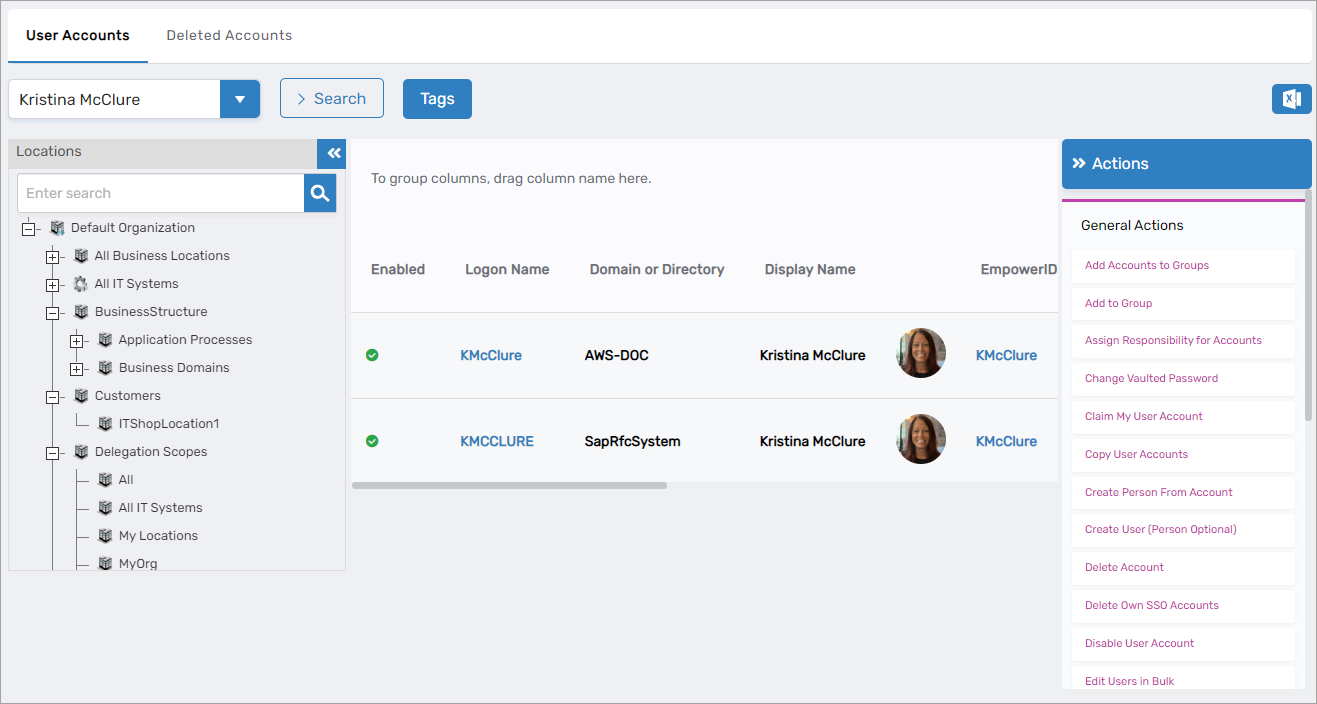
Figure 1: Using basic search on the Find User Accounts page
Advanced Search
Offers refined search capabilities for complex queries:
- Combine multiple search criteria
- Filter by location, domain, or system type
- Search by account state (disabled, locked, never logged in)
- Date range searches (last login, creation date)
Figure 2: Using the Locations tree to return all user accounts in the selected location
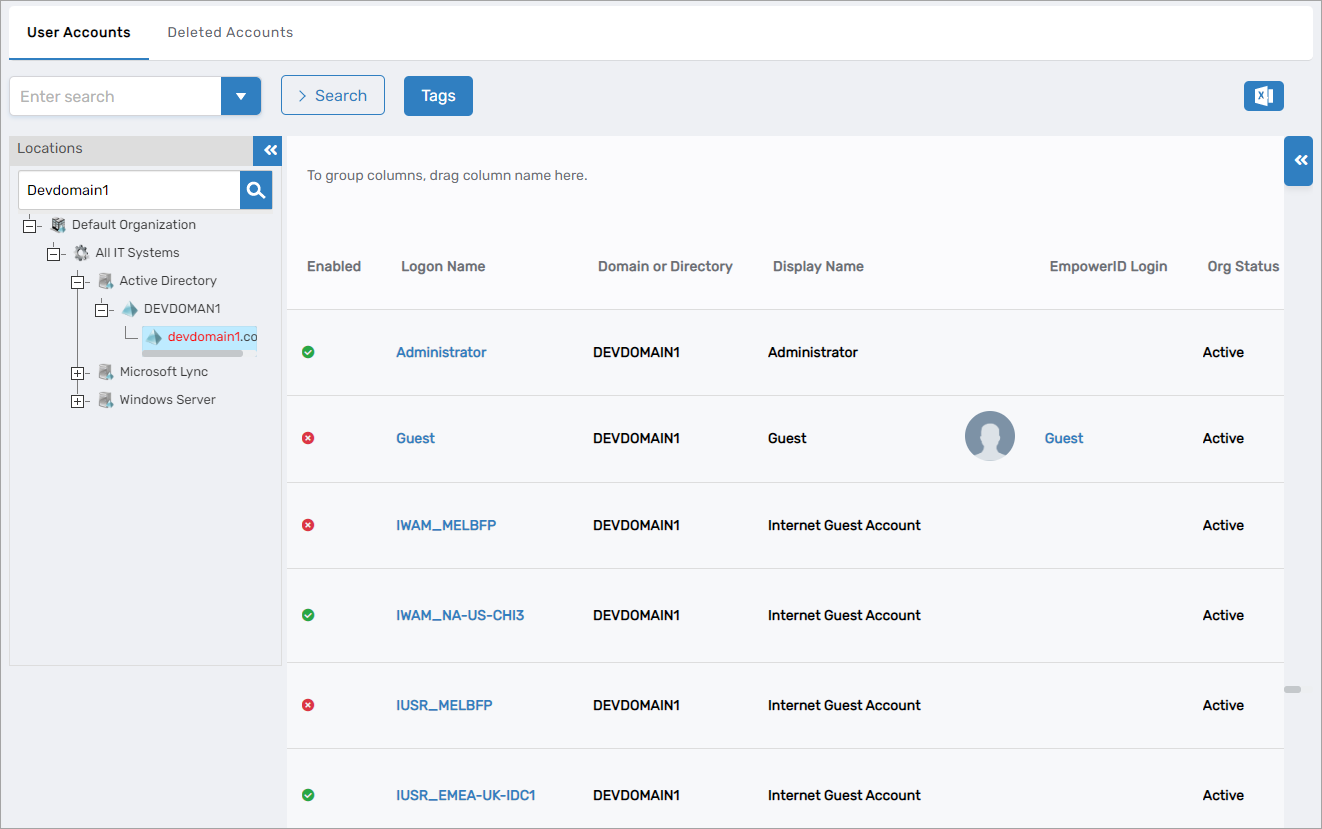
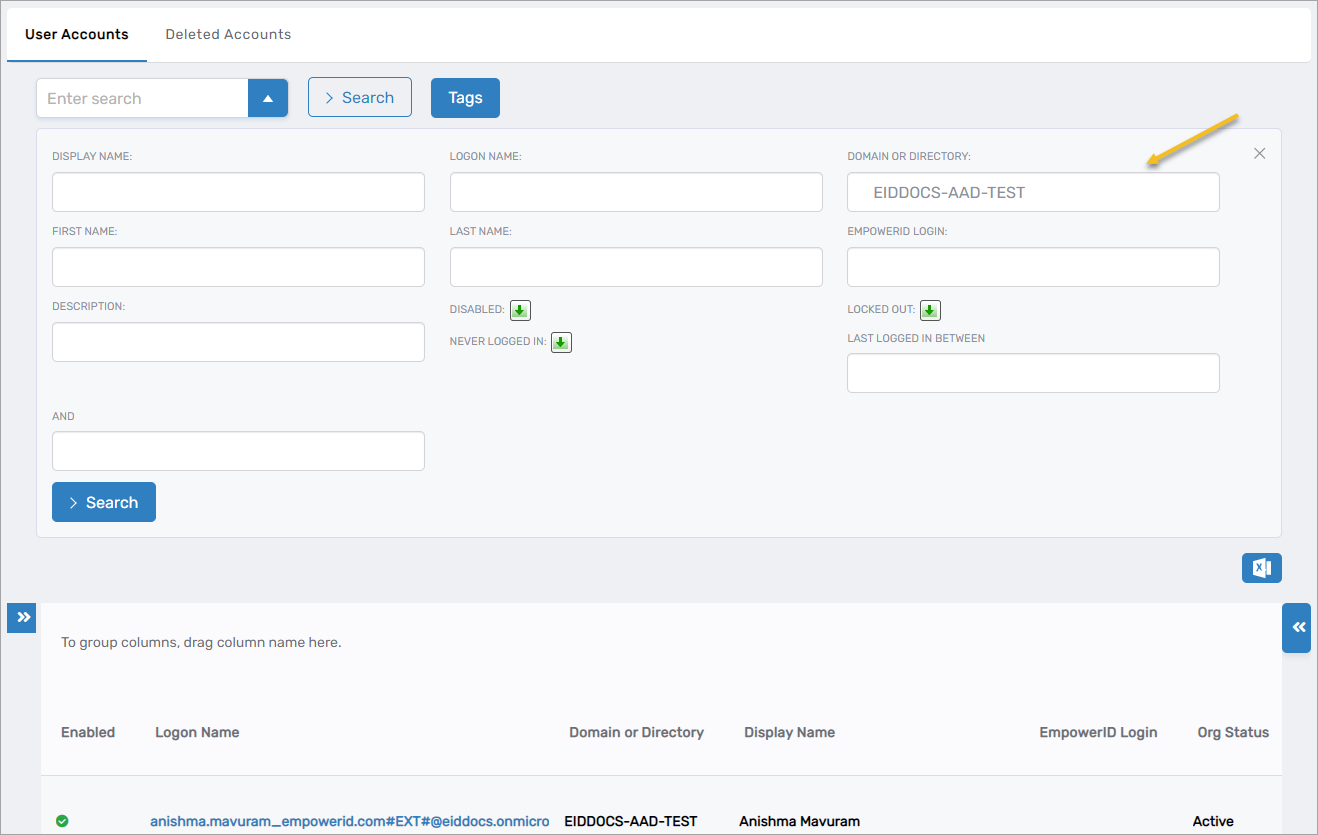
Figure 3: Using advanced search to find accounts in a specific domain or directory
Searchable Attributes by Identity Type
EmpowerID's Identity Warehouse stores each identity object type with searchable attributes. For successful search results, search terms must match these allowable attributes.
User Account Search Terms
| Attribute | Description | Search Result |
|---|---|---|
| Name | The name of the user account | Returns all user accounts with the specified name |
| FriendlyName | The friendly or display name of the user account | Returns all user accounts with the specified friendly name |
| The email address of the user account | Returns all user accounts with the specified email address | |
| FirstName | The first name of the user account | Returns all user accounts with the specified first name |
| LastName | The last name of the user account | Returns all user accounts with the specified last name |
| LogonName | The logon name of the user account | Returns all user accounts with the specified logon name |
| UserPrincipalName | The user principal name of the user account | Returns all user accounts with the specified user principal name |
EmpowerID Person Search Terms
| Attribute | Description | Search Result |
|---|---|---|
| Name | The name of the person | Returns all people with the specified name |
| FriendlyName | The friendly or display name of the person | Returns all people with the specified friendly name |
| The email address of the person | Returns all people with the specified email address | |
| FirstName | The first name of the person | Returns all people with the specified first name |
| LastName | The last name of the person | Returns all people with the specified last name |
| Login | The login of the person | Returns all people with the specified login |
Group Search Terms
| Attribute | Description | Search Result |
|---|---|---|
| Name | The name of the group | Returns all groups with the specified name |
| FriendlyName | The friendly or display name of the group | Returns all groups with the specified friendly name |
| The email address of the group | Returns all groups with the specified email address | |
| EmpowerIDName | The EmpowerID name of the group | Returns all groups with the specified EmpowerID name |
| EmpowerIDFriendlyName | The EmpowerID friendly name of the group | Returns all groups with the specified EmpowerID friendly name |
| LogonName | The logon name of the group | Returns all groups with the specified logon name |
| NetBiosName | The NetBIOS name of the group | Returns all groups with the specified NetBIOS name |
| FQN | The FQN of the group | Returns all groups with the specified FQN |
| DistinguishedName | The distinguished name of the group | Returns all groups with the specified distinguished name |
| Description | The description of the group | Returns all groups with the specified description |
Advanced Search Criteria
Advanced search allows combining multiple attributes for precise results. For example, to find all people with the last name "Stone" whose account is disabled, enter "Stone" as the last name and set the enabled flag to false.
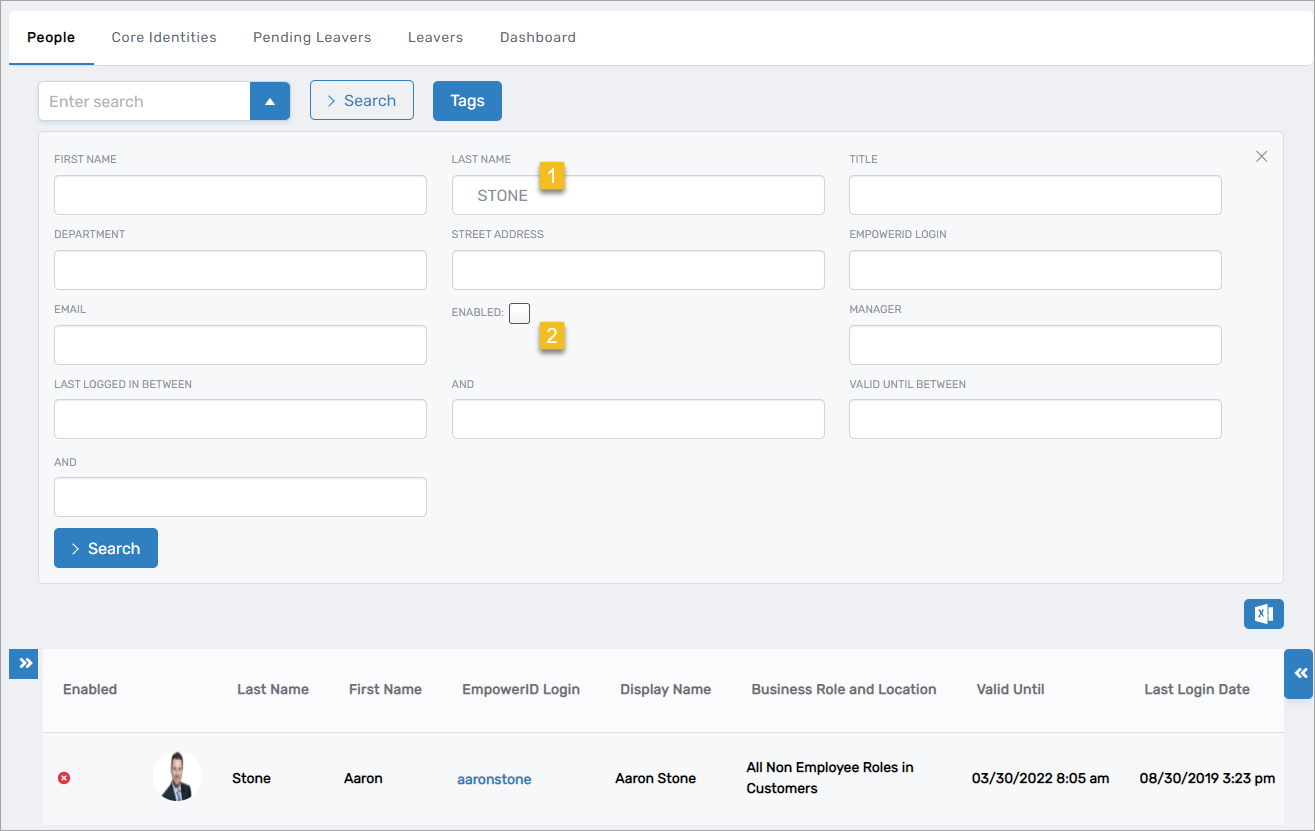
Each attribute in the advanced search tables can be combined with others for more specific searches. This enables complex queries like finding all disabled accounts in a specific domain that haven't logged in within the last 90 days.
User Account Advanced Search Terms
| Attribute | Description | Search Result |
|---|---|---|
| DisplayName | The display name of the user account | Returns all user accounts with the specified display name |
| LogonName | The logon name of the user account | Returns all user accounts with the specified logon name |
| Domain or Directory | The originating domain or directory of the user account | Returns all user accounts with the specified domain |
| FirstName | The first name of the user account | Returns all user accounts with the specified first name |
| LastName | The last name of the user account | Returns all user accounts with the specified last name |
| EmpowerID Login | The login of the EmpowerID Person account linked to the user account | Returns all user accounts with the specified EmpowerID Login |
| Description | The description of the user account | Returns all user accounts with the specified description |
| Disabled | The disabled state of the user account; can be true, false, or null | Returns all user accounts with the specified disabled state |
| Locked Out | Allows you to search for users who are locked out; can be true, false, or null | Returns all user accounts with the specified locked out condition |
| Never Logged In | Allows you to search for users who have never logged in; can be true, false, or null | Returns all user accounts with the specified logged in condition |
| Last Logged In Between | Allows you to search for users whose last log in dates match those specified | Returns all user accounts with the specified last log in dates |
Person Advanced Search Terms
| Attribute | Description | Search Result |
|---|---|---|
| FirstName | The first name of the person | Returns all people with the specified first name |
| LastName | The last name of the person | Returns all people with the specified last name |
| Title | The title of the person | Returns all people with the specified title |
| Department | The department of the person | Returns all people with the specified department |
| Street Address | The street address of the person | Returns all people with the specified street address |
| EmpowerID Login | The login of the person | Returns all people with the specified EmpowerID Login |
| The email address of the person | Returns all people with the specified email address | |
| Enabled | The enabled state of the user account; can be enabled, disabled, or null | Returns all user accounts with the specified state |
| Manager | Allows you to search for people by manager | Returns all people with the specified manager |
| Last Logged In Between | Allows you to search for people whose last log in dates match those specified | Returns all people with the specified last log in dates |
| Valid Until Between | Allows you to search for people whose valid until between dates match those specified | Returns all people with the specified valid until between dates |
Group Advanced Search Terms
| Attribute | Description | Search Result |
|---|---|---|
| DisplayName | The friendly or display name of the group | Returns all groups with the specified display name |
| LogonName | The logon name of the group | Returns all groups with the specified logon name |
| Group Type | The type of group, e.g., security universal, distribution, etc. | Returns all groups with the specified group type |
| By Member | Member of group | Returns all groups where the specified user is a member |
| By Owner | Owner of group | Returns all groups where the specified user is the owner |
| Notes | Notes set for the group | Returns all groups containing the specified text |
| Description | The description of the group | Returns all groups with the specified description |
| No Members | Allows you to search for groups without members; can be true, false, or null | Returns all groups with the specified membership state |
| Publish In IT Shop | Allows you to search for groups published in the IT Shop; can be true, false, or null | Returns all groups with the specified publish state |
| Is High Security Group | Allows you to search for groups flagged as high security; can be true, false, or null | Returns all groups with the specified security state |
| System Type | Allows you to search for groups belonging to a specific system type, such as Azure | Returns all groups belonging to the specified system type |
Search Best Practices
For Basic Search
- Use specific identifiers when possible (email addresses, logon names)
- Enter complete or partial attribute values
- Search is case-insensitive for better flexibility
For Advanced Search
- Start with broader criteria and refine as needed
- Combine location filtering with attribute searches for faster results
- Use date ranges to identify stale or inactive accounts
- Save complex searches for recurring audit or compliance tasks
Example Search Scenarios
Use advanced search capabilities to address common administrative needs:
Account Lifecycle Management:
- Use "Last Logged In Between" to identify accounts with no recent activity
- Combine "Disabled" state with date filters to review account status
Identity Governance:
- Search for People by "Manager" to review organizational reporting structures
- Use "Group Type" and "System Type" to audit groups by classification
Security and Compliance:
- Filter groups using "Is High Security Group" for access reviews
- Search by "By Owner" to identify resources under your management